Using the BayStack 350 Series 10/100 Autosense Switch
1-44
893-00992-E
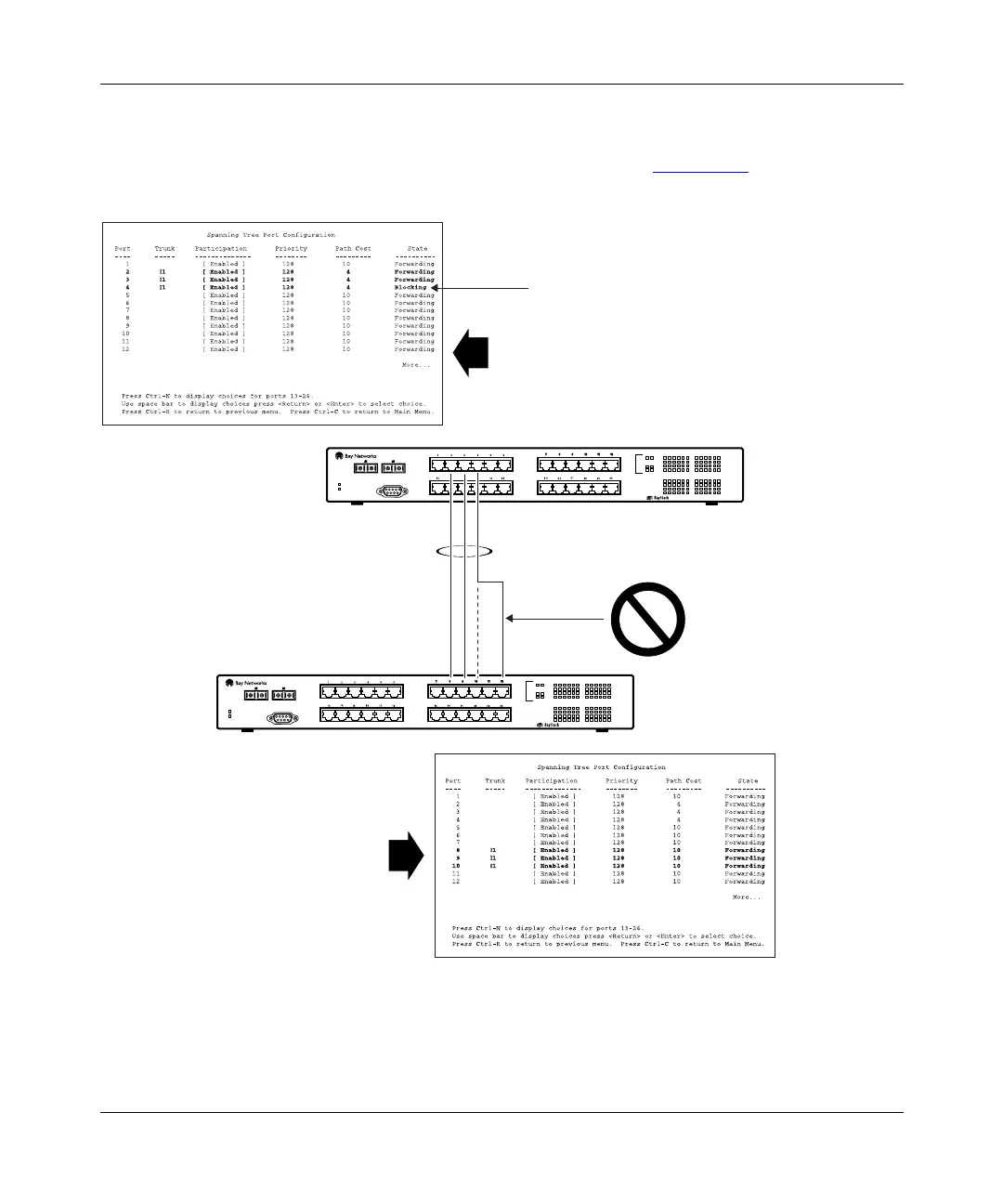
If switch SW2’s trunk member port 10 is physically disconnected and then
reconnected to port 12, the Spanning Tree Port Configuration screen for switch
SW1 changes to show port 4 in the Blocking state (Figure 1-29
).
Figure 1-29. Example 2: Detecting a misconfigured port
Diagnostics
Comm Port
Power
123456
F Dx
26
100
Activity
25
Activity
F Dx
10
100
789101112
13 14 15 16 17 18
Activity
F Dx
10
100
19 20 21 22 23 24
350F-HD
10/100 Autosense Switch
Diagnostics
Comm Port
Power
123456
F Dx
26
100
Activity
25
Activity
F Dx
10
100
789101112
13 14 15 16 17 18
Activity
F Dx
10
100
19 20 21 22 23 24
350F-HD
10/100 Autosense Switch
I1
SW1
SW2
SW1 Port Configuration screen
BS0025A
[Blocking]
SW2 Port Configuration screen














 To Next Page