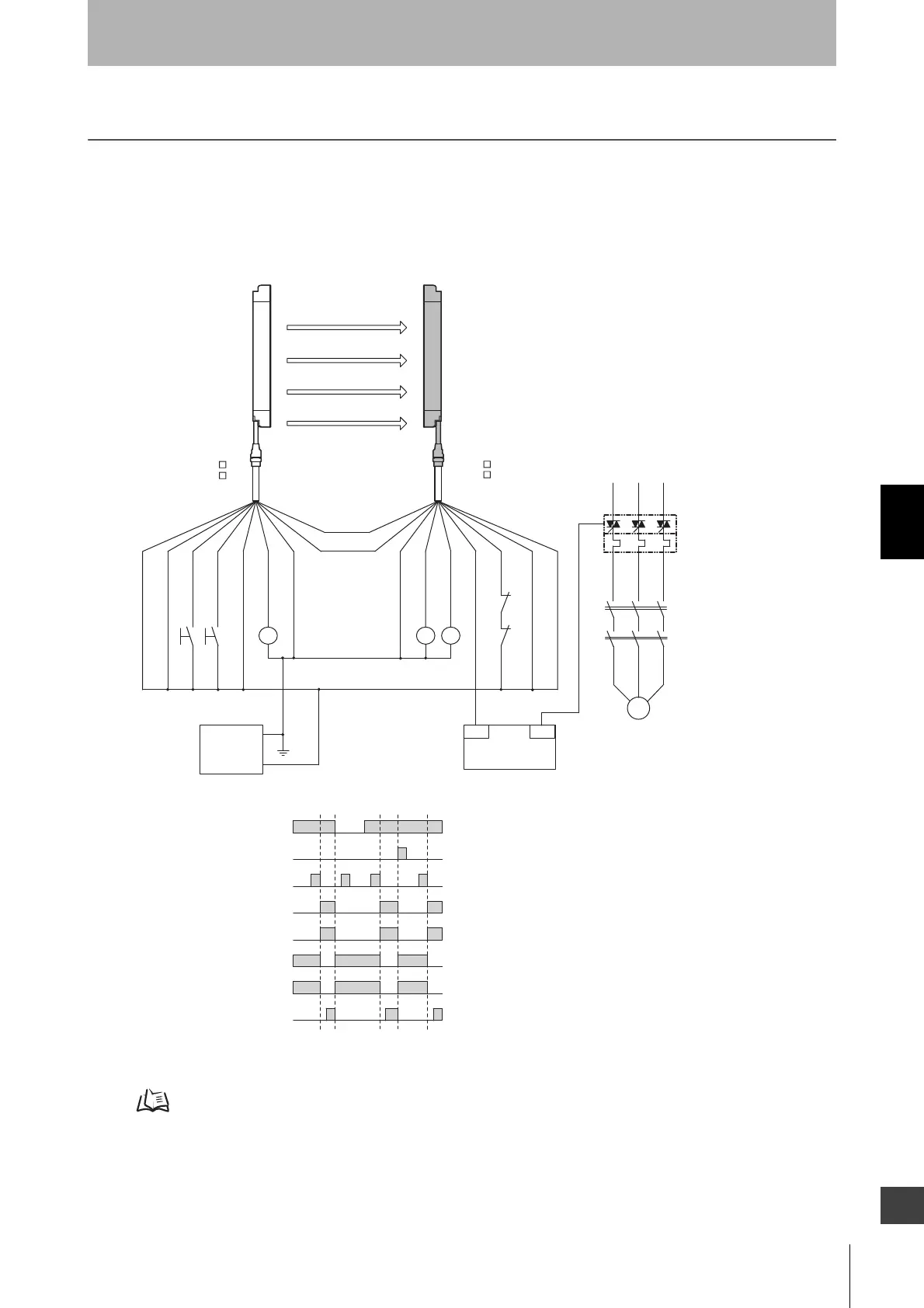
EN954-1 is 4.
S1
S2
M
KM1
KM2
OUT
PLC
IN
KM4
KM1
KM2
+DC24V
0 V
E1
Emitter
Receiver
Communication
line (+) (Grey)
Communication
line (-) (Pink)
Shield
0V (Blue)
Reset input (Yellow)
Interlock selection input (White)
+24V (Brown)
+24V (Brown)
External device monitoring input (Red)
Auxiliary output 1 (Yelllow)
Auxiliary output 2(Red)
Safety
output 2 (White)
0V (Blue)
Shield
- Manual reset mode
S1 :External test switch
S2 :Interlock/lockout reset switch
KM1, KM2 :Safety relay with forcibly-guided contact (G7SA)
or magnetic contactor
KM3
:
Load or PLC (for monitoring)
KM4 :Solid state contactor (G3J)
M :3-phase motor
E1 :24VDC power supply (S82K)
PLC :Programmable controller
(Used for monitoring -- not related to safety system)
- Using external device monitoring function
Unblocked
Blocked
External test switch (S1)
Reset switch (S2)
Safety output
KM1,KM2 N.O. contact
KM1,KM2 N.C.contact
PLC input *1
PLC output
KM1
KM3
KM2
*1 Output operation mode of auxiliary output 1 is "safety output information/reverse enabled" (initial setting)
(connect to 24V if a switch is not required)
F39-JC A-L
F39-JD A-L
F39-JC A-D
F39-JD A-D
Test input (Black)
Safety output 1 (Black)
* Green for the single-ended cable F39-JCA
*
*



 To Next Page
 Loading...