Four-Channel Digital Video Recorder
19
Set up PTZ Camera
0PATH: MENU ▶ Devices ▶ Camera0
(Refer to Figure 10 Camera Setup Dialog.)
1. Move to the Setup field of the selected camera, and press
ENTER
.
2. Move to the PTZ field, and select the camera name.
3. Move to the PTZ ID field, and set up the PTZ ID (0~256).
Set up PTZ Port
0PATH: MENU ▶ Devices ▶ Text-In/PTZ0
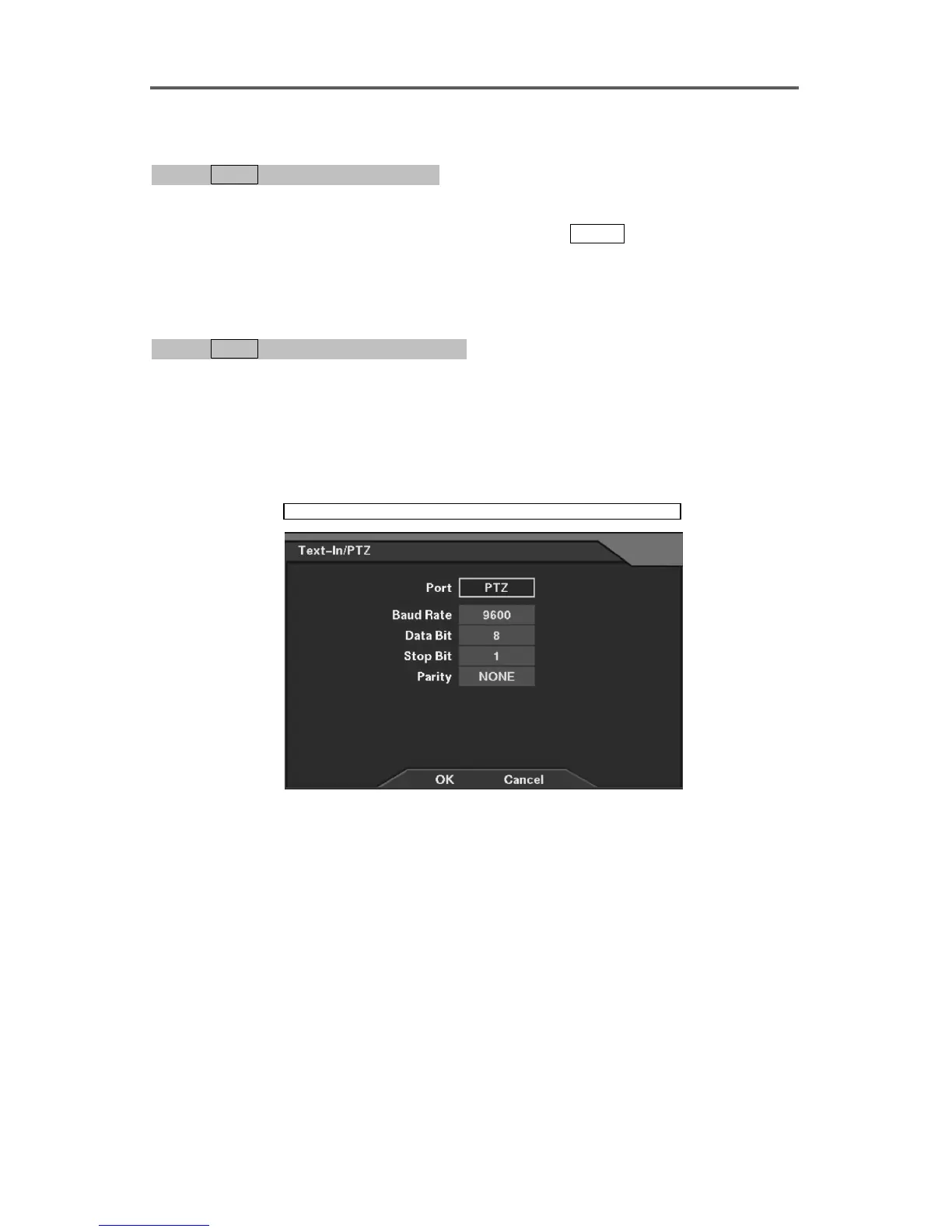
(Refer to Figure 19 Text-In/PTZ Dialog.)
1. Move to the Port field, and select PTZ.
2. Set up the communication parameters for the PTZ port.
NOTE: When using the PTZ camera, the text-in cannot be used since PTZ control
shares a port with text input.
Devices ► Text-In/PTZ
Figure 11 PTZ Setup Dialog
Set up the PTZ port
• Port: Select the PTZ as the port use.
NOTE: Selecting the Text-In in the Port field returns to the Text-In/PTZ dialog box from
the PTZ setup dialog box.
• Baud Rate: Set the baud rate of Comp port (300~115200).
• Data Bit: Set the data bit (7/8).
• Stop Bit: Set the stop bit (1/2).
• Parity: Enable or disable the parity (NONE/ODD/EVEN).







 To Next Page