Four-Channel Digital Video Recorder
63
Appendix A. Reviewing Backup Images
NOTE: It is suggested that the computer used for the Player program has at least an
800MHz Pentium III. If your CPU is slower than this, backup files recorded at
maximum speed with very high image quality will be played back slowly.
Disconnect the external USB-IDE hard disk drive or USB CD-RW drive from the DVR, and
connect it to your PC. Double-clicking the target backup file starts the Player program.
NOTE: You do not need to install any special software on your personal computer to
review the video. The backup file contains the Player program.
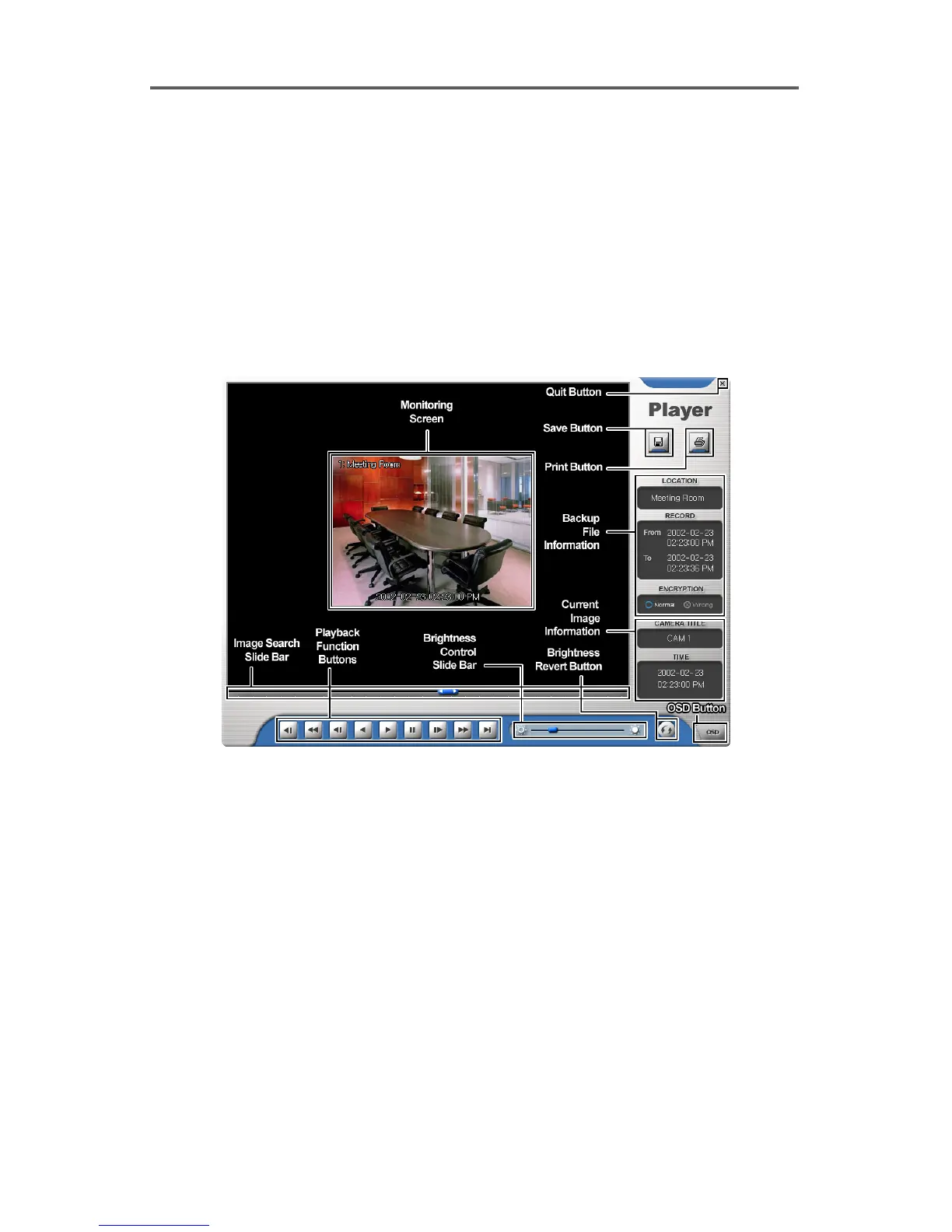
Figure 55 Player Screen
The Monitoring Screen displays the backed up images. Clicking the right mouse button on
the images switches the screen size between 320x240 and 640x480.
Clicking the Quit button exits the Player program.
Click the Save button to save the current image in a bitmap file format to the local hard disk
drive or floppy disk.
Click the Print button to print the current image on the printer connected to your computer.







 To Next Page