Four-Channel Digital Video Recorder
29
Event Action ► Motion Action
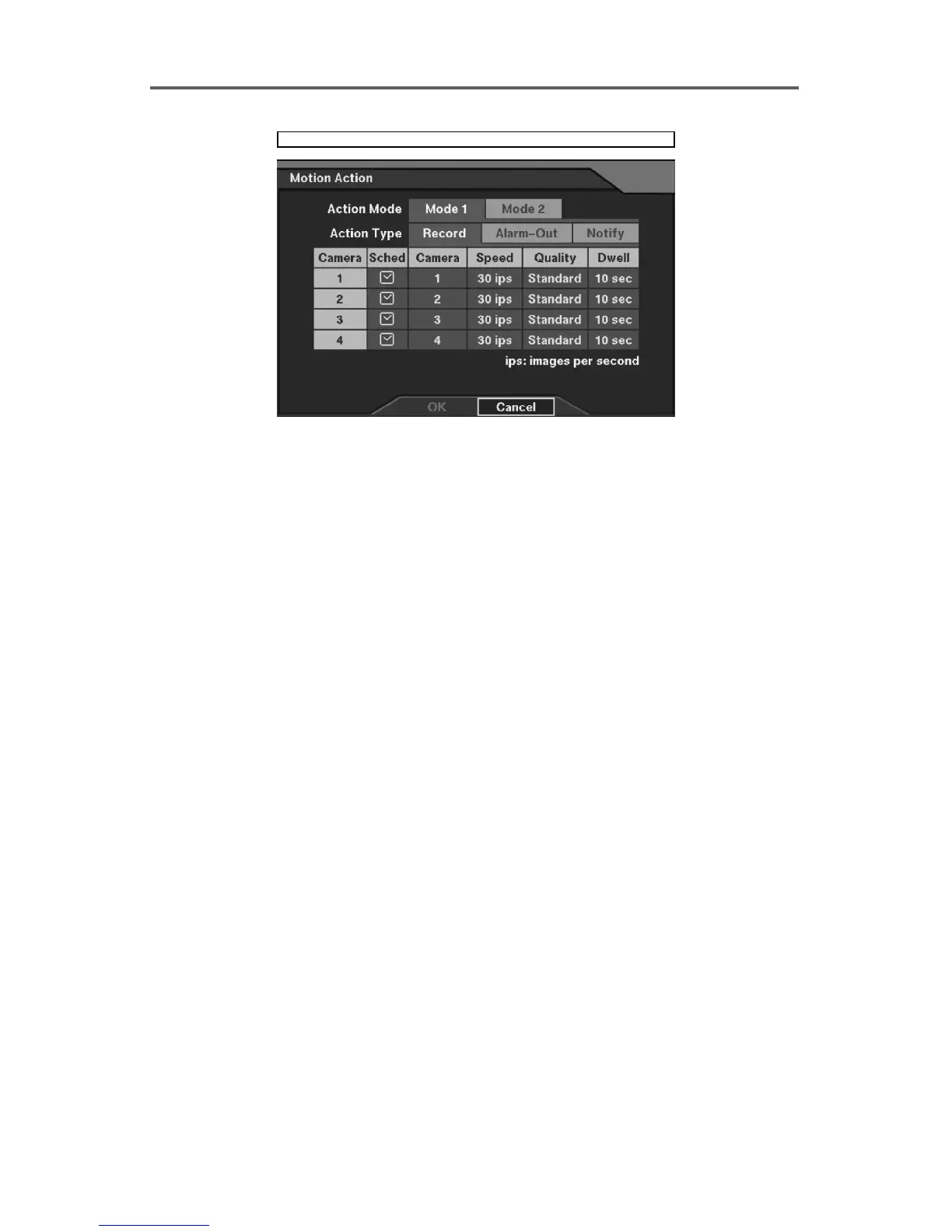
Figure 22 Motion Action ─ Record Setup Dialog
Set up the event-driven recording in case of motion detection.
Action Type ─ Record: Set up the camera to record in case of motion detection.
• Sched: Set the operating mode by time of the selected camera in case of motion detection
(Refer to Figure 21 Alarm-In Action Schedule Setup Dialog.)
• Camera: Select the camera(s) to record in case of motion detection.
NOTE: Multiple cameras can be selected
• Speed: Set the recording speed of an associated camera in case of motion detection
(1/5ips~30ips).
• Quality: Set the recording image quality of an associated camera in case of motion
detection (Very High, High, Standard and Low).
• Dwell: Set the recording dwell time of an associated camera in case of motion detection (1
sec~300 sec).
Action Type ─ Alarm-Out: Set up the alarm-out in case of motion detection (Refer to Figure
32 Motion Action ─ Alarm-Out Setup Dialog.)
Action Type ─ Notify: Set up the Notify function in case of motion detection (Refer to Figure
41 Motion Action ─ Notify Setup Dialog. Network-supported premium model only).







 To Next Page