– 111 –
Chapter 6 Input/Output Signal Settings — Setting input signals
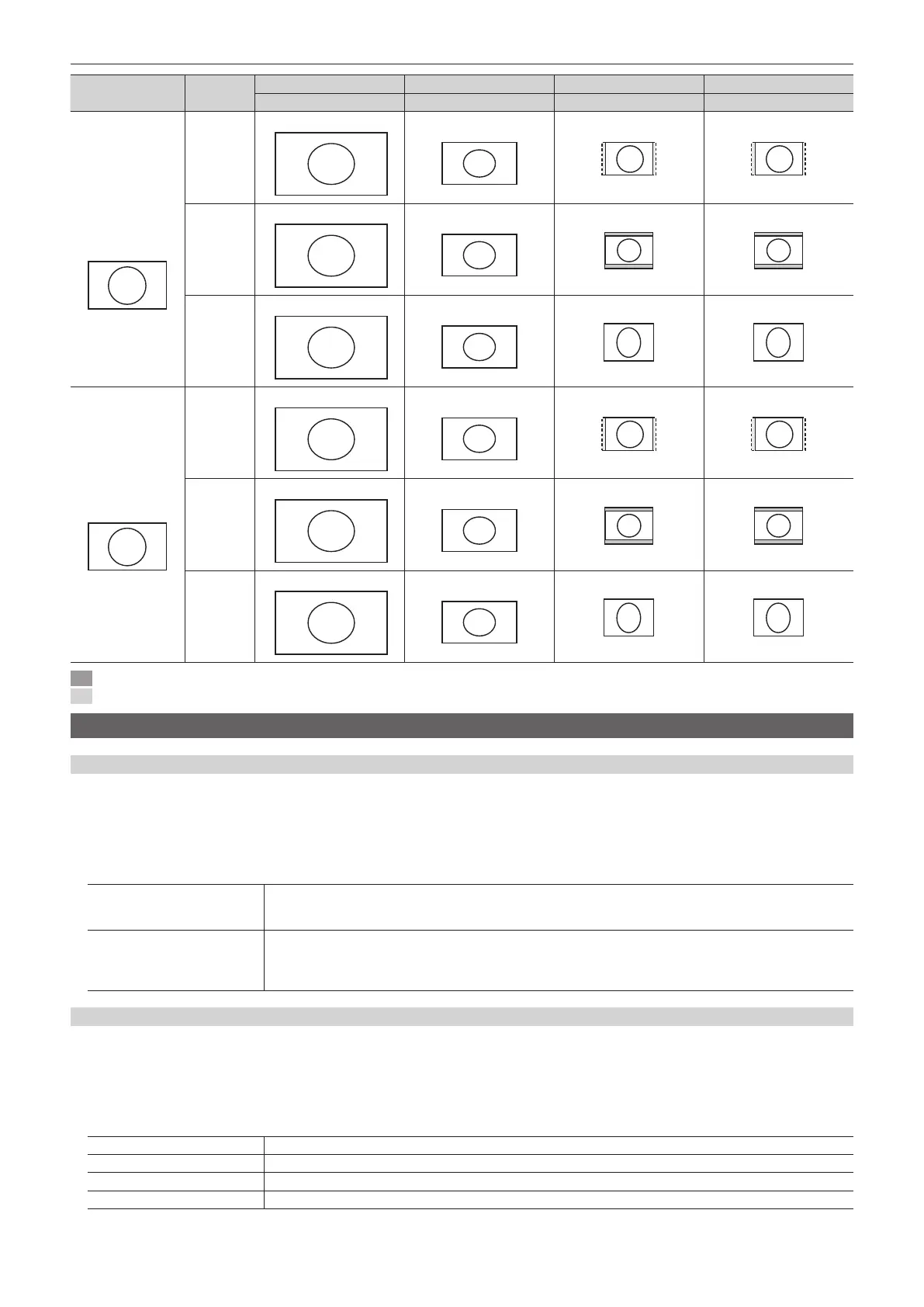
DVI format [Mode]
HD/1080i HD/720p SD/NTSC SD/PAL
1920×1080 1280×720 720×487 720×576
1080/59.94p
1080/50p
1080/59.94i
1080/50i
(1920×1080)
[Fit-V]
1920
1080
720
1280
[Fit-H]
1920
1080
720
1280
[Full]
1920
1080
720
1280
720/59.94p
720/50p
(1280×720)
[Fit-V]
1920
1080
720
1280
[Fit-H]
1920
1080
720
1280
[Full]
1920
1080
720
1280
: Black images are inserted here.
: The parts of the images protruding in these areas are cropped.
Displaying video input signal information
Displaying the SDI input signal information
Display the information concerning the SDI input signal images.
f The information cannot be changed.
1
Select the <IN OUT> button → [SDI IN] → [Status] tab.
2
Check the [SDI IN 1] to [SDI IN 32] columns.
[Format]
Displays the input format.
When there is no input signal, [No signal] is displayed.
For formats that are not supported, [Undened] is displayed. If horizontal pixels are the same, false detection may occur.
[Audio]
Displays the presence or absence of audio packets in the audio channels 1 to 8.
[*]: audio packet is present; [t]: audio packet is absent.
Ex) When only channels 1 to 4 have audio packets, the following is displayed.
[**** tttt]
Displaying the DVI input signal information
Display the information concerning the DVI-D input signal images.
f The information cannot be changed.
1
Select the <IN OUT> button → [DVI IN] → [Status] tab.
2
Check columns from [DVI IN 1]/[DVI IN 2].
[Size] Indicates the pixel count of the image.
[Dot Clock] Indicates the dot clock frequency of the image.
[H‑Frequency] Indicates the horizontal frequency of the image.
[V‑Frequency] Indicates the vertical frequency of the image.













 To Next Page