– 38 –
Chapter 4 Preparations — Basic operations for the multi‑selection panel area
Event memory menu
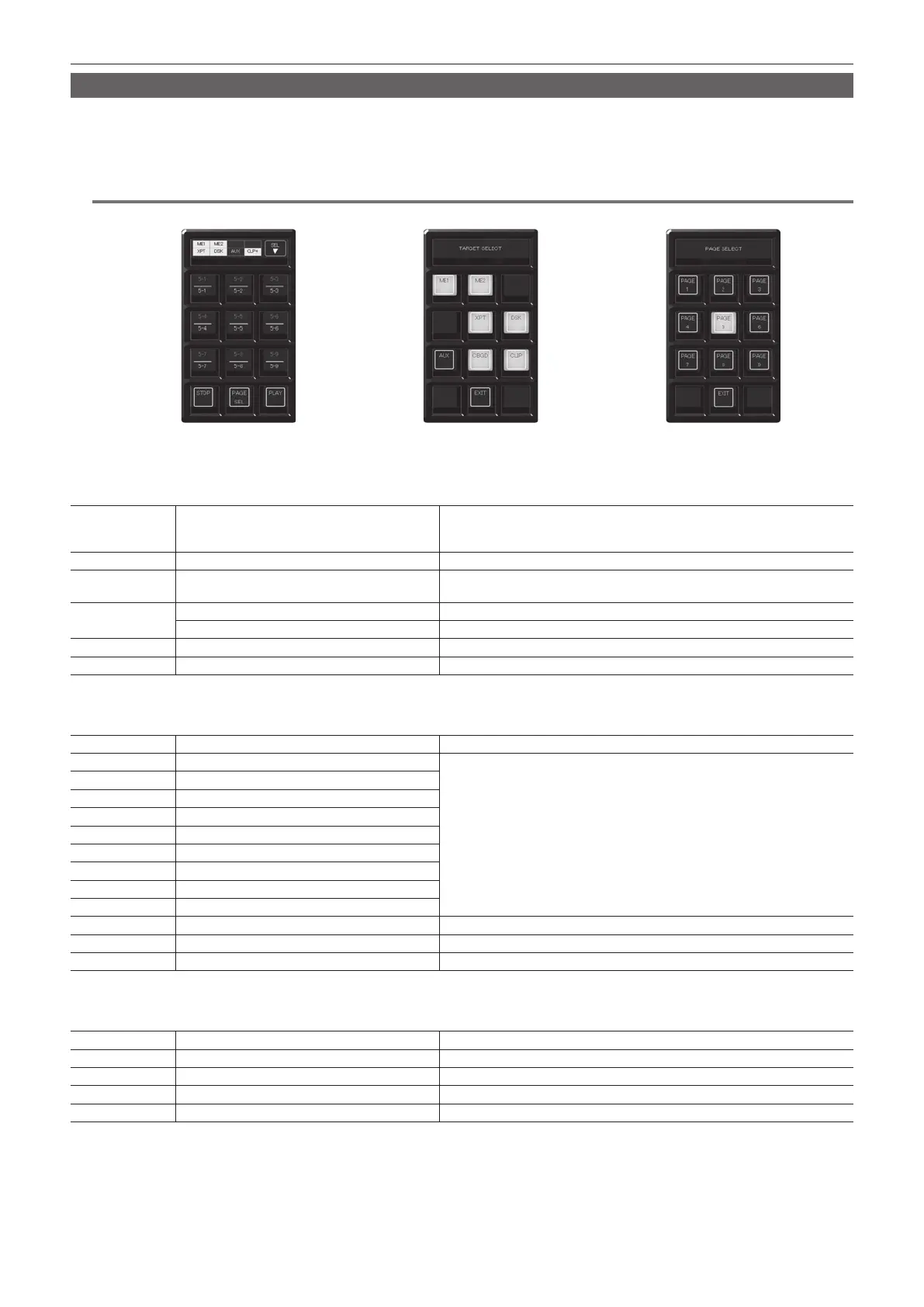
Press the <EVNT MEM> button on the multi-selection panel area to display the event memory menu.
Play back the 81 register memories (9 pages×9 memories).
Pages 1 to 9 can be specied for the page numbers of the memories.
Numbers 1 to 9 can be specied as the respective memory numbers for the specied page numbers.
@@
NOTE
t This function will be available in V2.00.00 or higher.
[TARGET SELECT] menu [PAGE SELECT] menuOperation menu for the register memory
r Operation menu for the register memory
Press the <EVNT MEM> button on the multi-selection panel area to display the operation menu for the register memory.
S1, S2 Status display eld of the [TARGET SELECT] menu
Displays the items selected in the [TARGET SELECT] menu.
f [CLP+]: Lights up when [CLIP] or [CBGD] is selected in the [TARGET SELECT]
menu.
S3 [SEL] Moves to the [TARGET SELECT] menu.
1 ‑ 9 Register memory for operation target
Selects the register memory for the operation target. Page numbers, sub-numbers,
etc. are displayed in each item.
10
[STOP] Interrupts playback when awaiting or pausing playback.
[PAUSE] Pauses playback during playback.
11 [PAGE SEL] Moves to the [PAGE SELECT] menu.
12 [PLAY] Starts playback when awaiting or pausing playback.
r [TARGET SELECT] menu
Select [SEL] in the operation menu of the register memory to display the [TARGET SELECT] menu.
S1 ‑ S3 [TARGET SELECT] Displays the menu title.
1 [ME1]
Selects the event memory playback target.
Among items stored by operating the Menu Panel AV-HS60C3, only the selected
items will be played back.
f Playback is impossible when performing the following playback operations in other
operation areas.
When the same register memory page in the event memory is being played back
When the same resource is being played back at the shot memory or event
memory
2 [ME2]
3 ―
4 ―
5 [XPT]
6 [DSK]
7 [AUX]
8 [CBGD]
9 [CLIP]
10 ― ―
11 [EXIT] Moves to the operation menu for the register memory.
12 ― ―
r [PAGE SELECT] menu
Select [PAGE SEL] in the operation menu of the register memory to display the [PAGE SELECT] menu.
S1 ‑ S3 [PAGE SELECT] Displays the menu title.
1 ‑ 9 [PAGE1] - [PAGE9] Selects the page number of the register memory.
10 ― ―
11 [EXIT] Moves to the operation menu for the register memory.
12 ― ―













 To Next Page