– 31 –
Chapter 4 Preparations — Basic menu operations
Basic menu operations
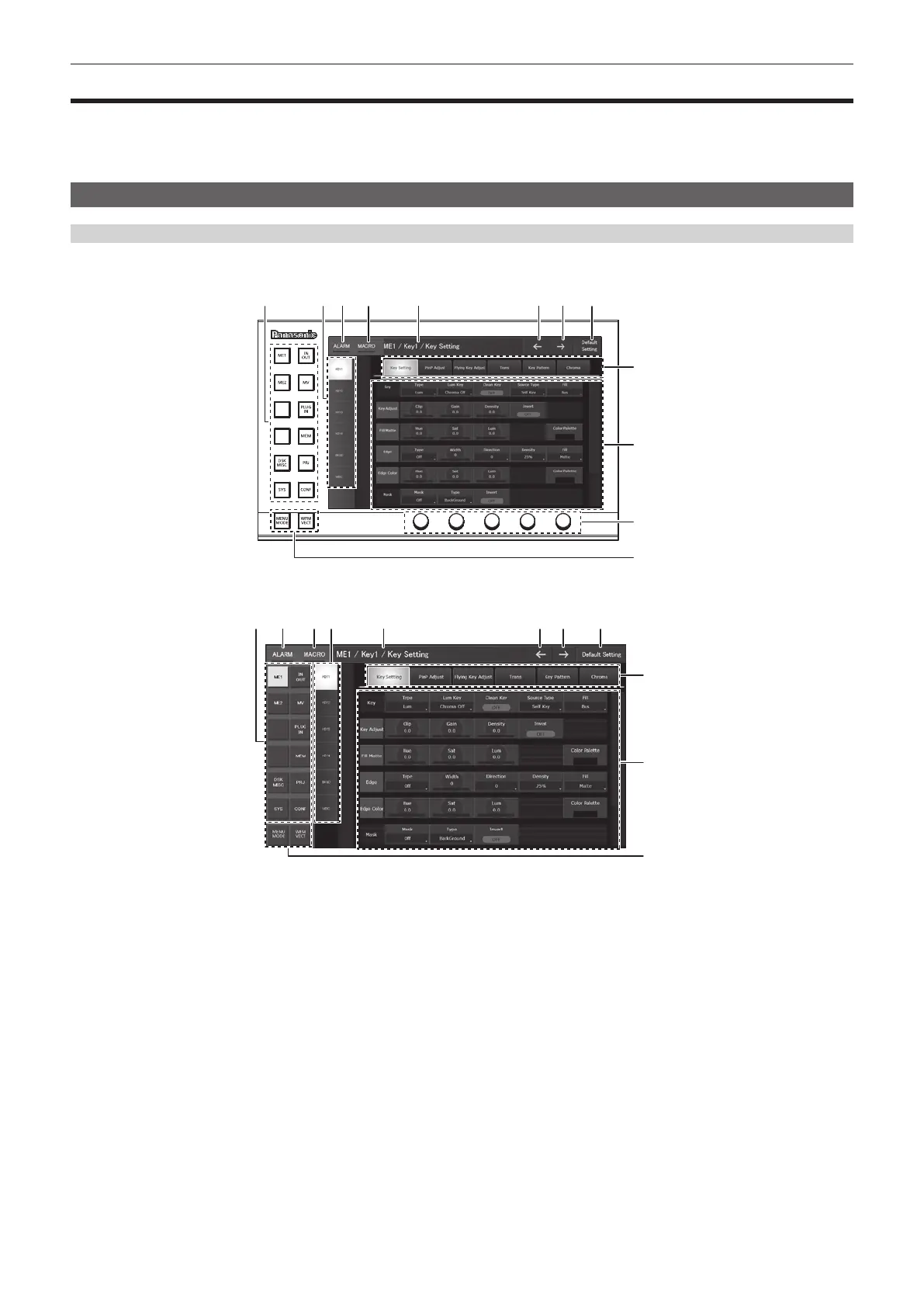
This section describes basic operations of the menu. Connect with the Menu Panel AV-HS60C3 or general-purpose DVI monitor to perform menu
operations. This document is written based on the operations with the Menu Panel AV-HS60C3. Operations may differ depending on the connected
devices.
For conguration of the menu, refer to “Setting menu table” (page 158).
Menu conguration and operations
Menu display
r Menu Panel AV‑HS60C3
9
10
1 2 3 4 5 6 7 8
11
12
r General‑purpose DVI monitor, LAN connected computer
9
10
12
1 3 4 52 6 7 8
1 Top menu
Selects the rst hierarchy of the menu.
2 Function menu
Selects the second hierarchy of the menu. When items you want to set are not displayed, move the scrollbar to display them.
3 [ALARM]
When an alarm has occurred, the [ALARM] indicator area will light up red.
If [ALARM] is selected, the same page as displayed with the <SYS> button on the top menu → [MAINTENANCE] → [Alarm] tab will appear.
4 [MACRO]
(This function will be available in V2.00.00 or higher.)
The status for the [MACRO] indicator is as follows.
f Lights up red during macro recording.
f Lights up green during macro execution.
If [MACRO] is selected, the same page as displayed from the <MEM> button on the top menu → [MACRO] → [Macro] tab page will appear. Check
[Status] in the [Macro] tab.
5 Page title
Displays the title of the displayed page. As a page title, the top menu/function menu/menu tab of the displayed page will be displayed.
6 Previous screen
Returns to the page of up to last 10 operations.
7 Next screen
Moves to the next page from the returned page.













 To Next Page