– 75 –
Chapter 5 Basic Operations — Color corrector
Tone curve
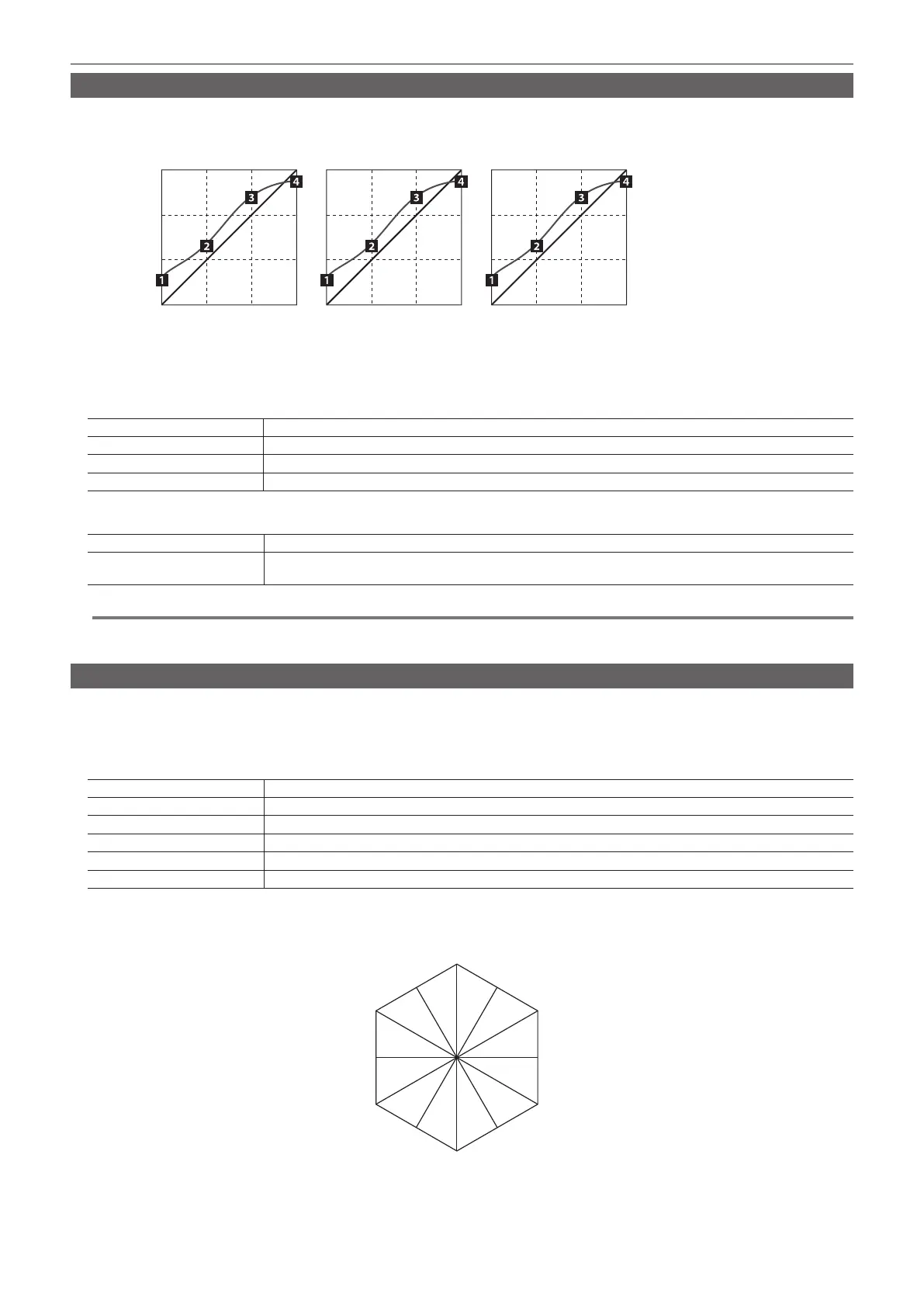
Correct the tone of input images.
Set the tone curve to adjust the screen brightness and contrast.
Adjust R, G, and B separately to adjust white balance or tone.
[Blue][Red] [Green]
1: [Tone1 Black]
2: [Tone2 Gray L]
3: [Tone3 Gray H]
4: [Tone4 White]
1
Select the <IN OUT> button → [C/C IN 25‑30], [C/C IN 31‑32], [C/C OUT] → the tab to be set.
f Select the tab to be set from the [SDI IN 25] tab to [SDI IN 32] tab, or the [SDI OUT 13] tab to [SDI OUT 16] tab.
2
Set [Red], [Green], and [Blue] in the [Tone1 Black]/[Tone2 Gray L]/[Tone3 Gray H]/[Tone4 White] column.
[Tone1 Black] Adjusts the black level.
[Tone2 Gray L] Adjusts the gray Low level.
[Tone3 Gray H] Adjusts the gray High level.
[Tone4 White] Adjusts the white level.
3
Select an item in [RGB Link] in the [Tone1 Black] column.
[Off] Enables setting of the [Tone1 Black]/[Tone2 Gray L]/[Tone3 Gray H]/[Tone4 White] column independently from RGB.
[On]
Uses the value of [Red] as the values of [Green] and [Blue] for the [Tone1 Black]/[Tone2 Gray L]/[Tone3 Gray H]/[Tone4
White] column.
@@
NOTE
t The unit simply connects the set black level, gray Low level, gray High level, and white level to create a tone curve. Depending on the setting values,
the tone curve might not be as desired.
Adjusting the gain of color matrix
1
Select the <IN OUT> button → [C/C IN 25‑30], [C/C IN 31‑32], [C/C OUT] → the tab to be set.
f Select the tab to be set from the [SDI IN 25] tab to [SDI IN 32] tab, or the [SDI OUT 13] tab to [SDI OUT 16] tab.
2
Set [R‑G], [R‑B], [G‑R], [G‑B], [B‑R], and [B‑G] in the [Matrix R/G]/[Matrix B] column.
[R‑G] Sets the gain value in the R-G axis direction.
[R‑B] Sets the gain value in the R-B axis direction.
[G‑R] Sets the gain value in the G-R axis direction.
[G‑B] Sets the gain value in the G-B axis direction.
[B‑R] Sets the gain value in the B-R axis direction.
[B‑G] Sets the gain value in the B-G axis direction.
r 12‑axis correction of the color matrix
Divide the hue into 12 axis areas to adjust the amount of gain and hue for each area.
R
Cy
Mg-RR-Ye
Mg
B
Cy-BG-Cy
B-Mg
Ye
G
Ye-G
1
Select the <IN OUT> button → [C/C IN 25‑30], [C/C IN 31‑32], [C/C OUT] → the tab to be set.
f Select the tab to be set from the [SDI IN 25] tab to [SDI IN 32] tab, or the [SDI OUT 13] tab to [SDI OUT 16] tab.













 To Next Page