– 39 –
Chapter 4 Preparations — Basic operations for the multi‑selection panel area
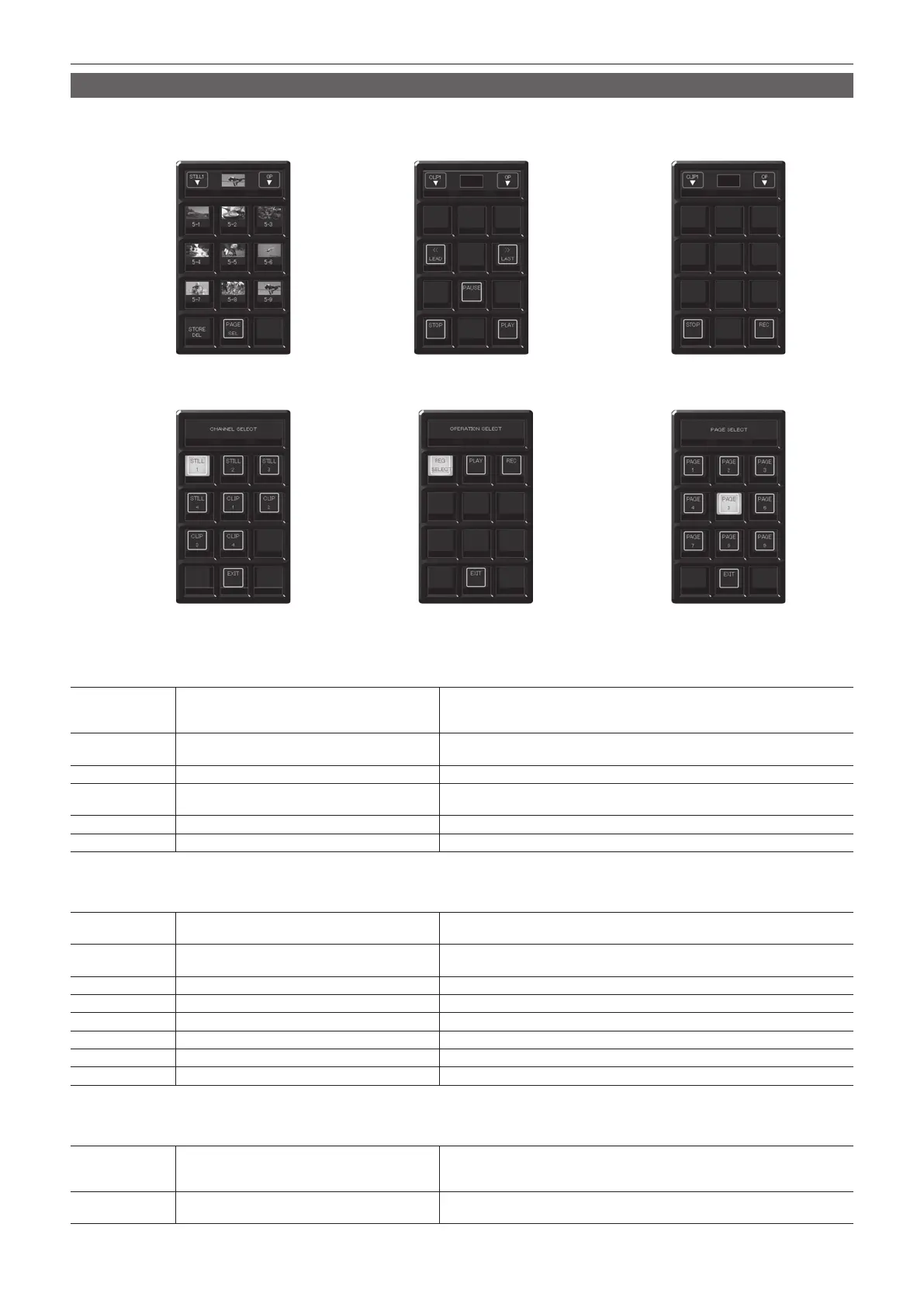
Video memory menu
Press the <VMEM> button on the multi-selection panel area to display the video memory menu.
Record or play back the moving image memories (Clip) and still image memories (Still), and save or recall the register memories. The current thumbnail
display will be available in V2.00.00 or higher.
[PLAY] menuOperation menu for the register memory [REC] menu
[CHANNEL SELECT] menu [OPERATION SELECT] menu [PAGE SELECT] menu
r Operation menu for the register memory
Press the <VMEM> button on the multi-selection panel area to display the operation menu for the register memory.
S1 [STILL1] - [STILL4], [CLIP1] - [CLIP4]
Moves to the [CHANNEL SELECT] menu.
f Among [STILL1] to [STILL4] and [CLIP1] to [CLIP4], the buttons for the operation
target will be displayed.
S2 Current thumbnails
Displays the thumbnails stored as the operation target among [STILL1] to [STILL4]
and [CLIP1] to [CLIP4].
S3 [OP] Moves to the [OPERATION SELECT] menu.
1 ‑ 9 Register memory for operation target
Selects the register memory for the operation target. Page numbers, sub-numbers,
etc. are displayed in each item.
10 [RECALL/STORE/DEL] Switches the operation mode.
11 [PAGE SEL] Moves to the [PAGE SELECT] menu.
r [PLAY] menu (only when operating [CLIP1] to [CLIP4])
Select [PLAY] in the [OPERATION SELECT] menu to display the [PLAY] menu.
S1 [CLIP1] - [CLIP4]
Moves to the [CHANNEL SELECT] menu.
f Among [CLIP1] to [CLIP4], the buttons for the operation target will be displayed.
S2 Current thumbnails
Displays the thumbnails stored as the operation target among [STILL1] to [STILL4]
and [CLIP1] to [CLIP4].
S3 [OP] Moves to the [OPERATION SELECT] menu.
4 [LEAD] Moves to the beginning of the Clip.
6 [LAST] Moves to the end of the Clip.
8 [PAUSE] Pauses playback of Clip for the operation target.
10 [STOP] Stops playback of Clip for the operation target.
12 [PLAY] Starts playback of Clip for the operation target.
r [REC] menu
Select [REC] in the [OPERATION SELECT] menu to display the [REC] menu.
S1 [STILL1] - [STILL4], [CLIP1] - [CLIP4]
Moves to the [CHANNEL SELECT] menu.
f Among [STILL1] to [STILL4] and [CLIP1] to [CLIP4], the buttons for the operation
target will be displayed.
S2 Current thumbnails
Displays the thumbnails stored as the operation target among [STILL1] to [STILL4]
and [CLIP1] to [CLIP4].













 To Next Page