– 36 –
Chapter 4 Preparations — Basic operations for the multi‑selection panel area
Basic operations for the multi‑selection panel area
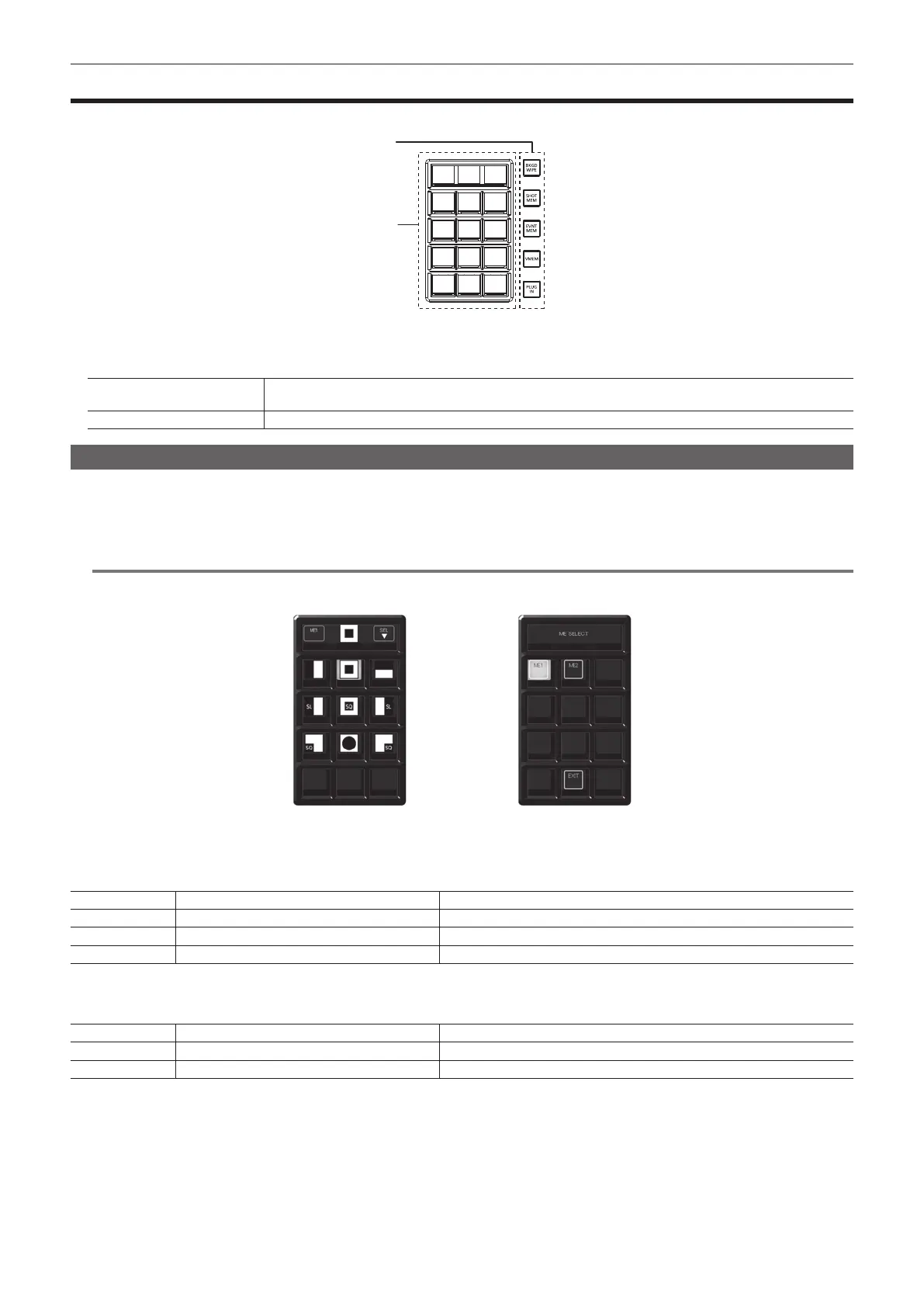
The multi-selection panel area is a color liquid crystal panel with buttons, which integrates wipe pattern selection and various memory operations.
S1 S2 S3
10 11 12
1 2 3
4 5 6
7 8 9
1
2
1 Mode selection button
Switches the mode using the buttons at the right side of the multi-selection panel area.
2 Multi‑selection menu panel
S1 ‑ S3
This is the status area of the menu. Displays and functions differ by menu. Depending on the menu, perform operations
with the button which appear on S1 or S3 area.
1 ‑ 12
Consists of 12 button sets of 3×4. Displays and functions differ by menu.
Background wipe preset menu
Press the <BKGD WIPE> button on the multi-selection panel area to display the background wipe preset menu.
Nine background wipe preset patterns can be stored for each ME.
The wipe setting used in the corresponding ME is always stored to the pattern button selected in the pattern selection menu. If another pattern button is
selected, the wipe pattern and setting values stored previously are retrieved.
@@
NOTE
t Operations are limited in the version below V2.00.00.
Nine default wipe patterns cannot be changed.
[ME SELECT] menuPattern selection menu
r Pattern selection menu
Press the <BKGD WIPE> button on the multi-selection panel area to display the pattern selection menu.
S1 [ME1], [ME2] Displays the ME for the operation.
S2 Current pattern Displays the current background wipe pattern.
S3 [SEL] Moves to the [ME SELECT] menu.
1 ‑ 9 Pattern 1 to pattern 9 Selects the background wipe preset pattern.
r [ME SELECT] menu
Select [SEL] in the pattern selection menu to display the [ME SELECT] menu.
S1 ‑ S3 [ME SELECT] Displays the menu title.
1 ‑ 2 [ME1], [ME2] Selects the ME for the operation.
11 [EXIT] Moves to the pattern selection menu.













 To Next Page