– 87 –
Chapter 5 Basic Operations — Memory
4
Select an item in [Clip1] to [Clip4] in the [Detail Clip] column.
[On] Sets as a memory target.
[Off] Does not set as a memory target.
5
Select an item in [AUX Sel1] to [AUX Sel5] in the [Detail AUX] column.
f Select items from [AUX1] to [AUX16].
To select all AUX buses, select [All] in [AUX Sel1].
EMEM LINK function
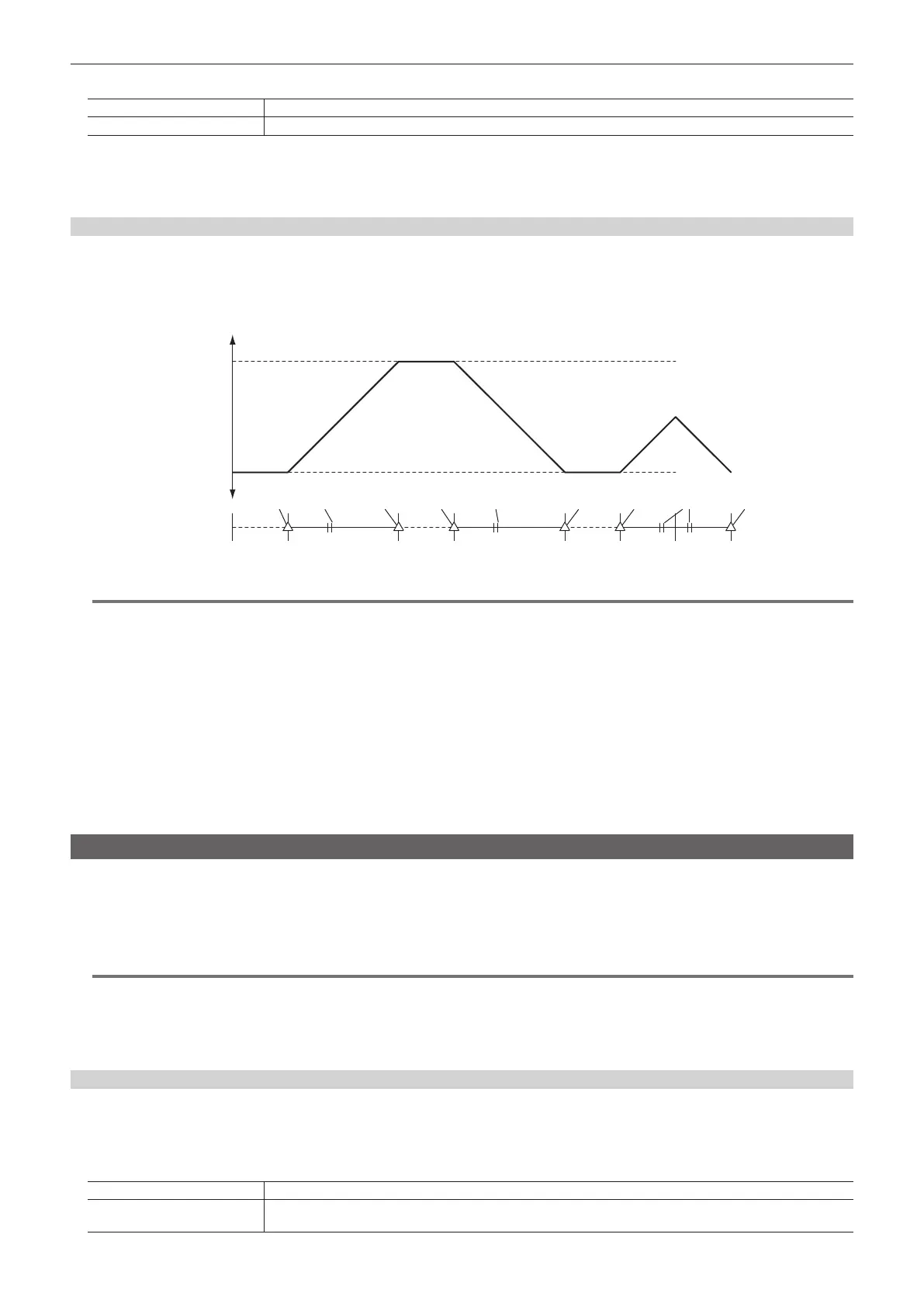
Select the <EMEM LINK> button in the transition area to execute a transition according to the pattern registered in the event memory. The next
transition operation by the fader lever or the <AUTO>/<CUT> buttons becomes the operation of the event memory.
f The amount of one transition corresponds to [Total Duration], and [Event Duration] of each event operates according to the ratio.
f Pause set using the mark is disabled.
Amount of transition
PGM-A
PGM-B
Event memory
Ex) Events 1 to 3
Event 1 Playback Event 1 Playback Event 1 Playback Reverse
playback
Event 1 Event 2 Event 2 Event 2Event 3 Event 3Event 1 Event 1 Event 1
@@
NOTE
t In the EMEM LINK status, the event memory number selected on the next page is played back according to the fader lever or the <AUTO>/<CUT>
button operations.
- Event memories to be linked to the fader lever operation in the ME1: Register memories 1‑1 to 1‑9 (rst page)
- Event memories to be linked to the fader lever operation in the ME2: Register memories 2-1 to 2-9 (second page)
t While in the EMEM LINK status, the event memory target in the multi‑selection panel area is xed in the relevant ME.
Ex) When the ME1 enters the EMEM LINK status, ME1 is xed to on, and ME2, DSK, BC, and AUX cannot be set to on. CLP can be set to on/off.
t When EMEM LINK is selected, the register memory selected in the past on the relevant page is played back by fader lever operation.
The register memory can be changed in the multi-selection panel before the fader lever operation.
In addition, if no register memory has been selected in the past, the default value is register memory 1.
t In the following cases, playback is performed not with EMEM LINK but with MIX.
- During editing on the Menu Panel AV-HS60C3
- No register memory is selected on the relevant page of the event memory, and register memory 1 on the page is not registered.
- An event memory on the same page is being played back by another panel.
- There is resource conict (such as the same ME is specied) with the event memory/shot memory being played back by another panel.
Macro memory
The macro memory is a function to record and play back a series of operations performed on the Control Panel AV-HS60C1/AV-HS60C2.
It enables recording and playback of a more detailed range including functions which are not covered by the shot memory and the event memory (such
as input setting, output setting, and USK setting).
Use the Menu Panel AV-HS60C3 to register and edit macros in the work memory, and save the created macro memory in a register memory. When the
macro bus or a button with macro attached is pressed, the relevant macro is played back.
@@
NOTE
t This function will be available in V2.00.00 or higher.
t The number of register memories that can be registered is 81 (9 pages × 9).
t Each register memory of macro memory has the capacity of 100 KB, and can record approximately 1000 steps of operations although the number
varies depending on the effects.
t Operations in the multi-selection panel area are outside the scope of macro.
Status displays
The [MACRO] indicator at the top on the Menu Panel AV-HS60C3 lights in red during macro registration, and lights in green during playback.
1
Select the <MEM> button → [MACRO] → [Macro] tab.
2
Select an item in the [Status] column.
[Rec] The [MACRO] indicator lights in red on the Menu Panel AV-HS60C3.
[Play]
The [MACRO] indicator lights in green on the Menu Panel AV-HS60C3. This is displayed when a macro is being played
back with the macro bus or macro attach.













 To Next Page