– 41 –
Chapter 4 Preparations — Menu delegation function
Menu delegation function
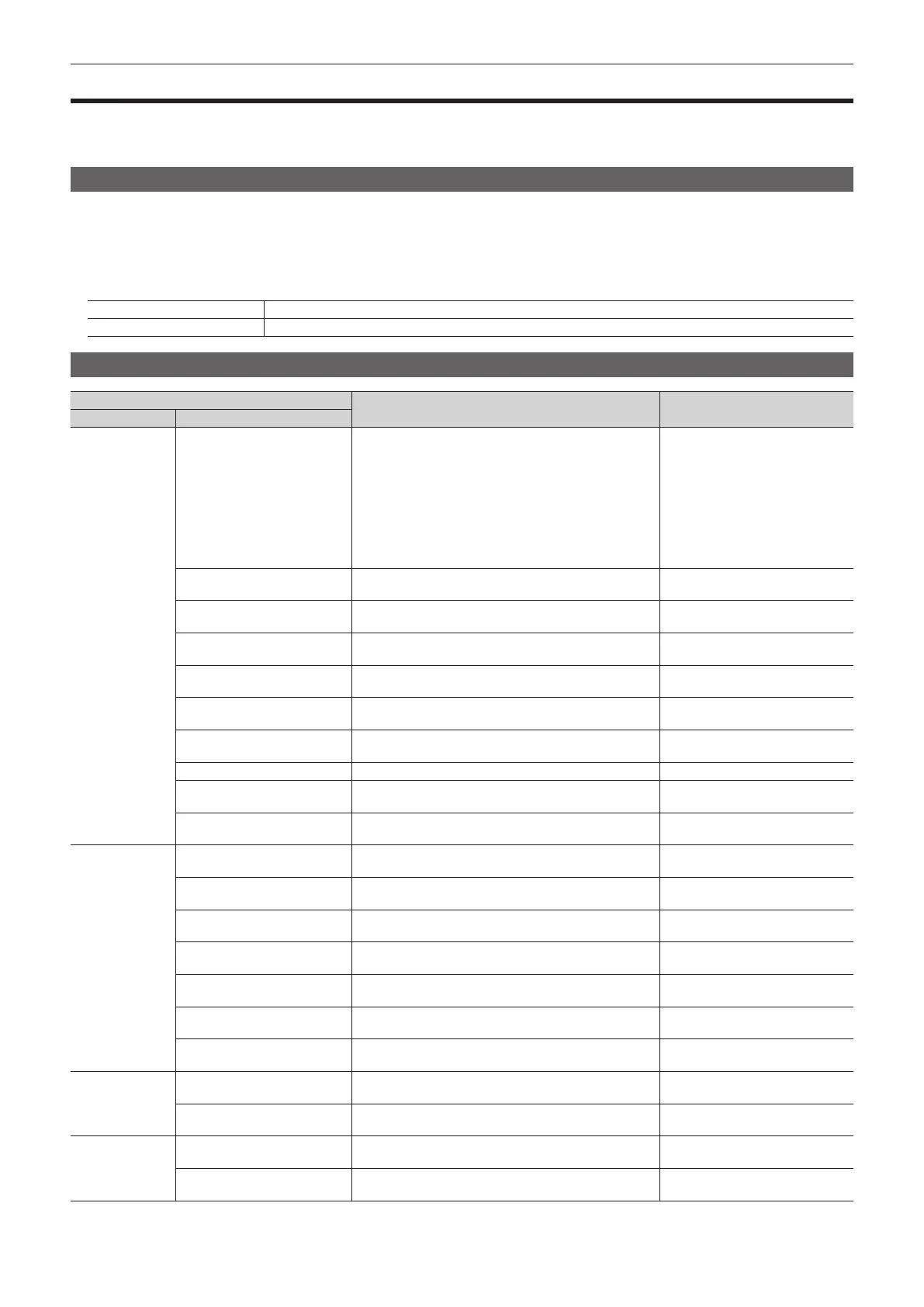
When a button on the Control Panel is double-clicked, the menu screen displayed on the Menu Panel AV-HS60C3 or the multi-selection panel area can
be switched.
At the same time, the normal operation activated when the button is pressed is also executed.
Enabling/disabling the menu delegation function
Enable/disable the menu delegation function at the Menu Panel AV-HS60C3 and the multi-selection panel area separately.
1
Select the <SYS> button → [CTRL PANEL] → [Main Panel]/[SubPanel1]/[SubPanel2] tab.
f The [SubPanel1]/[SubPanel2] tabs will be available in V2.00.00 or higher.
2
Select an item in [MenuPanel] or [Select Panel] in the [Delegation] column.
[On] button Enables the menu delegation function.
[Off] button Disables the menu delegation function.
Menu delegation function list
Button
Transition menu of the Menu Panel AV‑HS60C3
Transition menu of the multi‑
selection panel area
Button position Operation target button
Crosspoint area
<KEY1 F/S>, <KEY2 F/S>, <KEY3
F/S>, <KEY4 F/S>
f When the key type is [Lum]/[Linear]/[Full]
The <ME1>/<ME2> button on the top menu → [KEY1] to
[KEY4] → [Key Setting] tab → [Key Adjust] column
f When the key type is [PinP]
The <ME1>/<ME2> button on the top menu → [KEY1] to
[KEY4] → [PinP Adjust] tab
f When the key type is [Chroma]
The <ME1>/<ME2> button on the top menu → [KEY1] to
[KEY4] → [Chroma] tab
―
<MCRO>*
1
The <MEM> button on the top menu → [MACRO] → [XPT
Assign] tab
―
<IMAG> in A bus*
1
The <ME1>/<ME2> button on the top menu → [IMAGE] →
[BKGD] tab → [A Paint] column
―
<IMAG> in B bus*
1
The <ME1>/<ME2> button on the top menu → [IMAGE] →
[BKGD] tab → [B Paint] column
―
<CBGD1>*
2
, <CBGD2>*
2
The <DSK MISC> button on the top menu → [CBGD] →
[CBGD1]/[CBGD2] tab → [Main Color] column
―
<DSK1 F/S> - <DSK4 F/S>
The <DSK MISC> button on the top menu → [DSK1] to
[DSK4] → [Setting] tab → [DSK Adjust] column
―
<AUX 1/2>, <AUX 3/4>
The <CONF> button on the top menu → [OPERATE] →
[Transition] tab
―
<VMEM F/S>
The <MEM> button on the top menu → [STILL] → [Still] tab
―
<STILL1 V/K> - <STILL4 V/K>*
2
The <MEM> button on the top menu → [STILL] → [Still] tab
Selection of the register memories
([STILL1] to [STILL4])
<CLIP1 V/K> - <CLIP4 V/K>*
2
The <MEM> button on the top menu → [CLIP] → [Play Clip1]
to [Play Clip4] tabs
Selection of the register memories
([CLIP1] to [CLIP4])
Transition area
<KEY1> - <KEY4>
The <ME1>/<ME2> button on the top menu → [KEY1] to
[KEY4] → [Transition] tab → [In Type] column
―
<BKGD>
The <ME1>/<ME2> button on the top menu → [BKGD] →
[Transition] tab
―
<WIPE>
The <ME1>/<ME2> button on the top menu → [BKGD] →
[BKGD Pattern] tab
Selection of the BKGD WIPE
waveform
<MCRO ATCH>*
1
The <MEM> button on the top menu → [MACRO] → [Macro
Attach] screen
―
<ME CHG>*
1
The <CONF> button on the top menu → [OPERATE] →
[MECHG] tab → [MainPanel] column
―
<PATT LIMIT>
The <ME1>/<ME2> button on the top menu → [BKGD] →
[Position] tab → [Pattern Limit] column
―
<AUTO>
The <ME1>/<ME2> button on the top menu → [BKGD] →
[Transition] tab
―
KEY operation area
<KEY1> - <KEY4>
The <ME1>/<ME2> button on the top menu → [KEY1] to
[KEY4] → [Key Setting] tab
―
<1> - <4>*
1
The <MEM> button on the top menu → [KEY PRESET] →
[Register] tab → [Select1] column
―
DSK operation area
<DSK1> - <DSK4>
The <DSK MISC> button on the top menu → [DSK1] to
[DSK4] → [Setting] tab
―
<1> - <4>*
1
The <MEM> button on the top menu → [KEY PRESET] →
[Register] tab → [Select1] column
―
*1 This function will be available in V2.00.00 or higher.
*2 Can be used when assigned to the PGM/A bus crosspoint buttons or PST/B bus crosspoint buttons.













 To Next Page