– 32 –
Chapter 4 Preparations — Basic menu operations
8 [Default Setting] button
Initializes the corresponding pages when the menu tab or the function menu is selected while the button is selected.
9 Menu tab
Selects the third hierarchy of the menu.
10 Page
Makes various settings. When items you want to set are not displayed, move the scrollbar to display them.
One line within a page is called a column.
11 Rotary encoders
Used for entering numeric values. They are not equipped with a general-purpose DVI monitor or LAN connected computer.
For details, refer to “Entering numeric values using the rotary encoders or the Control Panel AV-HS60C1/AV-HS60C2” (page 33).
12 Split‑screen buttons (<MENU MODE>, <WFM VECT>)
(This function will be available in V2.00.00 or higher.)
Switches the display of the menu screen.
For details, refer to “Split display of the menu screen” (page 27).
Numeric entry item operations
In numeric entry items, numeric values can be entered using the following two methods.
The contents displayed on the screen will differ depending on the item to be input, such as time.
f Operations using the on-screen numerical keypad
f Operations using the rotary encoders
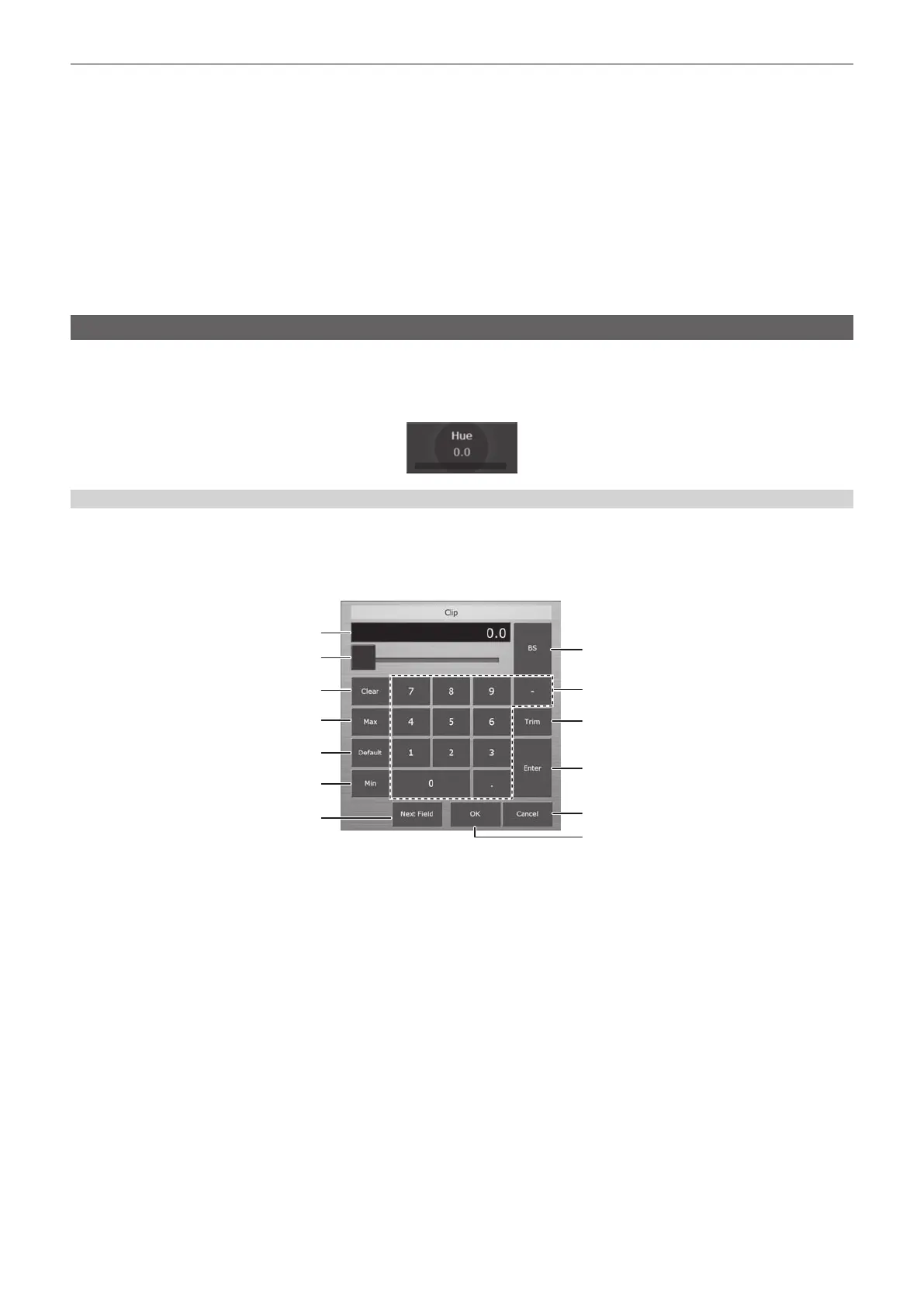
Entering numeric values using the on‑screen numerical keypad
When numeric entry items are selected, the on-screen numerical keypad appears. If set the values and closed the keypad, the numeric values set for
the items and the numeric bar will be displayed.
The contents displayed on the screen will differ depending on the item to be input, such as time.
r On‑screen numerical keypad
3
4
5
6
7
1
2
8
13
9
10
11
12
1 Entry eld
The entered numeric values are displayed. After selecting [Enter], the numeric values are displayed in the display format corresponding to the item.
Immediately after displaying the on-screen numerical keypad, the current numeric values are displayed.
2 Slider
Move the slider to change the numeric values in the entry eld.
3 [Clear]
Clears all numeric values in the entry eld.
4 [Max]
Reects the maximum setting values for the item in the entry eld.
5 [Default]
Reects the default values in the entry eld.
6 [Min]
Reects the minimum setting values for the item in the entry eld.
7 [Next Field]
Fixes the changed value without closing the on-screen numerical keypad and moves to the next numeric entry item in the same column, when
selected [Next Field] and then [OK]. This item is not displayed for the time entry.
8 [BS]
Erases the last digit of the numeric values in the entry eld.
9 [0] ‑ [9], [.], [:], [−]
Selects the values you want to enter in the entry eld in sequence. For the time entry, [.] is replaced with [:], and [−] is not displayed.













 To Next Page