– 72 –
Chapter 5 Basic Operations — USK (Upstream key)
Adjusting the luminance key/linear key
Adjust the luminance key and linear key denition.
1
Select the <DSK MISC> button → [UP STREAM KEYER] → [USK1] to [USK4] tabs.
2
Set [Clip], [Gain], and [Density] in the [Key Adjust] column.
[Clip] Sets the reference level for creating key signals.
[Gain] Sets the key amplitude.
[Density] Sets the key density.
3
Select an item in [Invert] in the [Key Adjust] column.
[Off] Does not invert the key signals generated internally.
[On] Inverts the key signals generated internally.
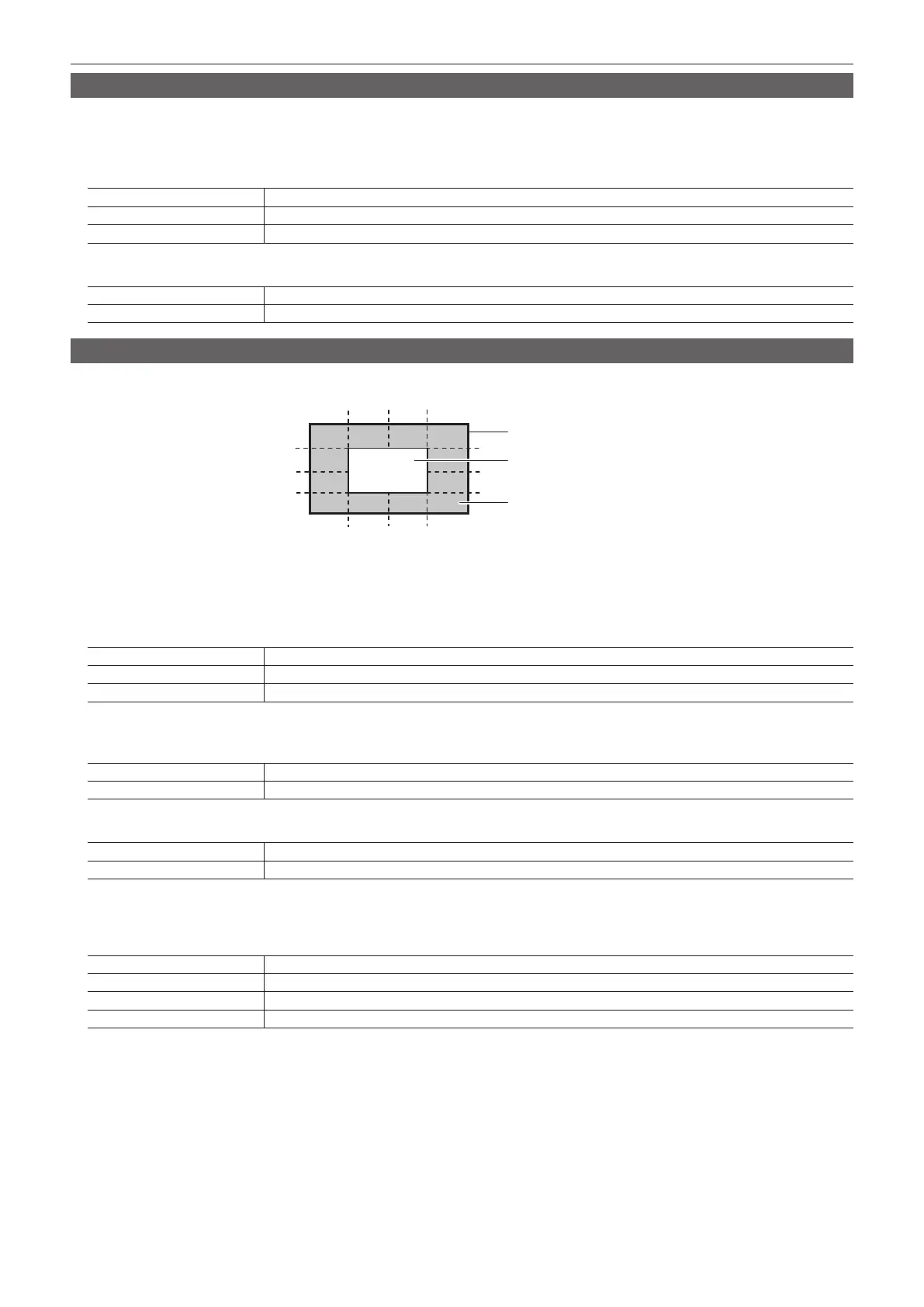
Masking the USK
Mask the key signals using the mask signal of the box pattern. The following gure is the status when [Type] is set to [ForeGround], and [Invert] is set to
[Off].
Area where the key signal is effective
Video signal range
Area masked
[Right][Left]
[Top]
[Bottom]
[50]
[25]
[0]
[−25]
[−50]
[−25]
[−50]
[25]
[0] [50]
1
Select the <DSK MISC> button → [UP STREAM KEYER] → [USK1] to [USK4] tabs.
2
Select an item in [Mask] in the [Mask] column.
f Set the mask method.
[Off] Does not mask the key signals.
[4:3] Masks the signals in the 4:3 aspect ratio.
[Manual] Masks the area set in [Adjust1] or [Adjust2].
3
Select an item in [Type] in the [Mask] column.
f Set the image to be masked.
[Foreground] Masks the foreground and displays the background.
[Background] Masks the background and displays the foreground.
4
Select an item in [Invert] in the [Invert] column.
[Off] Does not invert the mask signal.
[On] Inverts the mask signal.
5
Set [Left], [Top], [Right], and [Bottom] in the [Adjust1]/[Adjust2] column.
f Set the area to be masked. The [Left] setting cannot exceed the [Right] setting (and vice versa), and the [Top] setting cannot exceed the [Bottom]
setting (and vice versa).
[Left] Masks the key left position.
[Top] Masks the key top position.
[Right] Masks the key right position.
[Bottom] Masks the key bottom position.













 To Next Page