– 70 –
Chapter 5 Basic Operations — USK (Upstream key)
USK (Upstream key)
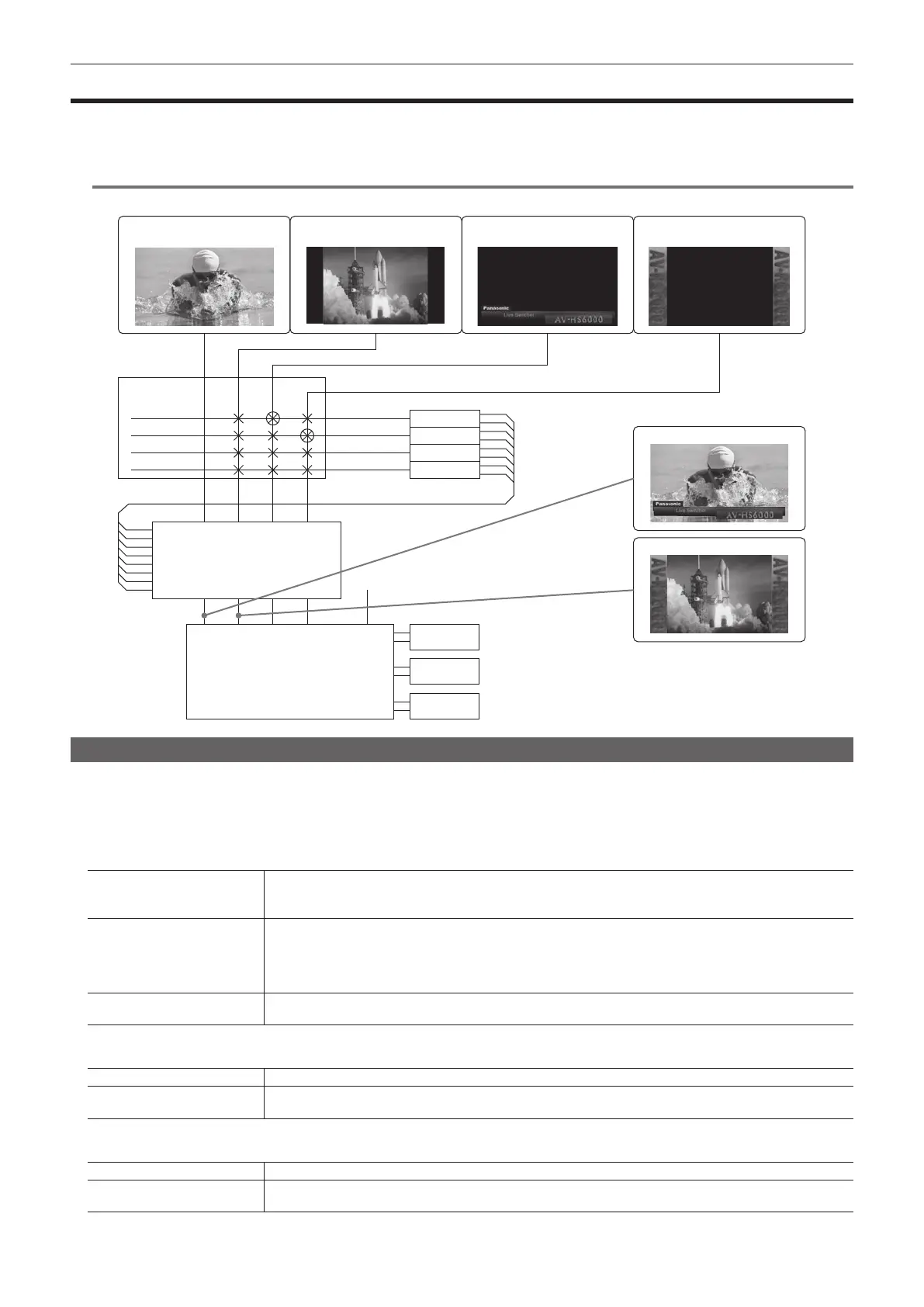
Combine characters or other images with the input image in the input area.
Combine key sources generated using the four USK lines with respective source signals to handle them as sources with a telop without using ME.
In addition, a 4:3 source of SD can be handled as a source by placing CG sources on both of its wings.
@@
NOTE
t This function will be available in V2.00.00 or higher.
USK1 ON
USK2 ON
ME1PGM, ME2PGM, MV1 - MV4, AUX1 - AUX16
Crosspoint area
[USK Insert]
Off/USK1/USK2/USK3/USK4
USK1
[USK XPT]
USK1-F/S
USK2-F/S
USK3-F/S
USK4-F/S
ME1
ME2
DSK
USK2
USK3
USK4
HD (16:9) source SD (4:3) source
CG source
(key fill, key source)
Still/Clip source
Selecting the USK type
Set the key type on the Menu Panel AV-HS60C3.
1
Select the <DSK MISC> button → [UP STREAM KEYER] → [USK1] to [USK4] tabs.
2
Select an item in [Type] in the [Key] column.
f Select the method to generate key signals. The selection status is stored for each source material.
[Lum]
(luminance key/self key)
Creates key signals from luminance components or luminance and chrome components of key ll signals.
f Since the luminance key is operated as a self key, the key ll signals are used as the key source signals.
The key signals do not change even when the key source signals are switched.
[Linear]
(linear key)
Creates key signals from luminance components of key source signals.
It is used when the key source signal and key ll signal are different.
f Use source with a black background and white characters or shape to be combined by the key as the key source
signal. Source which is not black and white may not be combined clearly. Source with white background and black
characters can be used by inverting the keys with the key invert function.
[Full]
(full key/self key)
Creates key signals using the images on the full screen as the key source signals.
f The key signals do not change even when the key source signals are switched.
3
Select an item in [Lum Key] in the [Key] column.
[Chroma Off] Generates the key signals only from the luminance components.
[Chroma On]
Generates the key signals considering the chrome components in addition to the luminance components. This item is set
when a low luminance component color is used for key signals such as when cutting blue characters.
4
Select an item in [Clean Key] in the [Key] column.
[Off] Cuts key ll with a key signal.
[On]
Does not cut key ll with a key signal. The part of key ll not cut out with the key signal is superimposed on the
background image.













 To Next Page