– 159 –
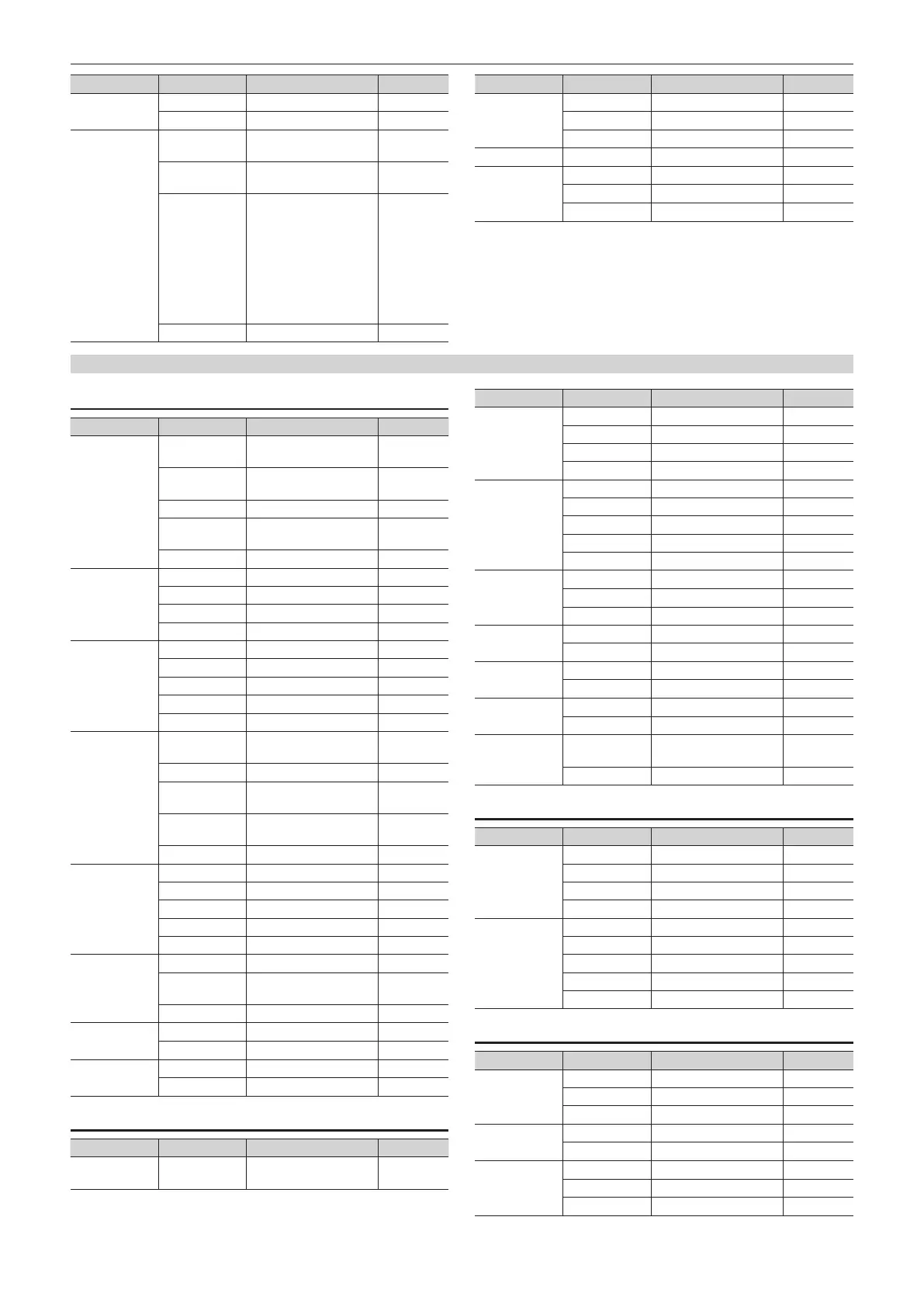
Chapter 11 Appendix — Setting menu table
Column Item Setting item Default
[Adjust] [Narrow] [Off], [0.5], [1.0], [1.5] [Off]
[Phase]
[−4.0] - [4.0]
[0.0]
[Sample] [Chroma PVW] [Off], [Key1], [Key2],
[Key3], [Key4]
[Off]
[View] [Composite], [Matte],
[Proc.FG], [FG]
[Composite]
[Mode] [Select BG Color], [Clean
BG Noise], [Clean FG
Noise], [Spill Sponge],
[Spill−], [Spill+], [Matte−],
[Matte+], [Detail−],
[Detail+], [Matte Sponge],
[Make FG Trans],
[Restore Detail], [Fine
Tuning]
[Select BG
Color]
[Undo] ― ―
Column Item Setting item Default
[Sample Area] [X-Pos]
[−50.00] - [50.00]
[0.00]
[Y-Pos]
[−50.00] - [50.00]
[0.00]
[Size] [0.1] - [100.0] [10.0]
[Sampling] [Sampling] ― ―
[Fine Tuning] [Spill]
[−1000] - [1000]
[0]
[Transition]
[−1000] - [1000]
[0]
[Detail]
[−1000] - [1000]
[0]
[KEY3]/[KEY4] (function menu)
[Key Setting] tab
Column Item Setting item Default
[Key] [Type] [Lum], [Linear], [Chroma],
[Full], [PinP]
[Linear]
[Lum Key] [Chroma Off], [Chroma
On]
[Chroma
Off]
[Clean Key] [Off], [On] [Off]
[Source Type] [Self Key], [External Key] [External
Key]
[Fill] [Bus], [Matte] [Bus]
[Key Adjust] [Clip] [0.0] - [108.0] [0.0]
[Gain] [0.0] - [200.0] [100.0]
[Density] [0.0] - [100.0] [100.0]
[Invert] [Off], [On] [Off]
[Fill Matte] [Hue] [0.0] - [359.9] [0.0]
[Sat] [0.0] - [100.0] [0.0]
[Lum] [0.0] - [108.0] [100.0]
― ― ―
[Color Palette] (Color palette screen) ―
[Edge] [Type] [Off], [Border], [Drop],
[Shadow], [Outline]
[Off]
[Width] [0] - [4] [2]
[Direction] [0], [45], [90], [135],
[180], [225], [270], [315]
[0]
[Density] [25%], [50%], [75%],
[100%]
[100%]
[Fill] [Matte], [UTIL1], [UTIL2] [Matte]
[Edge Color] [Hue] [0.0] - [359.9] [0.0]
[Sat] [0.0] - [100.0] [0.0]
[Lum] [0.0] - [108.0] [0.0]
― ― ―
[Color Palette] (Color palette screen) ―
[Mask] [Mask] [Off], [4:3], [Manual] [Off]
[Type] [BackGround],
[ForeGround]
[ForeGround]
[Invert] [Off], [On] [Off]
[Mask Adjust1] [Left]
[−50.00] - [50.00] [−25.00]
[Top]
[−50.00] - [50.00]
[25.00]
[Mask Adjust2] [Right]
[−50.00] - [50.00]
[25.00]
[Bottom]
[−50.00] - [50.00] [−25.00]
[PinP Adjust] tab
Column Item Setting item Default
[Shape] [Shape] [Square], [Circle], [Heart],
[Flower], [Star]
[Square]
Column Item Setting item Default
[Border] [Border] [Off], [On] [Off]
[Width] [0.1] - [100.0] [5.0]
[Soft] [0.0] - [100.0] [0.0]
[Mode] [Fix], [Variable] [Fix]
[Border Color] [Hue] [0.0] - [359.9] [0.0]
[Sat] [0.0] - [100.0] [0.0]
[Lum] [0.0] - [108.0] [100.0]
― ― ―
[Color Palette] (Color palette screen) ―
[Position] [X]
[−100.00] - [100.00]
[0.00]
[Y]
[−100.00] - [100.00]
[0.00]
[Size] [0.00] - [100.00] [25.00]
[Trim] [Trim] [Off], [4:3], [Manual] [Off]
[Manual] [Free], [Pair] [Free]
[Trim Adjust1] [Left]
[−50.00] - [50.00] [−40.00]
[Top]
[−50.00] - [50.00]
[40.00]
[Trim Adjust2] [Right]
[−50.00] - [50.00]
[40.00]
[Bottom]
[−50.00] - [50.00] [−40.00]
[Sync] [Target] [Off], [Key1], [Key2],
[Key4]
[Off]
[Symmetry] [X], [Y], [Center] [X]
[Transition] tab
Column Item Setting item Default
[In Type] [Transition] [Off], [On] [On]
[MIX] Off, on On
[WIPE] Off, on Off
[Time] [0] - [999] ―
[Out Type] [Transition] [Off], [On] [On]
[MIX] Off, on On
[WIPE] Off, on Off
[Time] [0] - [999] ―
[In=Out] [Off], [On] [Off]
[Key Pattern] tab
Column Item Setting item Default
[Key Pattern] [In] (Wipe pattern screen) [1]
[Out] (Wipe pattern screen) [1]
[Sync] [Separate], [Link] [Separate]
[Wipe In] [X-Pos]
[−100.00] - [100.00]
[0.00]
[Y-Pos]
[−100.00] - [100.00]
[0.00]
[Wipe Out] [X-Pos]
[−100.00] - [100.00]
[0.00]
[Y-Pos]
[−100.00] - [100.00]
[0.00]
[In=Out] [Off], [On] [Off]













 To Next Page