EasyManua.ls Logo

PennEngineering Haeger 824 WindowTouch-4e - Input 4: Unit & Size; Input 5: Insertion Values; Force (LBS)

PennEngineering Haeger 824 WindowTouch-4e
167 pages
Print Icon
To Next Page IconTo Next Page
To Previous Page IconTo Previous Page
Loading...
17-00001-C Page | 59
10.
11.
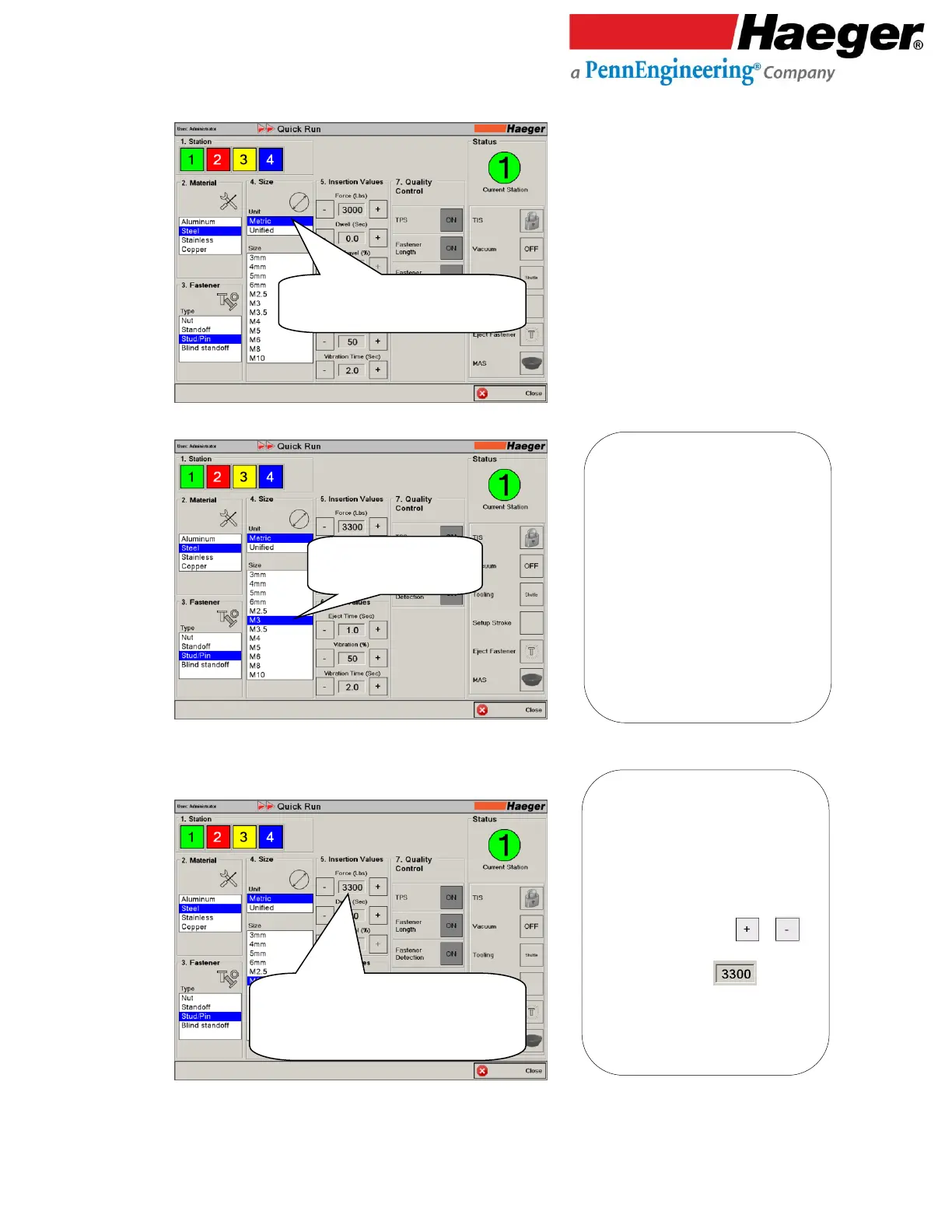
Input 4: Unit & Size
12.
Input 5: Insertion Values
Force (LBS)
Select Fastener Unit of Measure
Touch on Metric.
Select Fastener Size.
Touch on M3.
Force (lbs)
Change default value of 3300 to 3500
Touch “+” twice to set to 3500
5. Force (lbs): Is the amount of pounds of
force that will be applied between the
Upper and Lower Tools during the hardware
insertion cycle. The force can range from
1,000 pounds (4.46KN) to 16,000 pounds
(71.35 KN). The 3300 lbs value displayed is
derived from a manufacturers table of
values however it can be increased or
decreased by touching the or
symbols on either side of the value shown.
Or touch on the value itself, to
touch type a new value.
Check the specifications for your fastener
to determine the appropriate force to use.

4. Unit & Size:
Metric
Unified

Table of Contents