EasyManua.ls Logo

PennEngineering Haeger 824 WindowTouch-4e - Programs; Create New Program; Program Name

PennEngineering Haeger 824 WindowTouch-4e
167 pages
Print Icon
To Next Page IconTo Next Page
To Previous Page IconTo Previous Page
Loading...
17-00001-C Page | 69
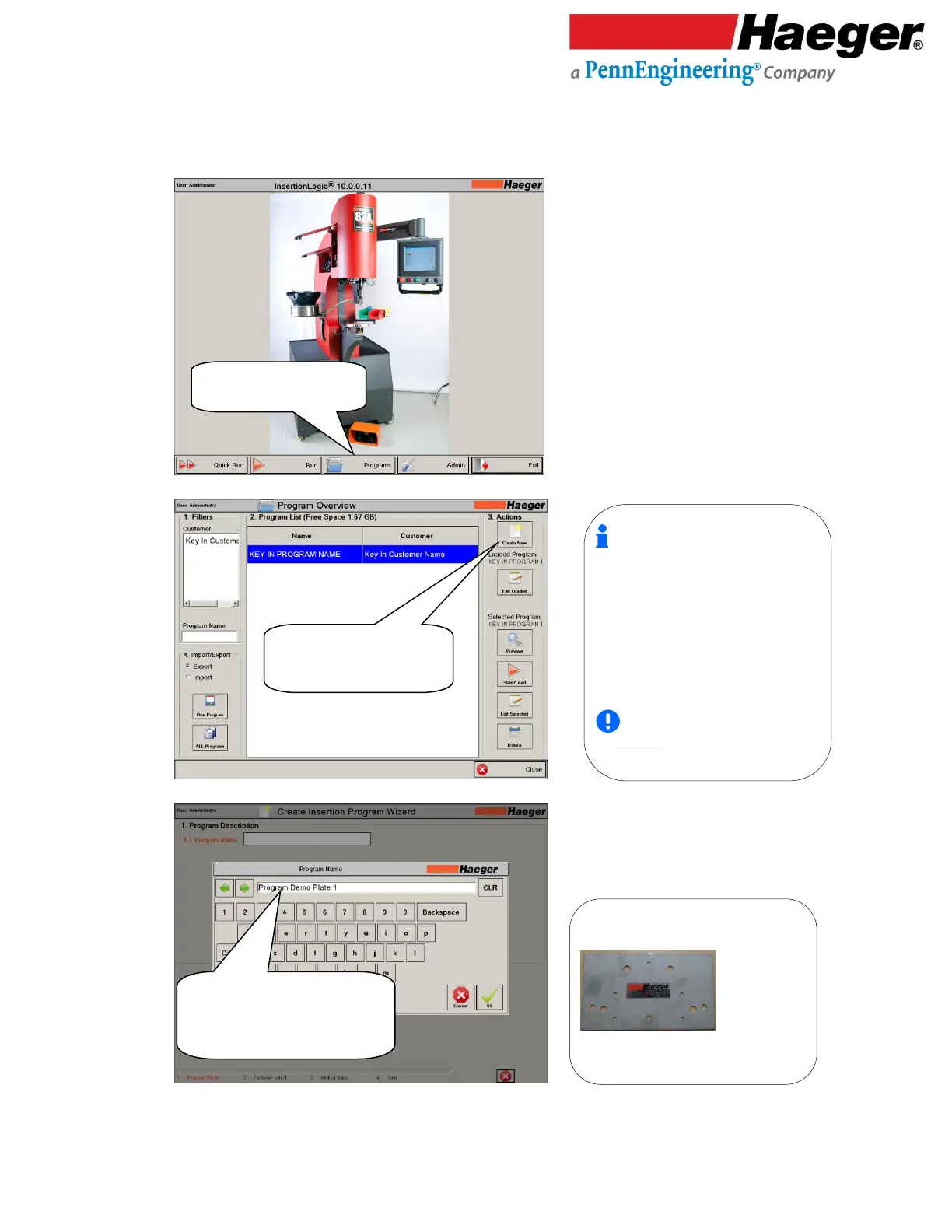
To Program a production operation you will follow the easy programming wizard using the steps.
37.
Programs
38.
Create New Program
39.
Program Name
Touch on Programs
Create a new program
Touch on Create New
3. Create New: One of the most useful
features of InsertionLogic is the ability to
store and retrieve programs. When you
save a program, you are saving all the setup
values (for instance: Force, Dwell, Up
Position, TPS, Fastener Detection, Fastener
Length, and Teach sequences). Programs
can also contain images which illustrate
where fasteners are to be inserted.
Programs are stored on
the machine hard drive.

1.1 Program Name: For this example we
chose Part ID: “Program Demo Plate 1 “
Touch Type Program Name
“Program Demo Plate 1”
Touch on OK

Table of Contents