EasyManua.ls Logo

PennEngineering Haeger 824 WindowTouch-4e - Select Tooling Type; Program Wizard (Manual, Station 2 of 4)

PennEngineering Haeger 824 WindowTouch-4e
167 pages
Print Icon
To Next Page IconTo Next Page
To Previous Page IconTo Previous Page
Loading...
17-00001-C Page | 73
49.
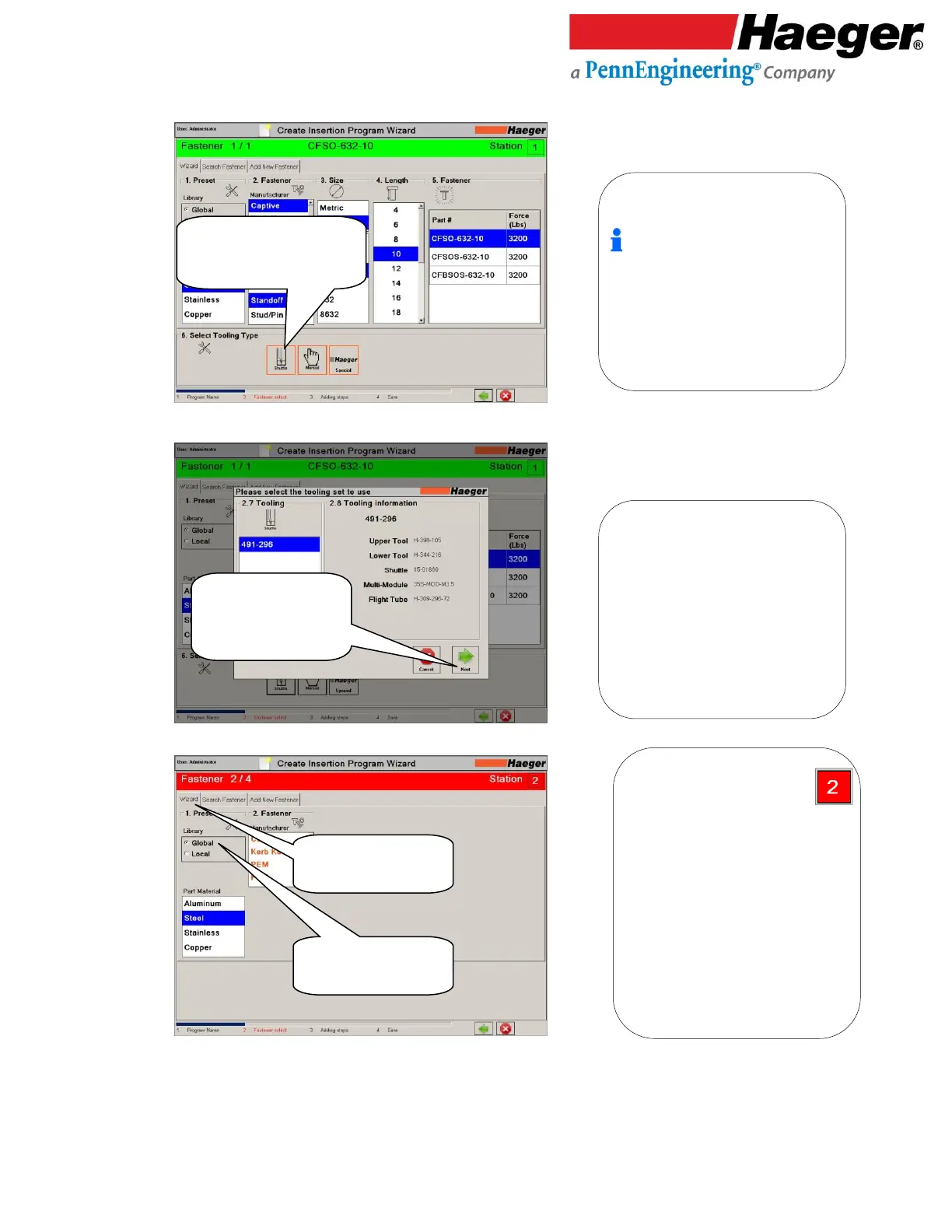
4. Select Tooling Type
50.
51.
Program Wizard (Manual, Station 2 of 4)
Select Tooling Type
Touch on SHUTTLE
6. Select Tooling Type:
Shuttle tool is typically setup in station 1
(automatic station), which works in
combination with the MAS bowl.
Repeat Wizard to program STATION
* This time, let’s select a Steel Captive Nut
C-632-2 for our fastener 2 of 4.
1. Preset Library:
Global: Includes Pre-loaded
fasteners from different
manufactures in software
database.
Local: User added fasteners to
their machine via the ADD NEW
FASTENER tab on this screen.

2.7 Tooling:
2.8 Tooling Information:
Verify Tooling Is
Correct
Touch on NEXT
Touch on the
WIZZARD Tab
Touch on GLOBAL

Table of Contents