EasyManua.ls Logo

PennEngineering Haeger 824 WindowTouch-4e - Program Wizard (Manual, Station 4 of 4)

PennEngineering Haeger 824 WindowTouch-4e
167 pages
Print Icon
To Next Page IconTo Next Page
To Previous Page IconTo Previous Page
Loading...
17-00001-C Page | 76
58.
59.
60.
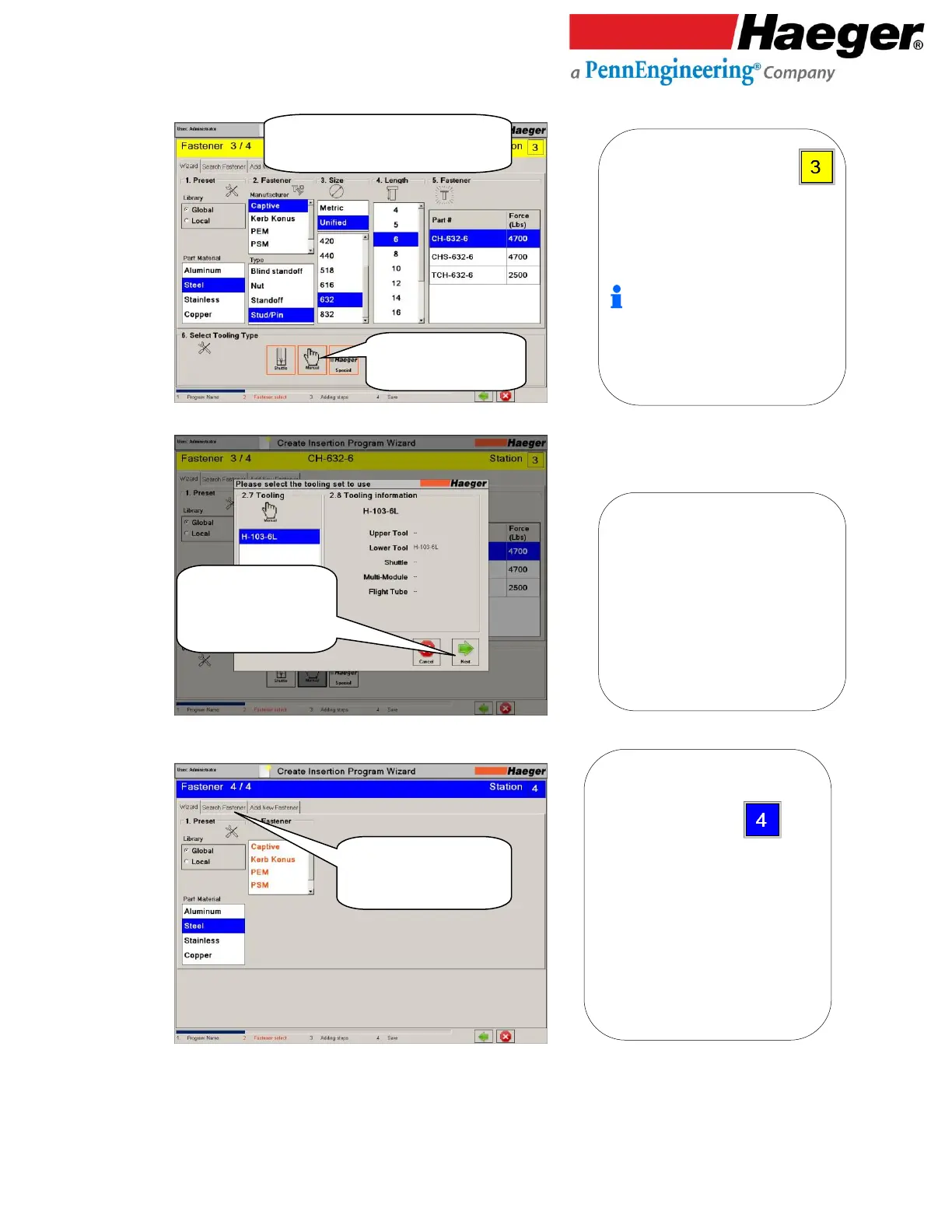
Program Wizard (Manual, Station 4 of 4)
Repeat Steps: to program STATION
1. Preset
2. Fastener
3. Size
4. Length
5. Fastener
6. Select Tooling Typer
Stations 2 through 4 are manually
operated stations.
Step through Wizard by touching
on the selections shown below
Select MANUAL
Tooling
Verify Tooling Is
Correct
Touch on NEXT
Touch on the SEARCH
FASTENER Tab
Let’s Speed up the programming steps by
using SEARCH FASTENER in lieu of the
wizard to program STATION .
* This time, let’s select a Steel Captive Nut
TR-SL-440-1 for our fastener 4 of 4.
1. Preset Library:
Global: Includes Pre-loaded fasteners
from different manufactures in
software database.
Local: User added fasteners to their
machine via the ADD NEW FASTENER
tab on this screen

2.7 Tooling:
2.8 Tooling Information:

Table of Contents