EasyManua.ls Logo

PennEngineering Haeger 824 WindowTouch-4e - Part Image; Location: USB HDD

PennEngineering Haeger 824 WindowTouch-4e
167 pages
Print Icon
To Next Page IconTo Next Page
To Previous Page IconTo Previous Page
Loading...
17-00001-C Page | 79
67.
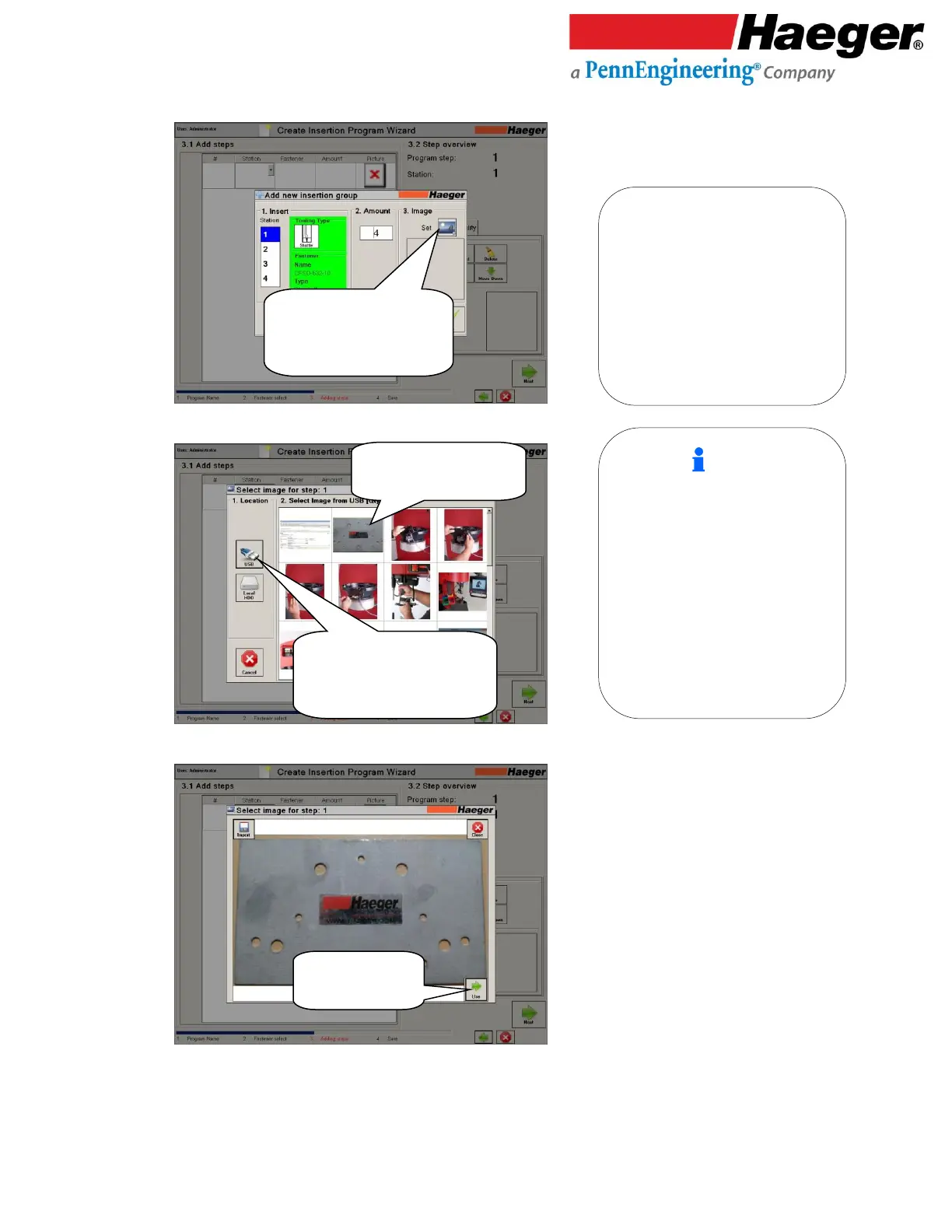
Part Image
68.
Location: USB HDD
69.
Select a part image for
hardware insertion
Touch on IMAGE
3. Image: This icon associates a part image
with the insertion group.
1. Location: Images can be selected
from two different locations:
USB: Typically used to pull in images
from a camera or flash drive. For
this example, we took a picture of
the part and loaded the image by
selecting USB.
Local HDD: Images that reside on the
machines local hard drive are
selected from here.

Select image from Camera
or USB Flash Drive
Touch on USB
Touch on part image
Touch on USE

Table of Contents