User’s Manual of FGSD-1022 Series
2.2.2 Rack Mounting
To install the Managed Switch in a 19-inch standard rack, please follows the instructions described below.
Step1: Place the Managed Switch on a hard flat surface, with the front panel positioned towards the front side.
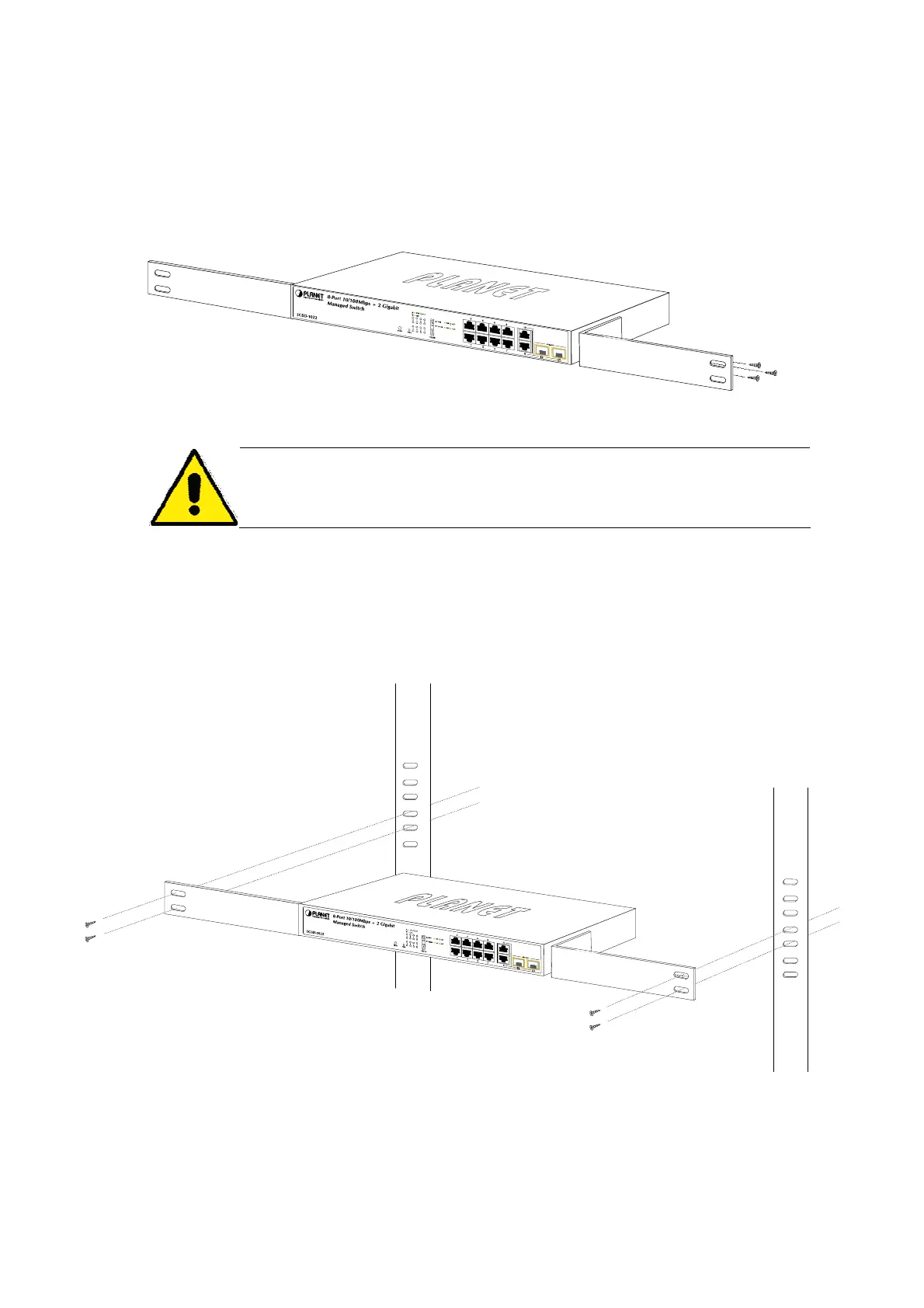
Step2: Attach the rack-mount bracket to each side of the Managed Switch with supplied screws attached to the package.
Figure 2-10 shows how to attach brackets to one side of the Managed Switch.
Figure 2-10: Attach brackets to the Managed Switch
You must use the screws supplied with the mounting brackets. Damage caused to the parts
by using incorrect screws would invalidate the warranty.
Step3: Secure the brackets tightly.
Step4: Follow the same steps to attach the second bracket to the opposite side.
Step5: After the brackets are attached to the Managed Switch, use suitable screws to securely attach the brackets to the
rack, as shown in Figure 2-11.
Figure 2-11: Mounting the Switch in a Rack
Step6: Proceeds with the steps 4 and steps 5 of session 2.2.1 Desktop Installation to connect the network cabling and
supply power to the Managed Switch.
24



 To Next Page
 Loading...