EasyManua.ls Logo

Protec 4400 - Page 36

Default Icon
88 pages
Print Icon
To Next Page IconTo Next Page
To Previous Page IconTo Previous Page
Loading...
93-310-10 Issue 4 Rev 5 Page 36 of 88 Copyright Protec Fire Detection PLC
6400 OPERATING MANUAL
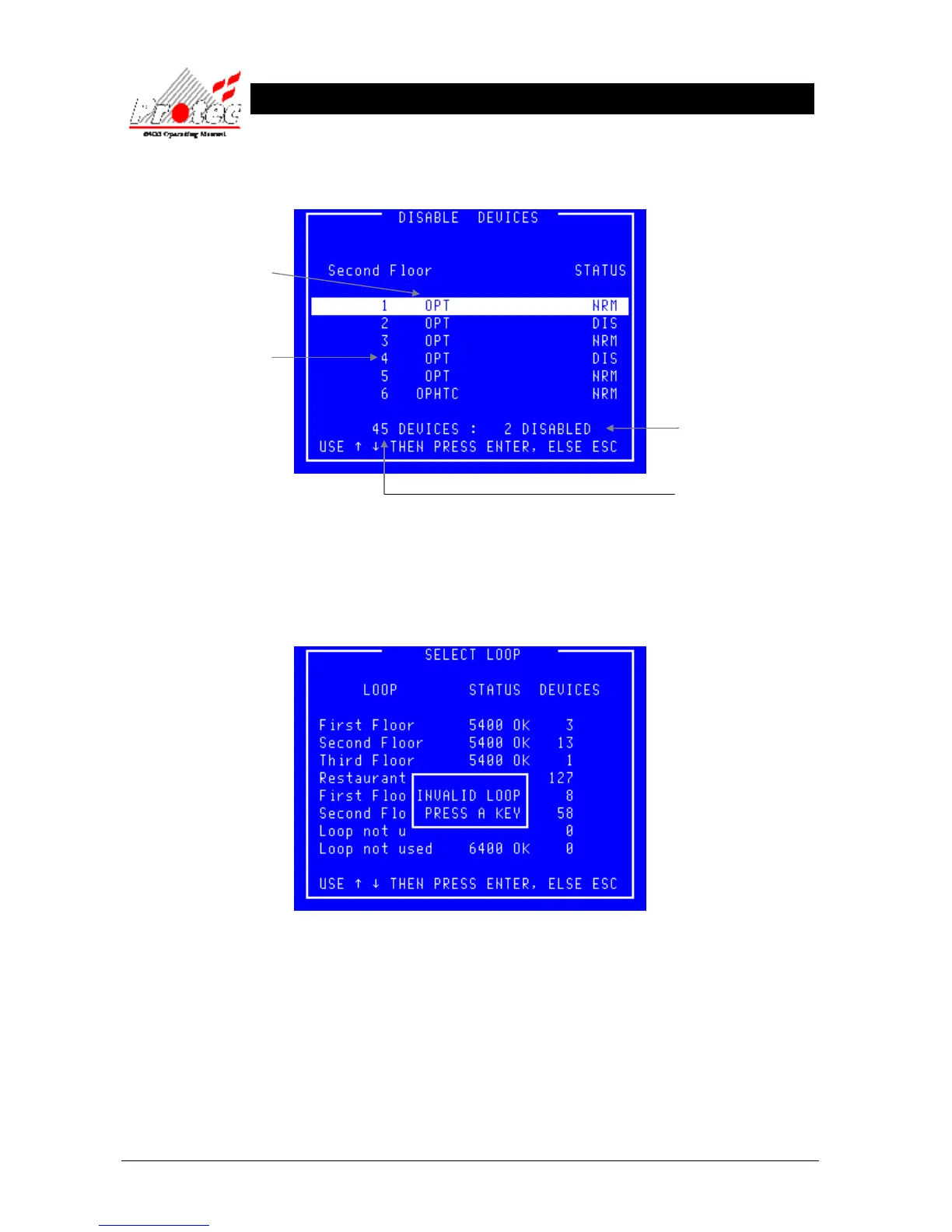
Once all the data has been received from the ‘Node’, the following ‘Disable devices’
Screen will be displayed :-
Selecting an invalid If an invalid loop is selected ie) No devices present on the loop, the LCD will
loop. display the following message :-
Press any key to return to the ‘Disable device’ screen , where a valid loop should be selected.
Device type
Status

NRM - Device is not disabled
DIS - Device has been
disabled individually
DSZ Device is disabled
because it is part of a disabled
zone
DSG - Device is disabled
because it is part of a disabled
group
It is possible for a device to be
disabled for multiple reasons.
The number of devices
disabled on this Loop.
Total number of devices
Logged onto the Loop
Either Location Text or
address numbers for each
device on the selected
loop. To display either
address Number or text
location data, this is
selected in the
‘Disablement menu’
Option Number ‘5
Change address /
location text’ (refer to
section 8.6)

Table of Contents

Related product manuals