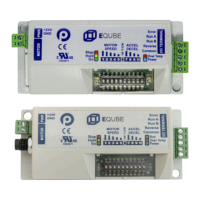
Need help?
Do you have a question about the Pulseroller ConveyLinx-Ai2 and is the answer not in the manual?
Explains symbols, important user information, and manual purpose.
Outlines the manual's objectives and identifies the target users.
Guides users to relevant sections based on their desired tasks.
Details the physical parts and their labels on the Ai2 module, including ports.
Covers mounting dimensions, connections, power, LEDs, and technical specs.
Defines linear conveyors, covers device connections, software installation, and network setup.
Details the auto-configuration process, expected results, and troubleshooting.
Explains Singulation Release and Flex Zone Recognition modes.
Details Sensor and Arrival Jams and their auto-clear procedures.
Covers automatic module replacement and resetting to factory defaults.
Introduces the main screen, node navigation, and identification features.
Covers ZPA settings, release modes, motor settings, and T-Zone configurations.
Configures look ahead, slowdown, jam timers, and induct settings.
Guides firmware updates and covers network management like discovery and backup.
Manages Flex Zone, sensors, extensions, and detailed Pin 2 usage scenarios.
Covers mounting, wiring, and electrical schematic of the IOX-2 module.
Details Wake Up, Lane Full, Product on Zone, and Pin 2 output configurations.
 General
| Power Supply | 24V DC |
|---|---|
| Operating Voltage | 24V DC |
| Input Voltage | 24V DC |
| Protection Rating | IP20 |
| Weight | 0.5 kg |
| Communication | Ethernet/IP, EtherCAT |
| Connectivity | Ethernet |
| Operating Temperature | -10°C to 50°C |

 To Next Page