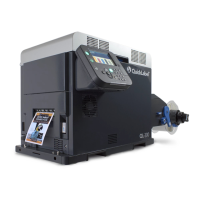
QLS-4100 Xe i
Table of Contents
Chapter 1: Quick Start ........................................................................... 1-1
QuickLabel media ...................................................................................................... 1-2
Quick Start Guide ...................................................................................................... 1-3
Chapter 2: Physical Setup ..................................................................... 2-1
Unpacking the Printer ............................................................................................... 2-2
Printer Orientation ..................................................................................................... 2-3
Features of the QLS-4100 Xe ..................................................................................... 2-4
Side view ................................................................................................................ 2-5
Rear Panel View .................................................................................................... 2-6
Installing the Media Unwind Mandrel ................................................................... 2-7
Power Connection ..................................................................................................... 2-8
Computer Connections ............................................................................................. 2-9
Centronics Parallel Port ........................................................................................ 2-9
RS-232 Serial Port ................................................................................................ 2-10
Ethernet Port and TCP/IP Communication ..................................................... 2-11
Print Servers ......................................................................................................... 2-12
Utility Port Connection ........................................................................................... 2-13
Compressed Air Connection .................................................................................. 2-14
Preparing the Air Regulator .............................................................................. 2-14
Connecting the Air Supply ................................................................................ 2-14
Chapter 3: Loading Media and Calibration ......................................... 3-1
Loading Thermal Transfer Ribbon .......................................................................... 3-2
Loading Label or Tag Media .................................................................................... 3-4
Adjusting the Media Sensor ..................................................................................... 3-7
Calibrating for Media Types .................................................................................... 3-8
Calibrating Gap Media ......................................................................................... 3-8
Calibrating Reflective Media ............................................................................. 3-11
Calibrating Continuous Media .......................................................................... 3-13
Calibrating Inverted Gap Media ....................................................................... 3-13
Chapter 4: Keypad Controls and Menus ............................................. 4-1
Keypad Layout and Functions ................................................................................. 4-2
Print/Pause ............................................................................................................. 4-3
Form Feed/Advance ............................................................................................. 4-3
Cancel ..................................................................................................................... 4-3
Menu Overview ......................................................................................................... 4-4
Ready State & Adjust Menu ..................................................................................... 4-9
Print Intensity ........................................................................................................ 4-9


 To Next Page