Page 105 of 254
5.15.1 Robo Settings
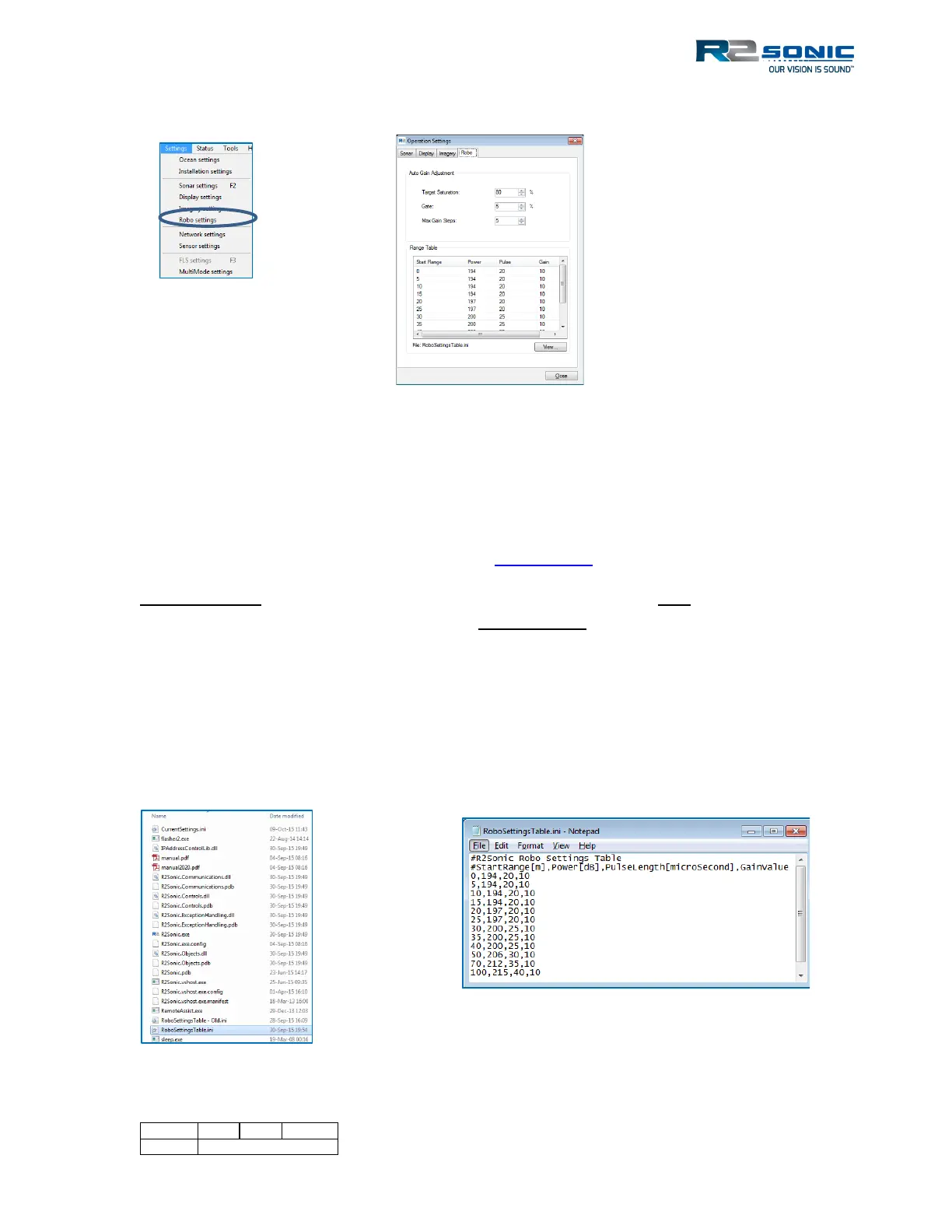
Figure 121: Robo Settings
5.15.1.1 Auto Gain Adjustment
The Robo feature uses the Range setting and the percentage of receiver saturation to determine
when to change the Power, Pulse Width and Gain.
The Range setting will determine the Power and Pulse Width. Receiver saturation percentage will
set the Gain. The Saturation Monitor is covered in Section 5.10.4
Target Saturation is the level of receiver saturation to be maintained. The Gate is the limit, about
the Target Saturation, before a change is made. Max Gain Steps determines how the gain should
increase or decrease.
5.15.1.2 Range Table
The current settings are shown in the Range Table; the values cannot be edited within this window.
Selecting View will link directly to the RoboSettingsTable.ini file location. The ini file can be opened
in Notepad or any text editor and modified to suit local survey conditions. The Range is in metres. If
the user is using US Survey Feet, Sonic Control will automatically use US Survey Feet for Range.
Figure 123: In Robo Settings, View link to the ini file
Figure 122: Robo Settings Table



 To Next Page