Page 106 of 254
Part No. 96000001
5.16 Main Operation Parameters
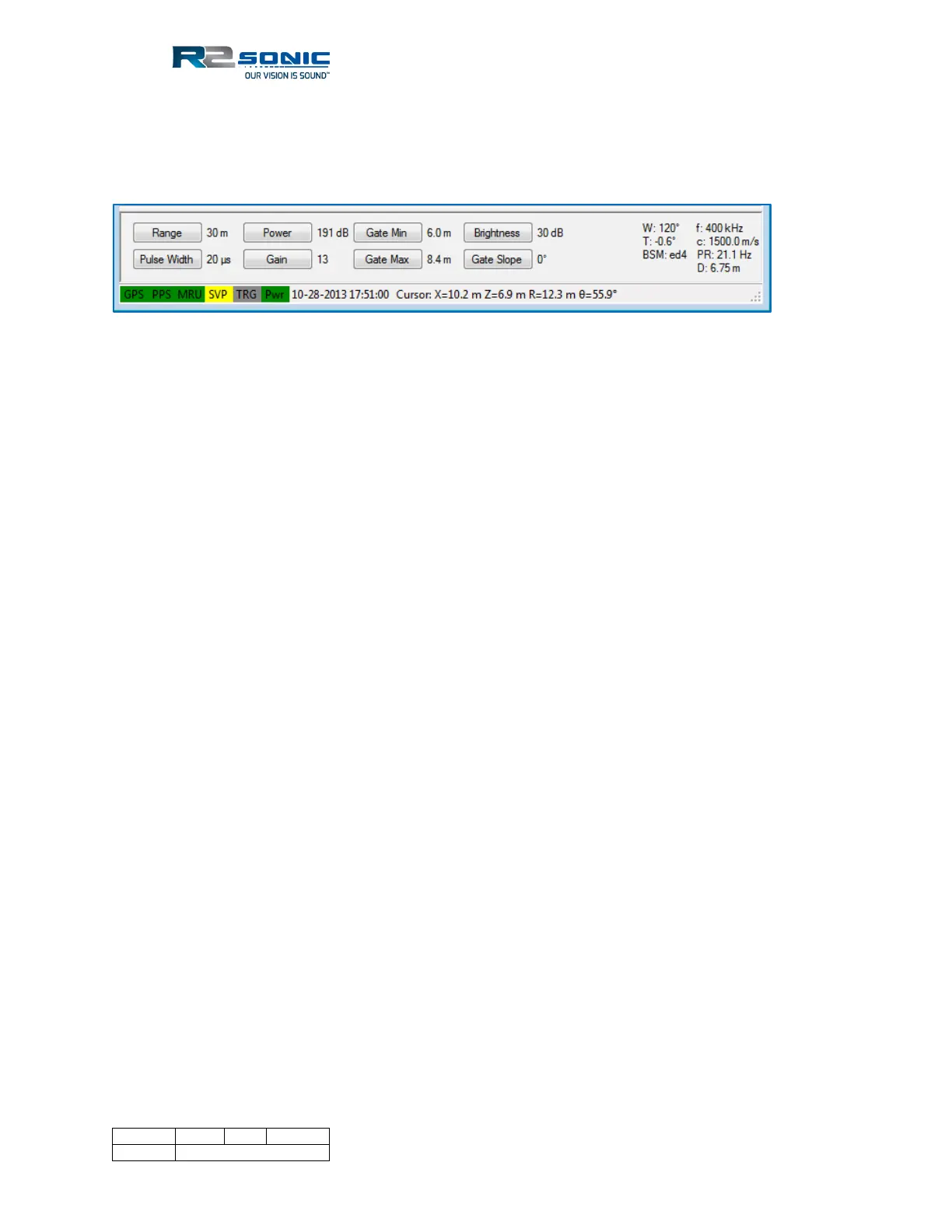
The main operating parameters of the Sonic MBES are controlled by the buttons in the lower
portion of the window.
Figure 124: Operating parameter buttons
To change a value, position the mouse cursor on the button then use the left mouse button to
decrease the value and the right mouse button to increase the value.
The right-hand side of the panel provides system information:
• W: Wedge sector (opening angle)
• T: Sector Tilt angle
• f: Operating frequency
• c: Sound velocity at the sonar head
• PR: Ping rate
• BSM: Bottom Sampling Mode
• D: Nadir depth
The lower left area displays the colour of the SIM communications LEDs, time, which is decoded
from the bathymetry packet and the current cursor position, relative to the sonar head. The angular
information is represented by theta Θ.
5.16.1 Range: 0 – 1200 metres
The Range setting sets the maximum slant range of the Sonic MBES. The maximum slant range
determines how fast the Sonic MBES can transmit; this is the Ping Rate. What the range setting is
doing is telling the MBES the length of time that the receivers should be ‘listening’ for the reflected
acoustic energy. If the Range setting is too short, some of the returning energy will be received
during the subsequent receive period, i.e. out of sync, and will be seen as noise.
It is easy for the operator to maintain the correct Range setting by noting the bottom detection dots
relationship to the straight legs of the wedge display.



 To Next Page