Page 63 of 254
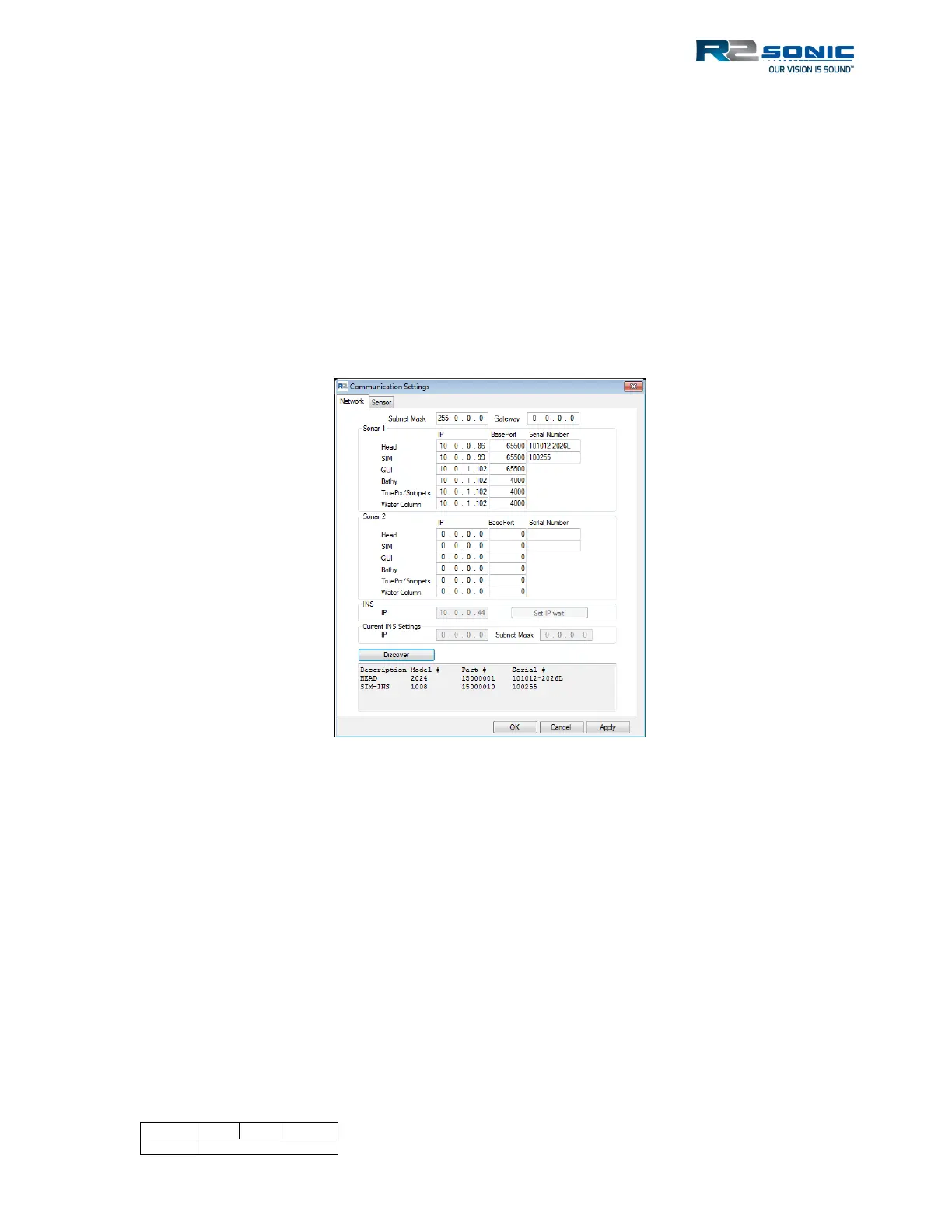
5.4.2.1 Default Network Configuration
Head IP: 10.0.0.86 BasePort: 65500
SIM: 10.0.0.99 BasePort: 65500
GUI: 10.0.1.102 BasePort: 65500
Bathy: 10.0.1.102 BasePort: 4000 (actual port 4000)
Snippets: 10.0.1.102 BasePort: 4000 (actual port 4006)
TruePix™: 10.0.1.102 BasePort: 4000 (actual port 4001)
Water Column: 10.0.1.102 BasePort: 4000 (actual port 4005)
INS: 10.0.0.44 No BasePort – Does not apply
Figure 49: Sonic Control Network setup
Until the correct serial numbers are entered, there will be no communication. Once the correct
serial numbers are entered, click Apply, and dots will be visible in the wedge display, signifying
communication is established. Using Discover will guarantee that the serial numbers will be entered
correctly and verify Ethernet communication between devices.
5.4.2.2 INS Addressing
When using the I2NS system, the INS default IP is 10.0.0.44. Initially, the INS will not be ready to
receive an IP address. The ‘Set IP’ becomes active when the INS is ready to accept an IP (after one to
two minutes). When the time period, to set the IP address, is over the button changes to ‘Set IP
Expired.’



 To Next Page