Page 110 of 254
Part No. 96000001
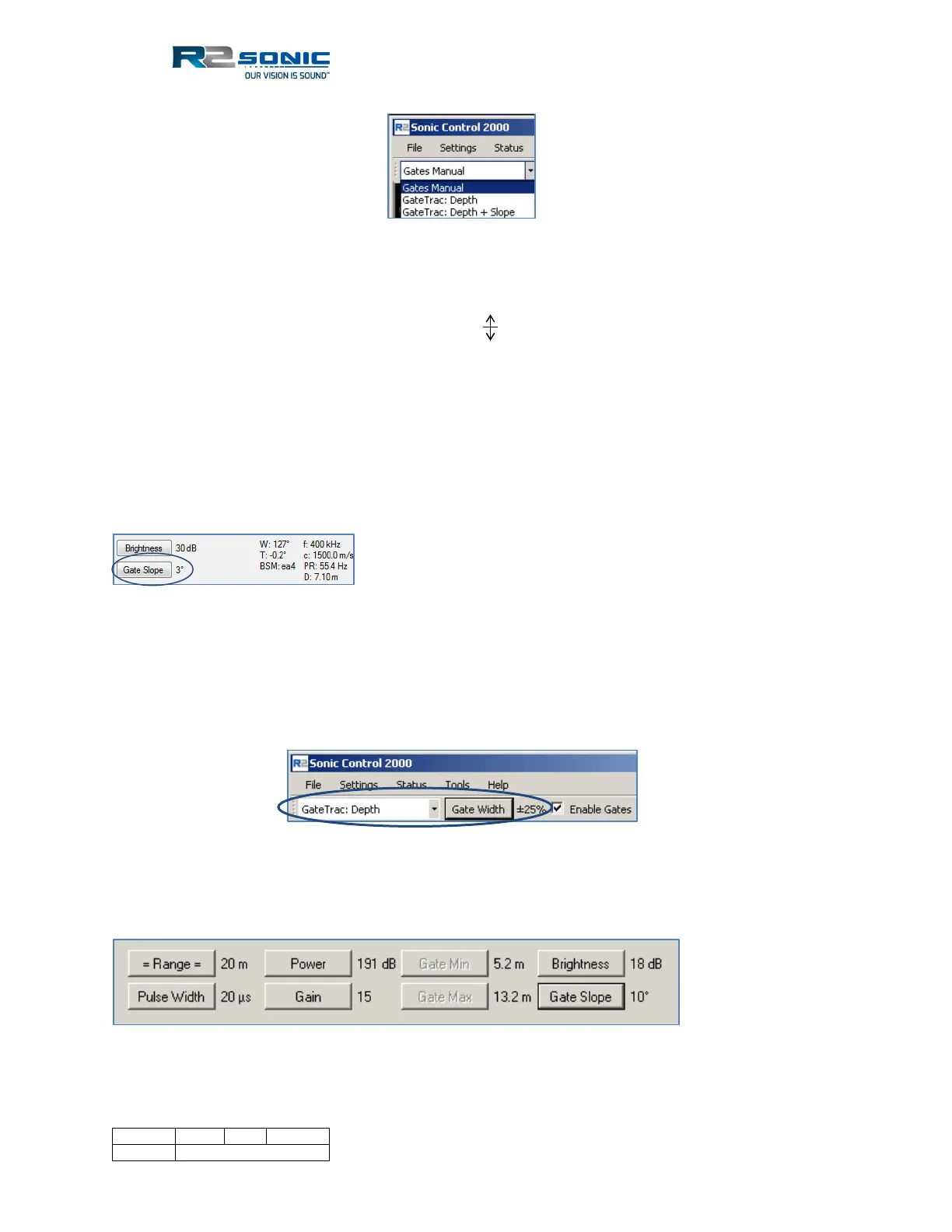
Figure 130: Manual and GateTrac selections
5.16.6.1 Gates Manual
The depth gates can also be changed using the mouse in the wedge display. Click and drag on either
depth gate; the cursor will change to a double arrow , drag the gate to the new depth and release
the mouse button. The depth gate position is visible in the lower left-hand section of the display.
When the mouse button is released, the gate will be updated in the Operation Parameters area.
To move both gates, simultaneously, use the right mouse button, and both gates will move, keeping
the same relationship.
In Manual mode, the gate slope can be adjusted by using the Gate Slope button in the Operation
area. The gates can be tilted up to ±90°.
Figure 131: Manually adjust the gate slope
5.16.6.2 GateTrac: Depth
GateTrac: Depth will automatically adjust the gates, for water depth, based on the tolerance that is
selected by the control next to the gate drop-down menu. The tolerance is a ± percentage of nadir
depth. Right-click will increase tolerance (up to ±90%); left-click reduces tolerance.
Figure 132: Gate width tolerance toggle
When GateTrac: Depth is enabled, the Gate Min and Gate Max buttons will be disabled, but the
Gate Slope button will still be active.
Figure 133: GateTrac enabled; Gate min and max control is disabled



 To Next Page