Instrument Functions
R&S
®
NRP2
160User Manual 1173.9157.02 ─ 03
4.7.6.1 Internal sensor selftest
►
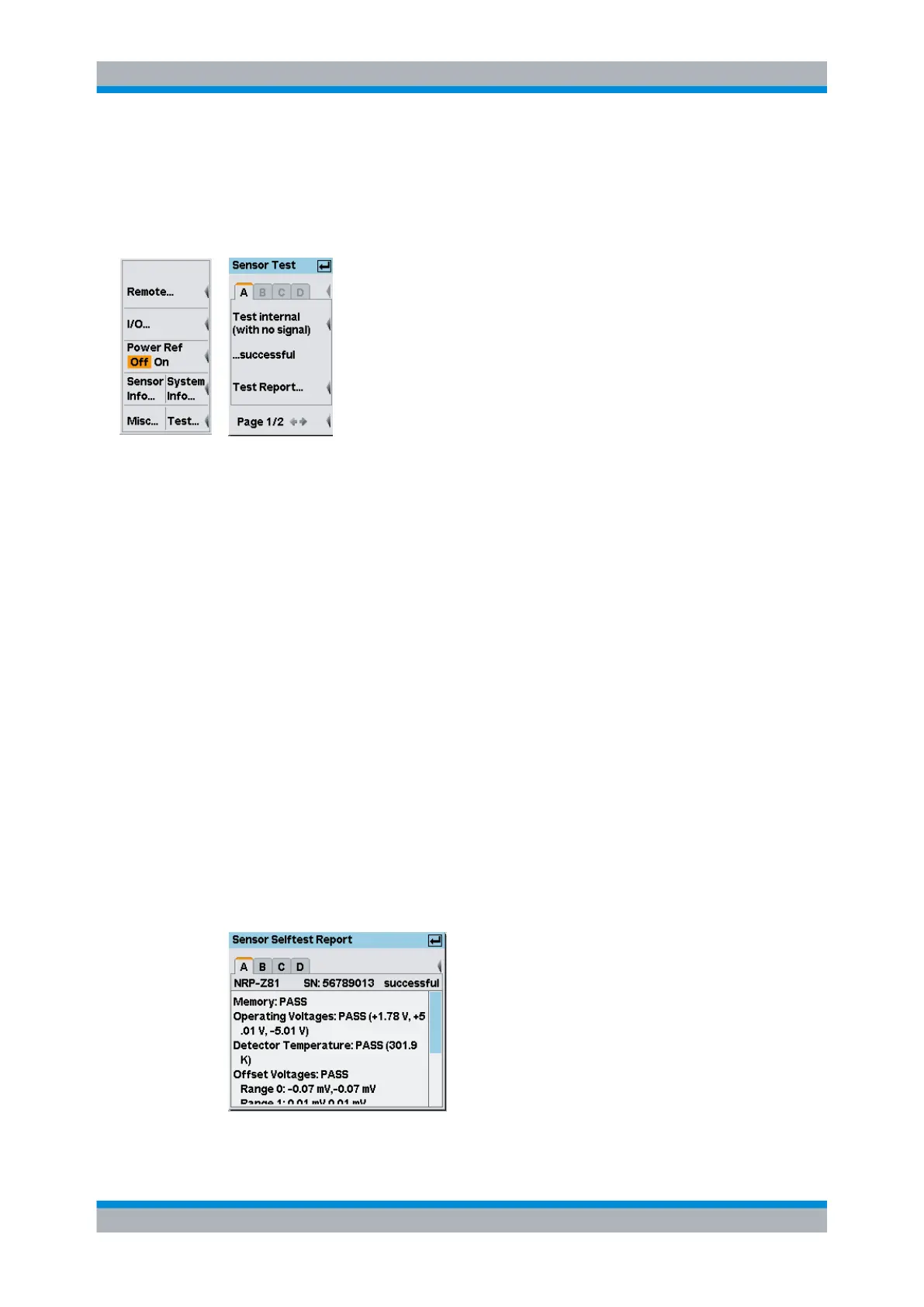
Open the "Sensortest" dialog box in the "System"→"Test..." menu.
Fig. 4-92: Sensortest dialog box / page 1
The first page of the "Sensortest" dialog box covers the settings for performing an internal
selftest of the sensor without using the reference signal.
A | B | C | D
Tabs for selecting the sensor.
Note: In remote-control commands, select the sensor with the suffix in command
SENSe<[1]..4>:..., i.e. choose suffix 1 for channel A, channel 2 for B, and so on.
Selftest internal (with no signal)
Starts a selftest of the sensor. A signal must not be applied.
The instrument indicates the corresponding states to internal self-test directly in the
menu:
●
"...not tested" (prior to testing)
●
"...running" (in progress)
●
"...successful" (outcome)
●
"...failed" (outcome)
Test Report…
Opens the "Sensor Selftest Report" window displaying the results of the internal selftest.
The status bar of the report window shows type and serial number of the tested sensor,
and the overall test result. The results of the individual tests are indicated below.
Fig. 4-93: Sensor Selftest Report dialog box
System settings


 To Next Page