Technical Bulletin PAGE: 9/11
Reissued:27-Mar-14
Model: Finisher SR4090/Booklet Finisher SR4100
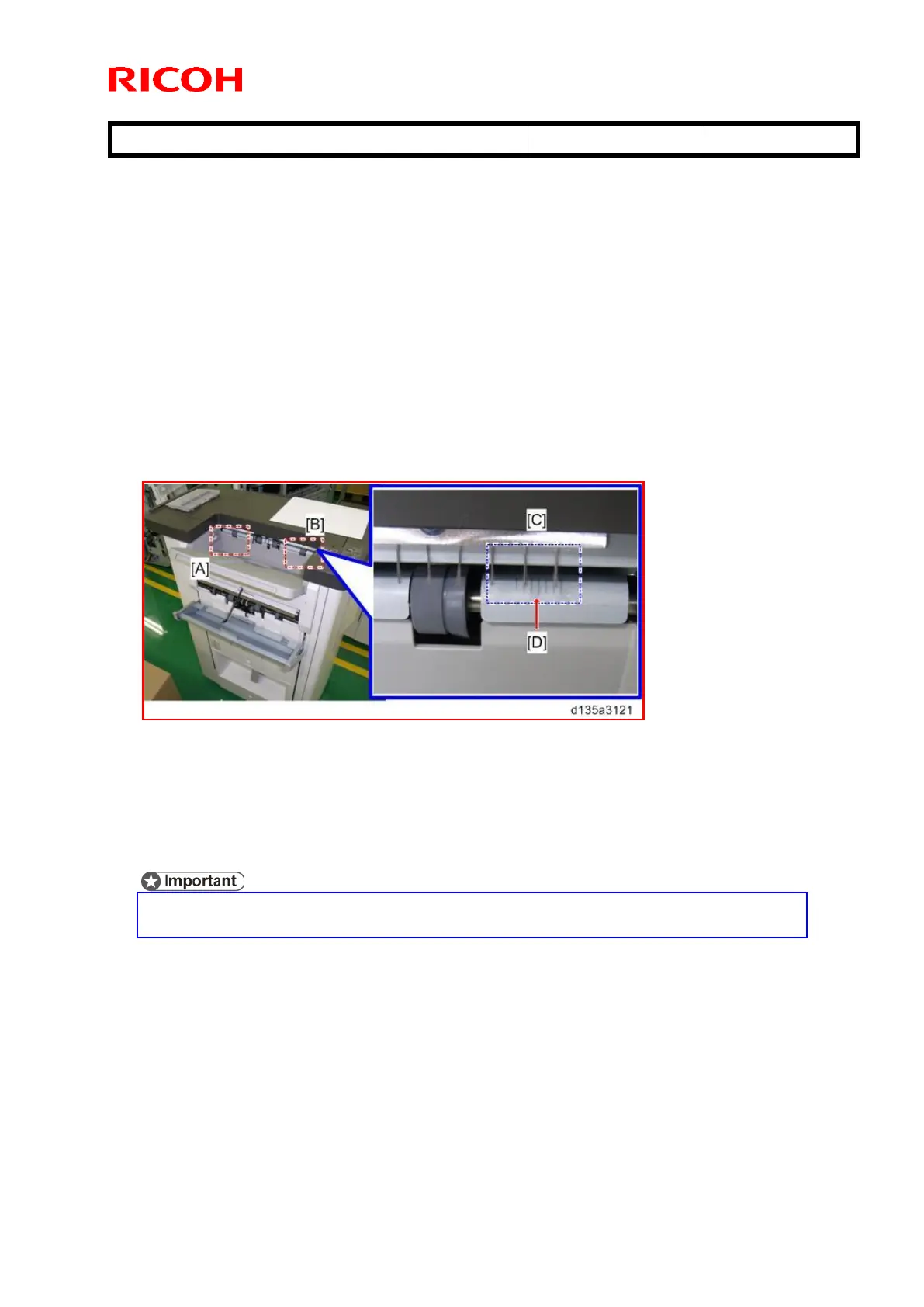
22. Print out five A3 or DLT sheets to the proof tray and check the side-to-side registration
as follows:
A3 sheets: Use the scale marks on the FRONT exit roller [B].
If the paper edge lines up with the center marking [D], the paper is aligned
correctly.
If the paper edge is aligned with marks to the right of center, the paper is shifted
toward the front (operator) side.
If the paper edge is aligned with marks to the left of center, the paper is shifted
toward the rear (non-operator) side.
DLT sheets: Use the scale marks on the REAR exit roller [A].
Check the side-to-side registration in the same way, using the rear rollers.
23. If side-to-side registration is shifted, see RTB #RD703009 and correct the shift.
[A]: Scale marks for DLT
[B]: Scale marks for A3
[C]: 7 scale marks at 2mm intervals
[D]: Center mark
24. Print out some sheets with center-folding and make sure that the folding line is not
misaligned or shifted.
If the folding line is misaligned or shifted, see RTB #xxxxxx and correct the
misalignment or shift.



 To Next Page