50
Creating a Patch
3
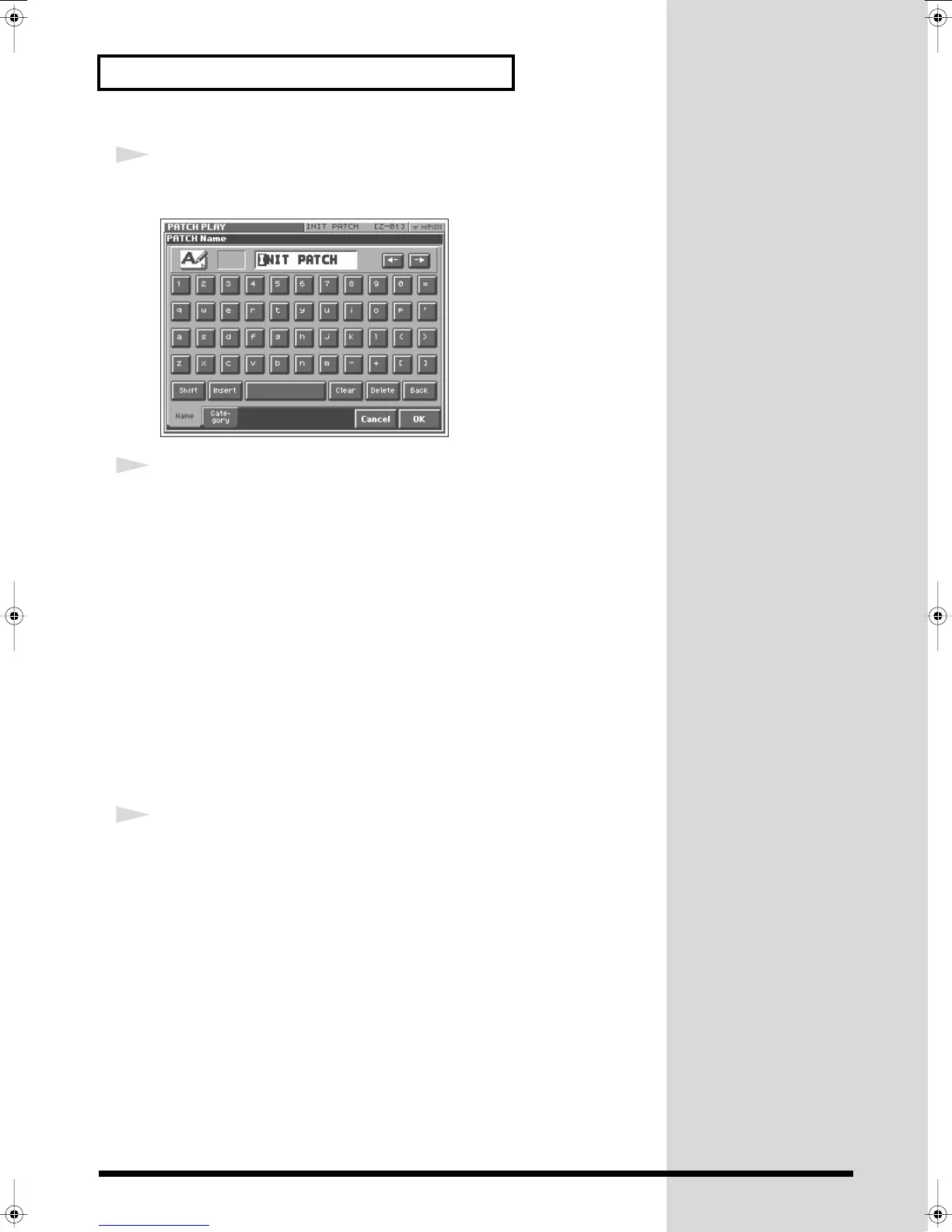
Touch <PATCH Name> in the pulldown menu.
The PATCH Name window appears.
fig.Q-38_60
4
Enter a name into the text box by touching the desired characters. For
this example, let’s enter “My Patch1” as the currently selected patch’s
name.
4-1.
Touch <Clear> to erase all characters from the text box.
4-2.
Touch <Shift> to turn it on, and then touch <M> to enter a capital
“M.”
4-3.
Touch <Shift> to turn it off, and then touch <y> to enter a lower-
case “y.”
4-4.
Touch <
→
> to move the cursor one character to the right.
4-5.
Touch <Shift> to turn it on, and then touch <P> to enter “P.”
4-6.
Touch <Shift> to turn it off, and then successively touch
<a><t><c><h><1>.
5
When you’ve finished entering the name, touch <OK> to close the
PATCH Name window.
Reference_e.book 50 ページ 2005年3月10日 木曜日 午後5時6分



 To Next Page