56 •
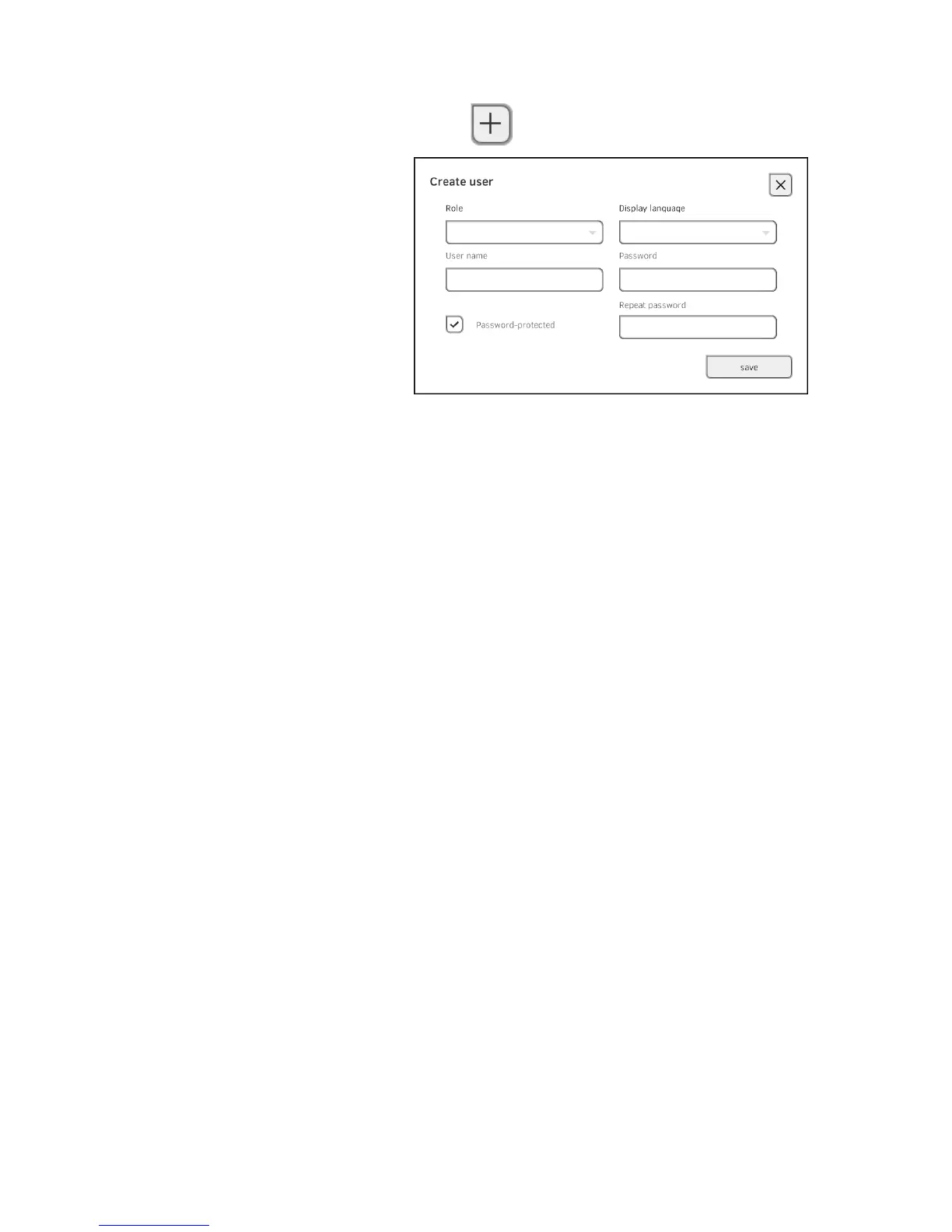
2. Press the button.
3. Enter the requested user data by pressing the relevant input field.
► Specify role
► Select display language
► Assign user name
4. Enter a password.
5. Repeat the password.
6. Let the user know his or her password.
7. Ensure that the
Password-protected field is activated (default).
8. Press the save button.
The user account is set up.
The user account can be synchronized with the
seca 115 PC software ➔
Synchronization and backup.
NOTE:
• To protect patient data, we recommend always assigning a pass-
word to user accounts. User accounts without password protection
should only be set up for special applications (e.g. configuring inter-
faces to practice or hospital information systems). seca service
would be pleased to help you if you have any questions relating to
"interface configuration".
• Specification of the role
Assistant or Physician is relevant for use of
the user account in the
seca 115 PC software. Details on this can be
found in the Administrator Manual for the PC software.



 To Next Page