Step Sync, continued…
Back in playlist edit, and with pattern 1 only playing for 6 steps, your playlist should sound a little
different now.
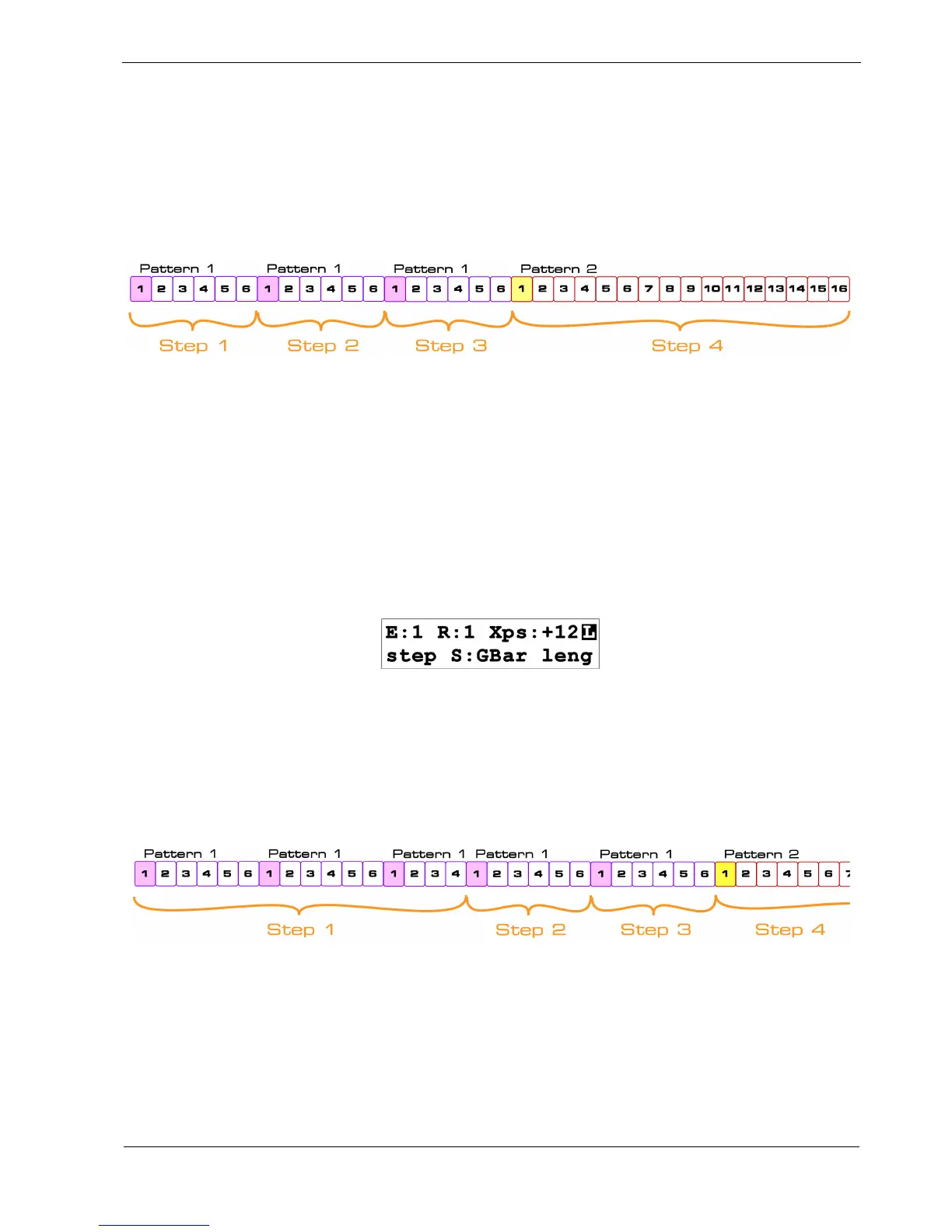
This diagram should help visualise what’s going on:
Pattern 1 plays for 6 steps on each of playlist steps 1, 2 and 3.
Pattern 2 plays for its full 16 steps length on playlist step 4.
This is what happens if the default setting of sync – pattern, is used on every playlist step.
Now select playlist step 1 in edit view .
The sync value is shown above soft-key F2, and this key is used to toggle the value.
Press F2 now, and the display should change to this:
The sync value on step 1 is now set to GBar , for global bar.
This means that playlist step 1 will play for the full length of one global bar, regardless of the length
of the pattern.
The result is this:
Playlist step 1 will play pattern 1 twice for its full length of 6 steps, then again for its first 4 steps,
before the playlist moves on to step 2.
The total number of steps that pattern 1 plays for is 16 steps – the global bar length .
As you can see, playlist steps 2 and 3, which still have a sync value of Ptrn, play as before for the 6
step length of pattern 1.



 To Next Page