GB SGM Technology for lighting
User’s Manual 1.00 Pi
lot 3000
- 36 -
The “Fixture configuration” panel allows modifying the default Palette type configuration which
relates an Attribute to a Family.
This might be useful when the operator requires a more comfortable configuration of the Attributes
during the programming ad playback procedure.
The connection Attribute – Family, is also affecting the “Palette” creation activity. For this reason an
Attributes configuration different than default, may result into a more friendly use of the Pilot 3000
for the operator.
A more detailed explanation about the importance of the Attributes when creating new palettes can
be found into the chapter “PALETTE”.
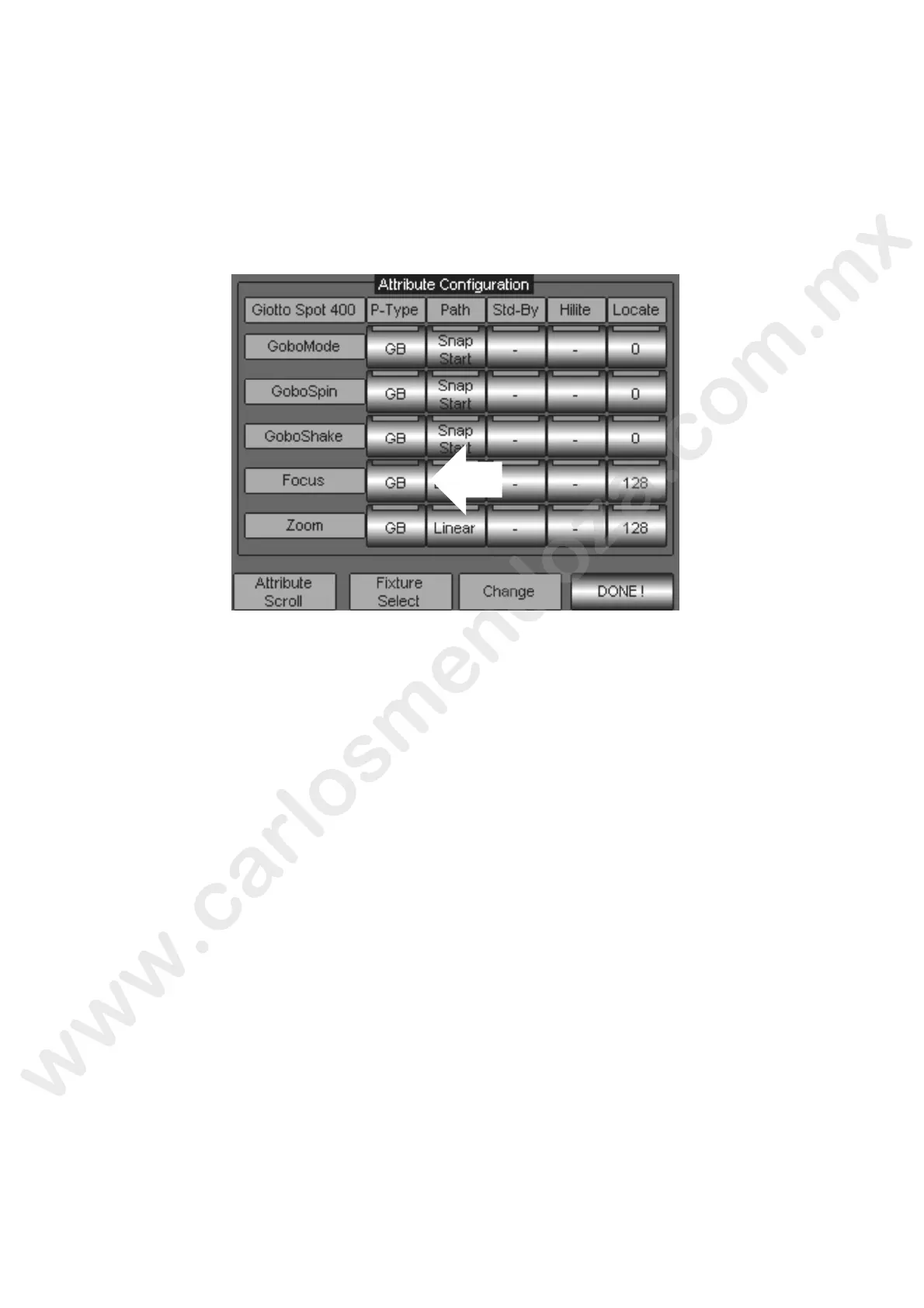
To modify the connection between an Attribute and i s Family, proceed as follows:
Scroll the Attributes by means of the Encode wheel “Attribute Scroll” until visualizing the
Attribute to be modified (in the example of the “Focus” figure).
Push the touch key of the Palette type ( n th picture indicated by the arrow) from the “P-Type”
column.
Scroll through the 6 available op ions by using the Encoder Wheel “Change” until the required
one has been found (for example PT) The options available will be showed on the touch key.
Push DONE! to confirm
Wait to the end of the updating procedure showed by the progress bar.



 To Next Page