GB SGM Technology for lighting
User’s Manual 1.00 Pi
lot 3000
- 44 -
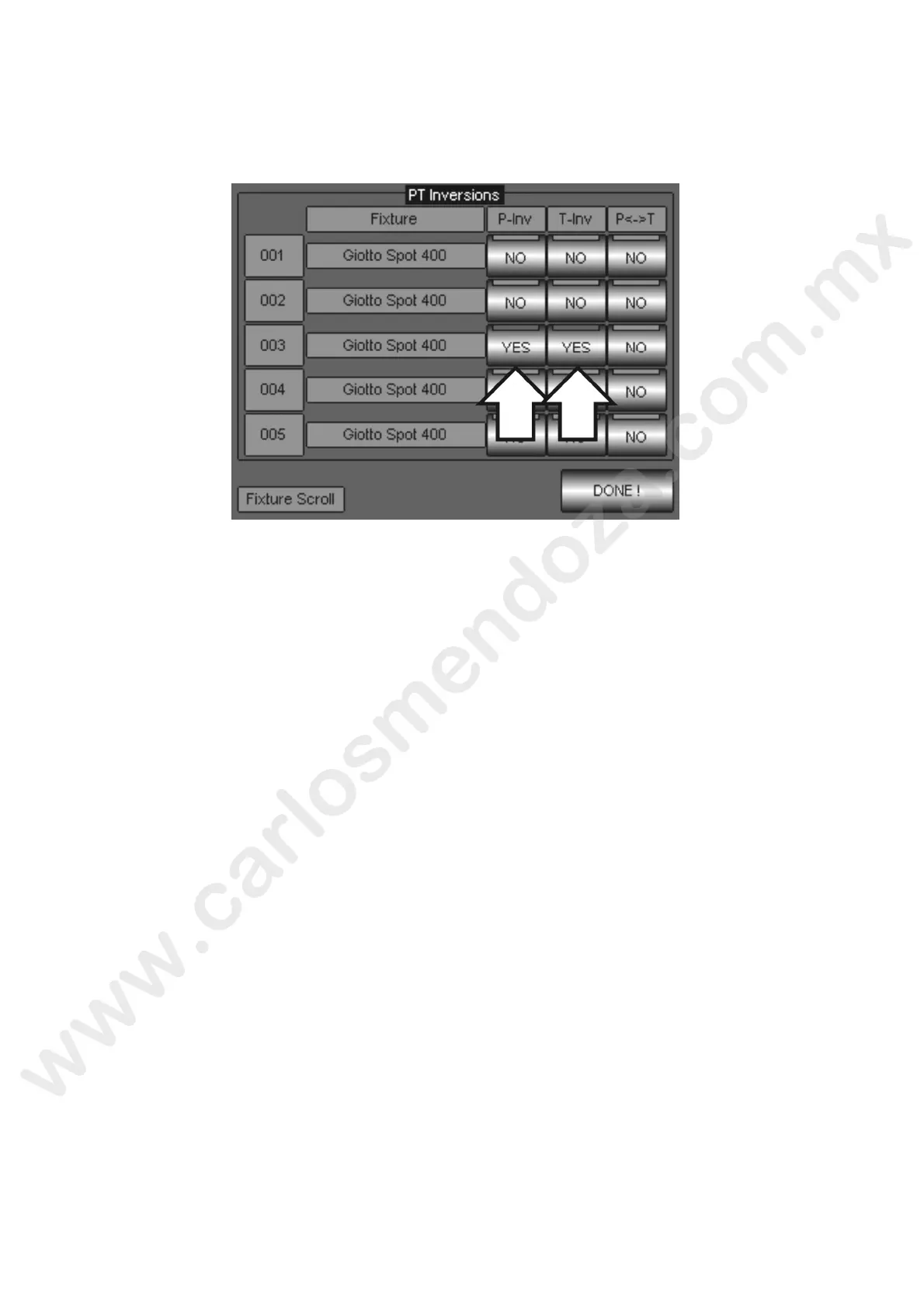
PAN TILT OPTIONS
By this menu it is possible to choose the Pan and Tilt movement reverse of projectors already configured.
To apply a reverse click on the “P-Inv”, T-Inv”, “P<>T” colum s keys, in correspondence of the fixtures
desired. The Fixtures can be scrolled through the First Whee “Fixture Scroll”. The two statuses that each
key can take up are “YES” (reverse applied) or “NO” (not n erted)
The P-Inv columns allows the Pan movement reverse
The third column P<>T or “Swap” allows the re lacement of the Pan with the Tilt and vice versa. This
means that, where it is applied, the DMX infor ation assigned to the Pan channel will accomplished by the
Tilt channel and vice versa. It is possible to pply the Pan and Tilt reverse also by Swap active.
The possible combinations are 8 in total:
1. N
o invert
2. Invert Pan
3. Invert Tilt
4. Invert Pan + inver Tilt
5. Swap P/T
6. Swap P/T + inve t Pan
7. Swap P/T + invert Tilt
8. Sw p P/T + invert Pan + invert Tilt



 To Next Page