4-4
056404-443 Operator Manual Operating Instructions
4.7 Connecting Table to AC Power
Required line power for surgical table is 100-240 Vac, single-phase, 50/60 Hz, 4.0 Amp.
Each table is shipped from the factory configured to the electrical requirement specified on the factory order. If
this electrical configuration needs to be changed in the field, consult STERIS for the needed procedure and
required materials.
NOTE: Before connecting the table to your ac power system, ensure table is marked for your power system
(100, 120, 220 or 230/240 Vac).
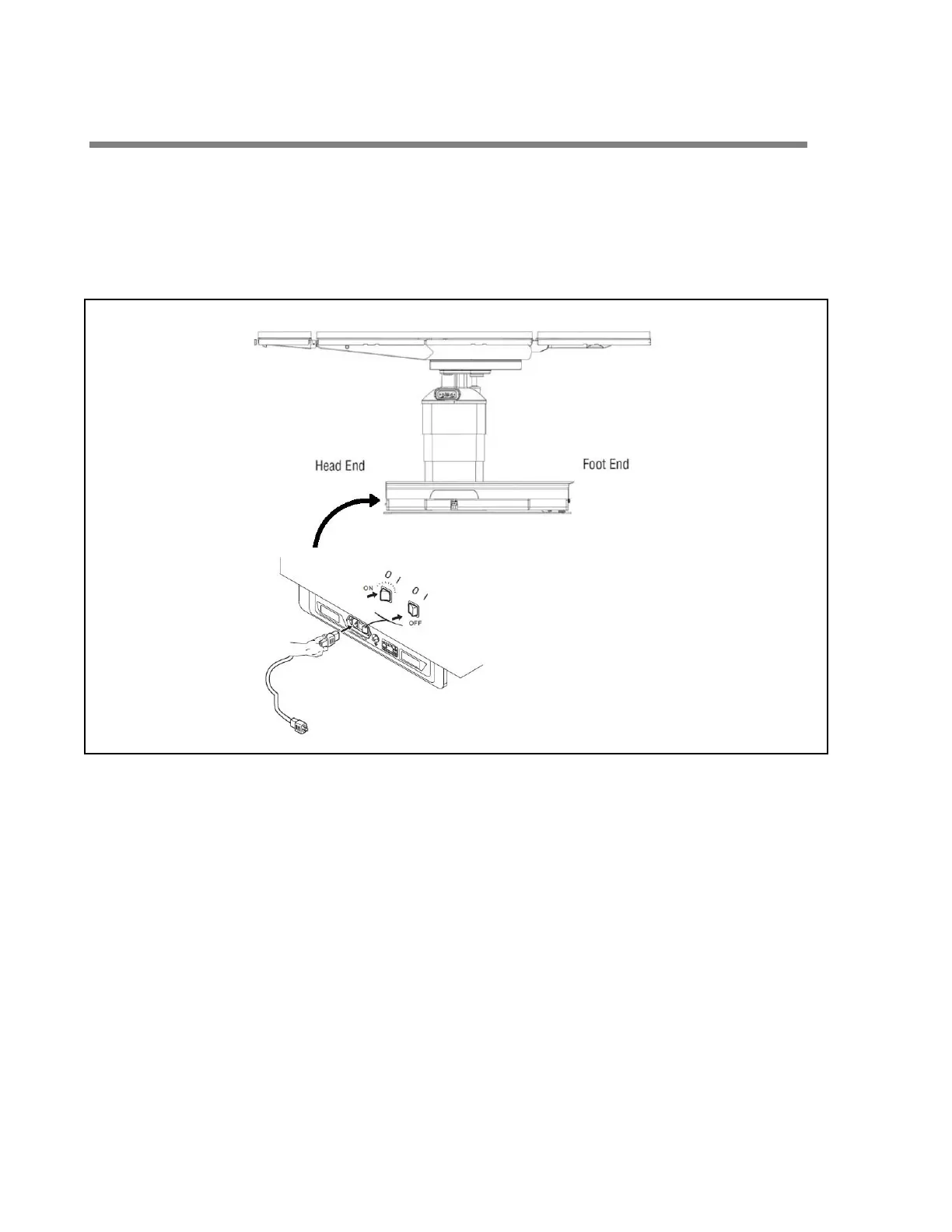
Figure 4-3. Connecting Table to Facility Power (Typical)
1. Route power cord to prevent tripping hazard.
2. Plug power cord into appropriate socket on table base (see Figure 4-3).
3. Plug power cord into appropriate facility outlet.
NOTE: When integrity of external protective earth conductor arrangement is in doubt, use battery power only.
4. Turn Main Power Switch to ON.
Switch turns Green and plug symbol on INTELLIPOWER
®
LED Display lights.
NOTE: A green Main Power Switch indicates facility power is available to the STERIS 4095 General Surgical
Table. A lighted plug symbol on the LED Display indicates the batteries are charging. Refer to S
ECTION 6.6,
B
ATTERY CHARGING.














 To Next Page