4-8
056404-443 Operator Manual Operating Instructions
4.10 Installing/Removing Dual-Articulating Head Rest
NOTE: For instructions on adjusting the head rest, refer to SECTION 5, OPERATING THE SURGICAL TABLE and to
Figure 5-1.
4.10.1 Installing the Head Rest
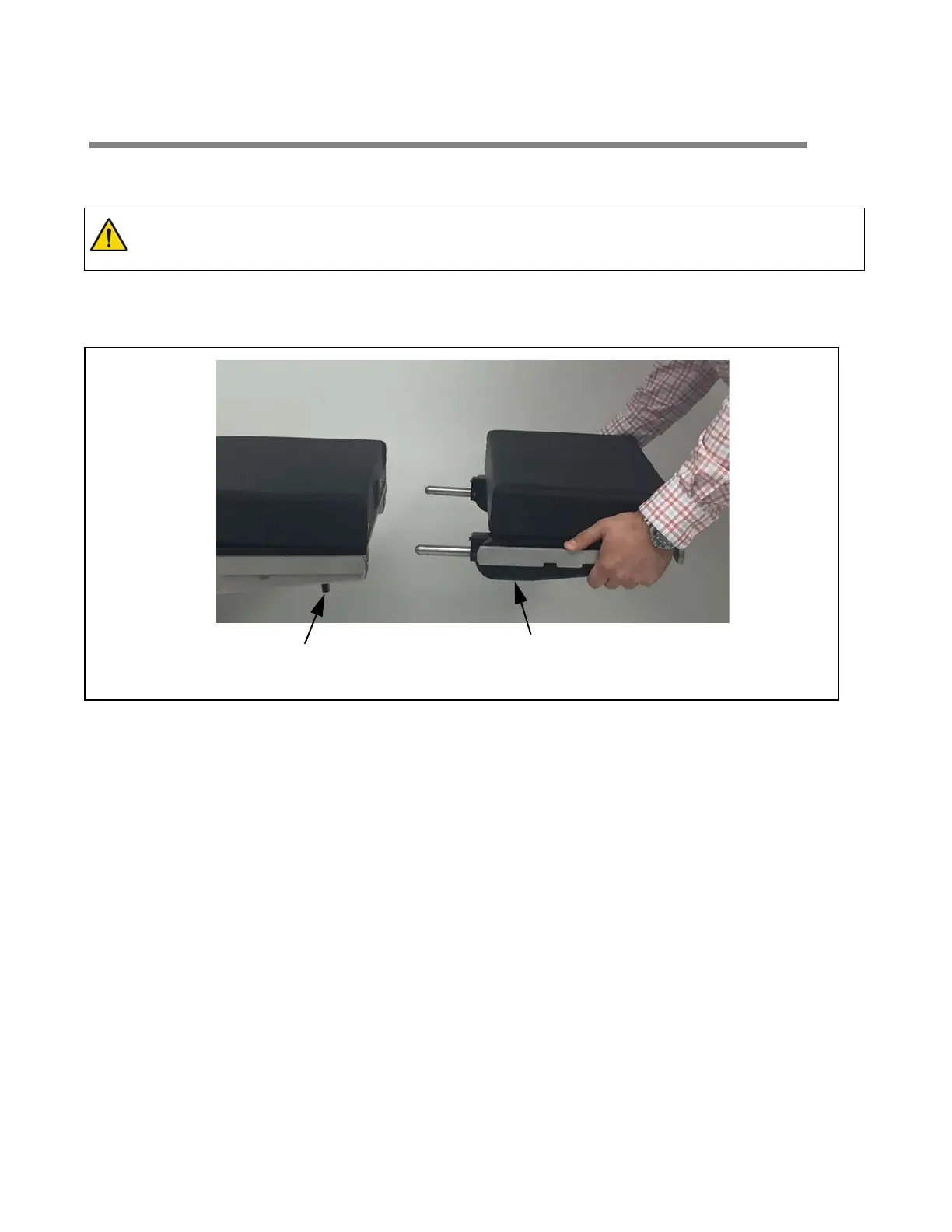
1. Fully loosen both locking thumbscrews located at bottom edge of back frame (see Figure 4-8).
Figure 4-8. Installing the Head Rest
2. Insert both head rest installation rods into back frame until fully engaged.
NOTE: The head rest should slide easily into back frame. Do not force.
3. Fully tighten both locking thumbscrews to lock head rest in place.
4. Pull head rest (both sides) to ensure correct installation.
4.10.2 Removing the Head Rest
1. Fully loosen both locking thumbscrews located at bottom edge of back frame (see Figure 4-8)
2. Pull head rest free of table.
WARNING – PERSONAL INJURY HAZARD:
Dual-articulating headrest side rails support 100 ft-lbs. (135 N•m) maximum. The headrest end rail
supports 50 ft-lbs. (67 N•m) maximum. Exceeding these limits could result in injury.
Thumbscrew Dual-Articulating Head Rest
(1 of 2)














 To Next Page