6 — Operation
39
10085896_H
V-PRO
®
maX 2
Operator Manual
(Power-Up Screen)
*
(Press
A
Touch
Pad)
(Touch Screen)
NOTE: For Control Display touch panel screen touch
pad definitions, refer to SYMBOLS.
Status Screen
Touch Pad
NOTE: For OPERATING screen displayed times and
pressures, note the following:
1) Projected cycle completion time shown on display
is estimated. Control automatically evaluates cycle
progress and corrects estimated time at beginning
of each phase.
2) Current time and pressure (as well as temperature
and phase) are displayed and printed (extended
printout) at each transition point (refer to
EXTENDED CYCLE PRINTOUT EVALUATION).
See CONTROL OPTIONS
(Or)
(Or)
(Press
YES Touch Pad)
(Or)
*
*
*
*
*
(Double Door Screens Shown)
OR
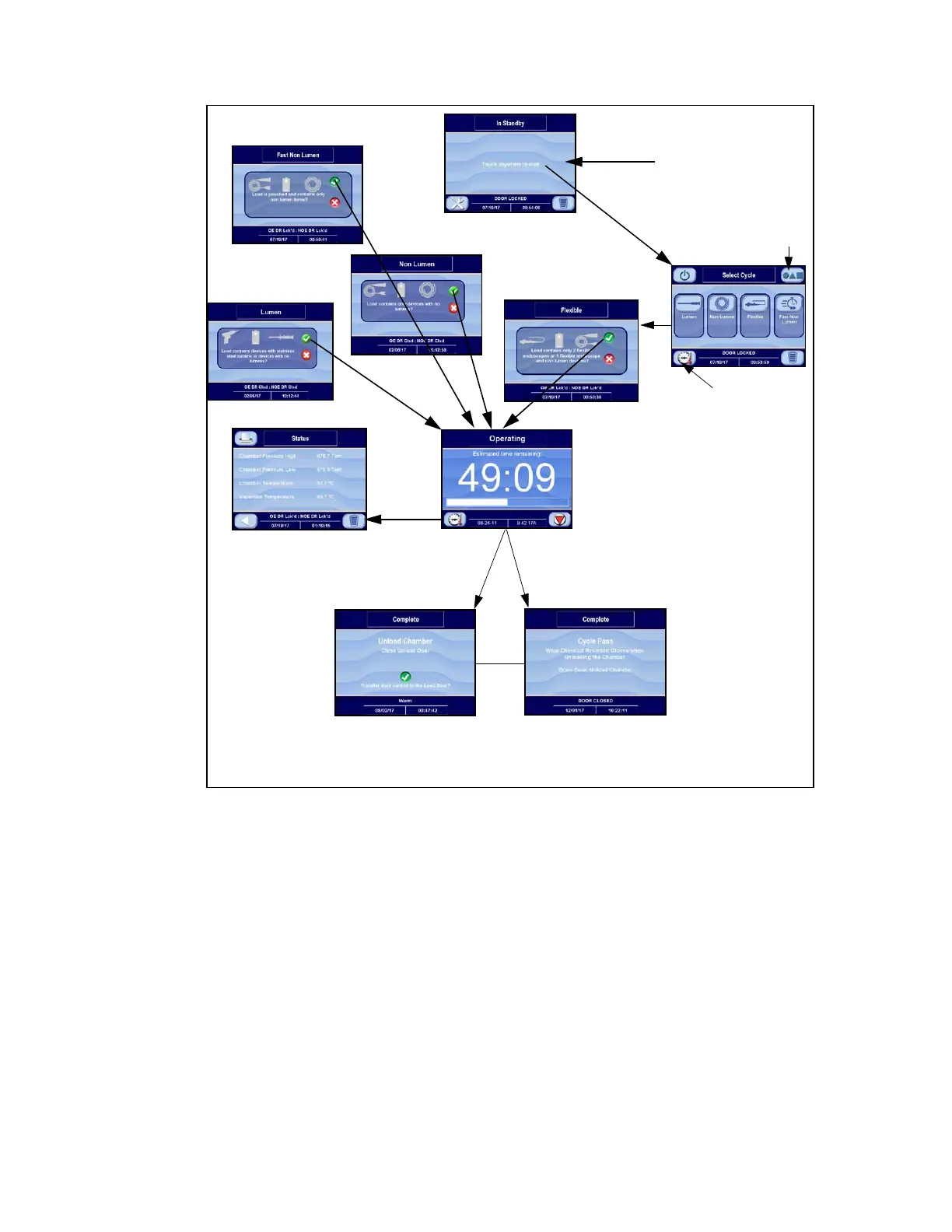
Figure 6-3. Cycle Operation Flow (Typical)
b. Press Options touch pad and OPTIONS screen displays (see Figure 6-5). See Control Options, for more
information.
c. Press Status touch pad and STATUS (Out-of-Cycle) screen displays (see Figure 6-6). Press Back Arrow
(white, located at lower left) touch pad to return to CYCLE screen.
d. Start VHP Sterilization Cycle as follows:
i. Press Lumen Cycle, Non Lumen Cycle, Fast Non Lumen, or Flexible touch pad. Remember to choose
appropriate Cycle (see Figure 6-3).
• (North America) Lumen Cycle: Used to process loads with lumened devices. Non-lumened
instruments or instruments with mated surfaces (such as hinged portion of forceps and
scissors) may be processed in this cycle.
• (Outside North America) Lumen Cycle: Used to process loads with lumened devices. Non-lumened
instruments may be processed in this cycle.












 To Next Page