136 EN/01.2019/G22 © STULZ GmbH – all rights reserved
ec tower technical manual
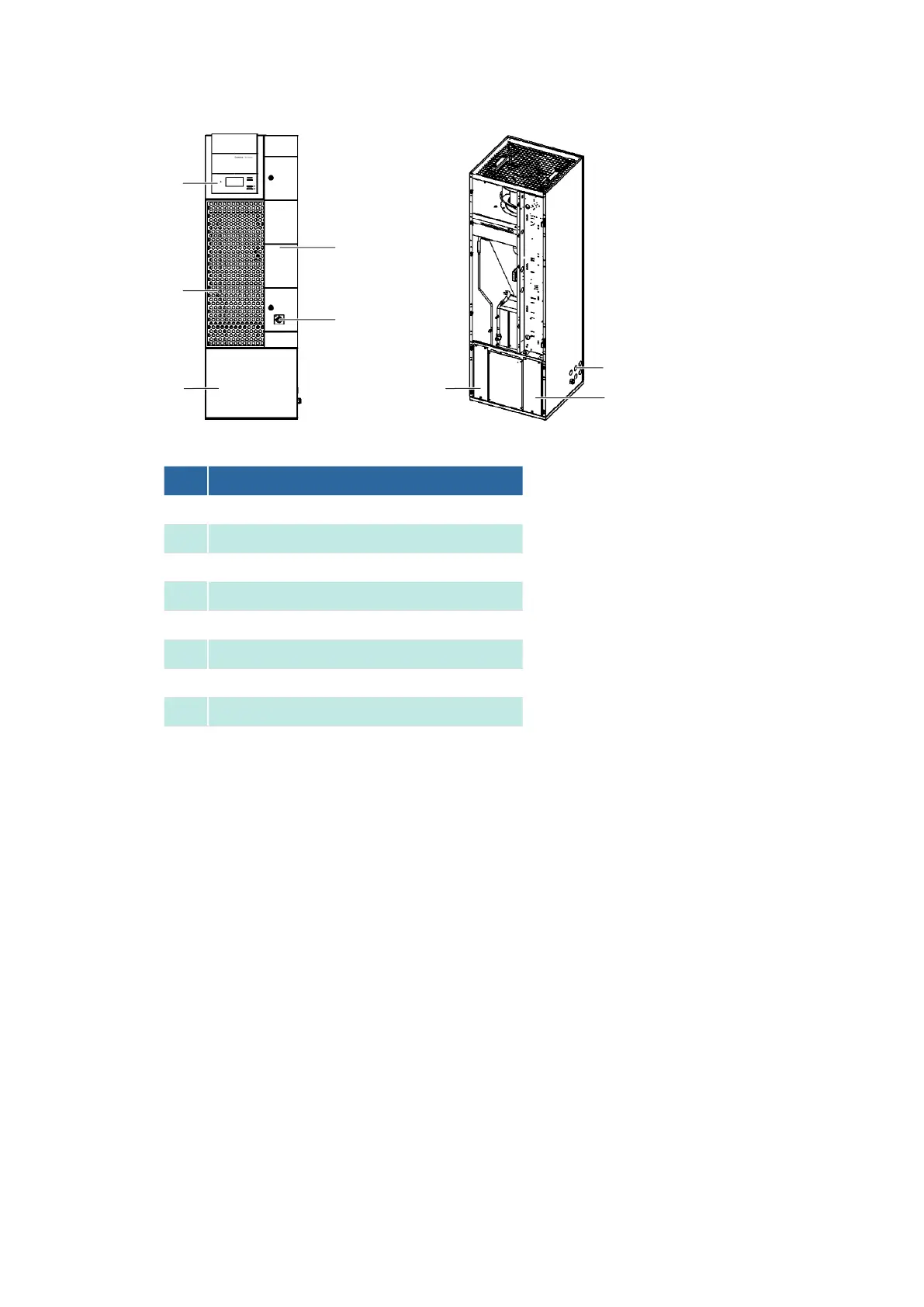
Removing components from the EC Tower
No. Description
1
2
Door of junction box 1
3
4
Lower front panel
5
Central front panel
6
Holes for connections
7
Right cover panel
8
Left cover panel
Procedure
1.
2. Switch off the unit via the master switch.
3.
4. Switch off the circuit-breaker (F20) by turning it to setting 0.
5. Secure the air conditioning unit so it cannot inadvertently be switched back on.
6.
7. Wait until the fan has come to a complete stop.
8.
9. Pull the plastic hoses out of the central front panel.
Removing the central and lower front panels
10. Remove the central front panel.
11. Remove the lower front panel.
12. Remove the ball studs from the central front panel.
13. Install the ball studs in the front door.
14. Remove the right-hand cover panel.
15. Remove the left-hand cover panel.
8
7
6
1
5
4
2
3



 To Next Page