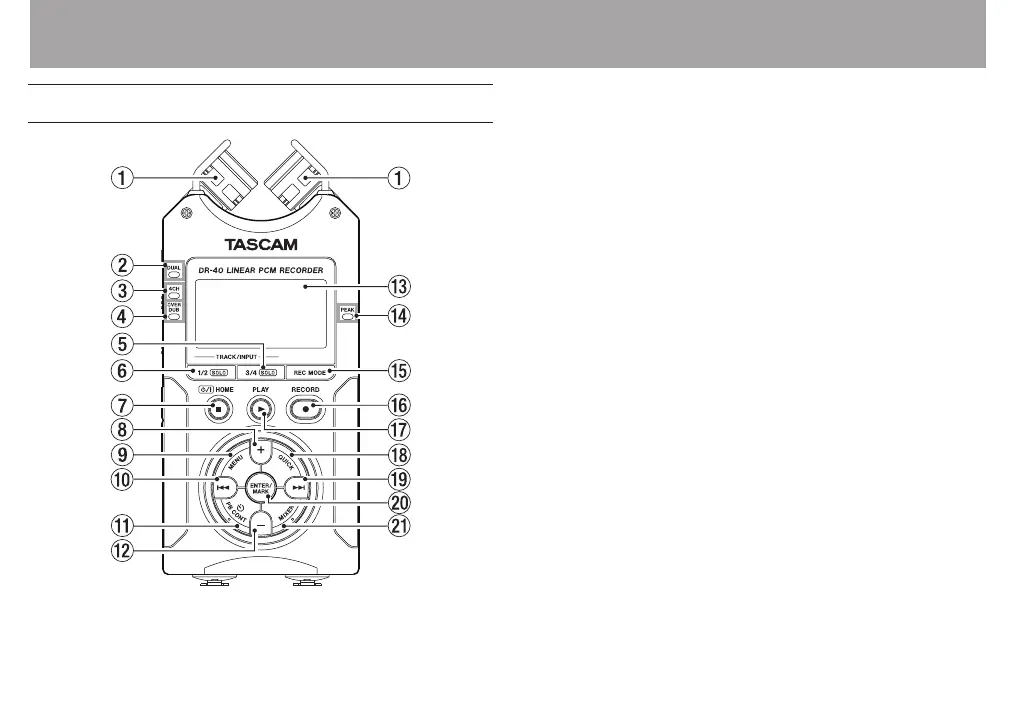
2 – Names and Functions of Parts
Top panel
1 Built-in stereo microphone
Cardioid stereo electret condenser microphone. You can
set the microphone angles to open (A-B), or close (X-Y).
2 DUAL indicator
This lights orange when recording in dual recording mode.
3 4CH indicator
This lights orange when recording in 4-channel recording
mode.
4 OVER DUB indicator
This lights orange when recording in overdubbing mode.
5 3/4 [SOLO] button
When in 4-channel recording mode, press this to open
a display pull-up that shows meters with the input level
settings for 3/4.
Press when the 1/2 input level meter pull-up is displayed
to switch to the 3/4 input level meter pull-up.
Press and hold when recording or playing back in DUAL
or 4CH mode to use the solo function, which switches the
monitored sound to sources other than channels 1 and 2.
Press and hold to solo channels 3 and 4.
6 1/2 [SOLO] button
Press this to open a display pull-up that shows meters with
the input level settings for 1/2.



 To Next Page