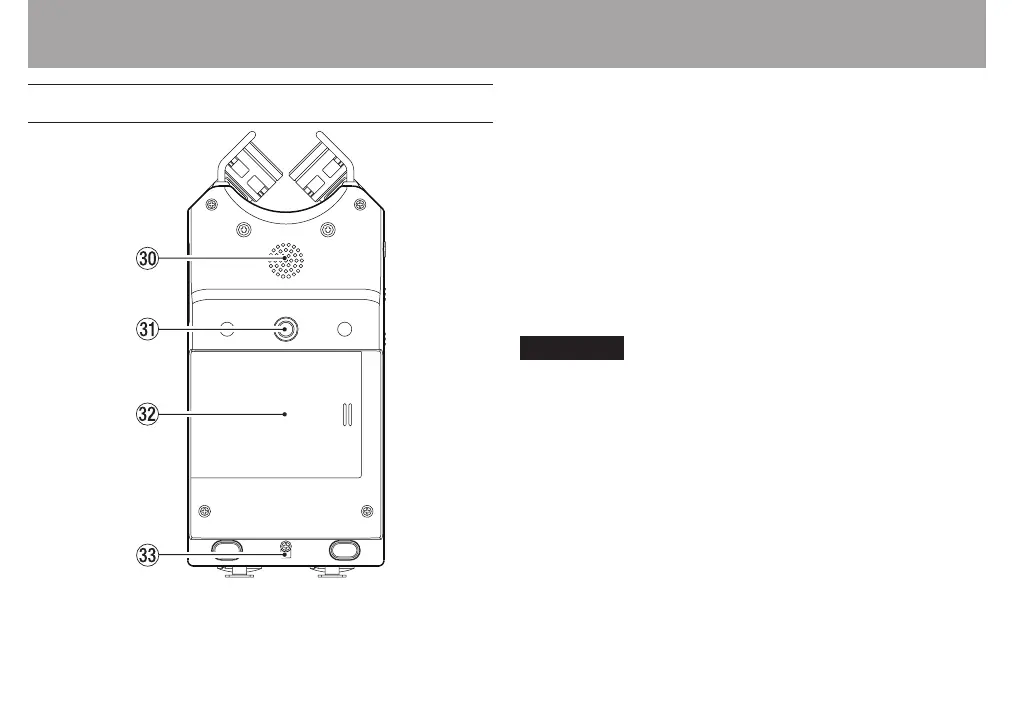
Bottom Panel
; Mono speaker
Use this built-in speaker to listen to recordings.
The speaker will not produce sound in the following
situations.
When in recording standby
•
When headphones are connected
•
When recording
•
When the speaker output setting is o
•
When in overdubbing mode
•
z Mounting thread for tripod or tilt foot (1/4-inch)
Use this to attach a tripod or the included tilt foot to the
recorder.
CAUTION
Tighten the unit securely to the tripod or microphone stand
•
to prevent it from falling o.
Place the tripod or microphone stand on a level surface
•
when using it with this unit.
x Battery compartment cover
When not using the included tilt foot, it can be stored by
inserting it between the two protrusions on the inside of
the battery compartment cover.
c Hole for strap
2 – Names and Functions of Parts



 To Next Page