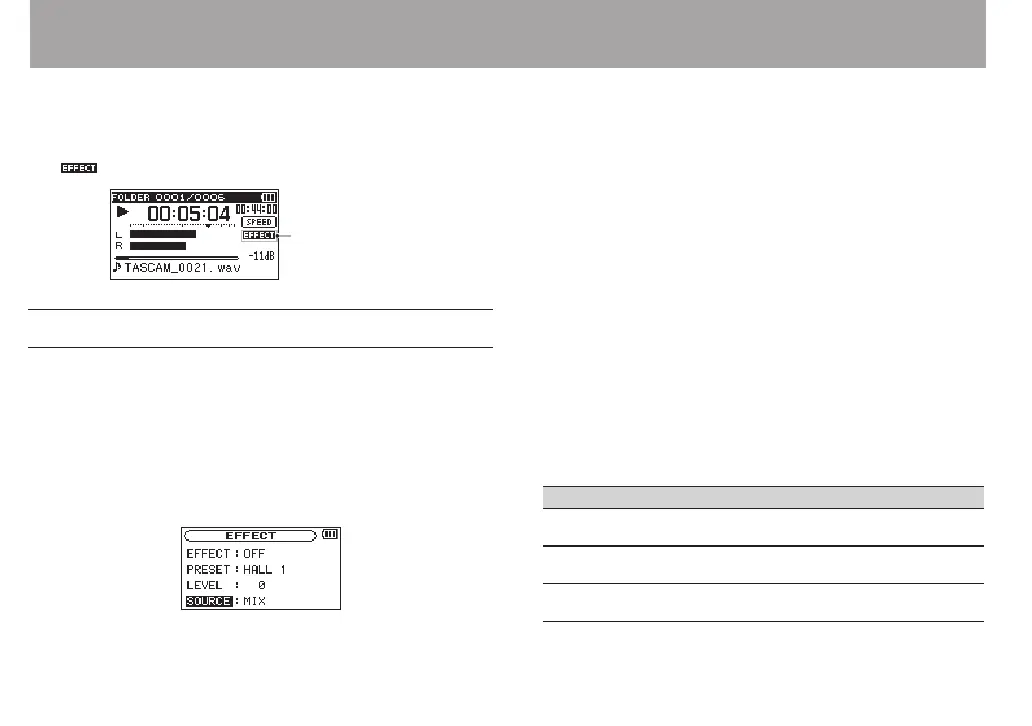
The DR-40 has built-in eects that can be applied to the input
signal during recording and practice. They can also be applied
to the output signal during playback.
The icon appears as light letters on a dark background.
Setting the effect
1 Press the MENU button to open the
MENU
screen.
2 Use the + or − button to select
OTHERS
, and press the
ENTER/MARK or / button to open the
OTHERS
submenu.
3 Use the + or – button to select
EFFECT
, and press the
ENTER/MARK or / button.
The
EFFECT
screen appears.
As shown in the above illustration, there are four setting
items on the
EFFECT
screen.
Set each item using the . or / buttons or + or –
buttons.
EFFECT:
Use this to turn the effect on or off.
The default setting is
OFF
.
PRESET:
See the Effects Preset List on page 93 for details about the
preset effects.
LEVEL:
Use this to change the output level of the preset effect
selected in the
PRESET
item.
Setting range:
0
-
20
SOURCE:
You can choose one of the following as the sound that the
effect is applied to (default value:
MIX
).
SOURCE Explanation
MIX (default
value)
Apply the eect to the output of an overdubbed
recording or a mixed down recording
INT MIC ST Apply the eect to signals input through the
built-in mics
EXT IN 1/2 Apply the eect to signals input through
external mics or equipment
8 – Using the Effects



 To Next Page