4 – Recording
In addition to using the built-in microphone, you can record
using an external microphone or record the output signal
from a mixer or other audio source. You can select among MP3
(44.1/48 kHz, 32–320 kbps) and WAV/BWF (44.1/48/96 kHz,
16/24-bit) audio recording formats.
Marks added when recording to Broadcast Wave Format
(BWF) can be used with software that supports this format, for
example.
This recorder has ve recording modes. Using the overdubbing
function, you can mix input signals with an audio le that is
played back and record either the combined signals or just
the input signal as a new le. With dual recording you can
simultaneously record the same input signals at two dierent
levels. You can also use external mics with the built-in mics for
4-channel recording.
Selecting file format, sampling
frequency, and maximum file size
Select the audio le type that you want to record before you
start recording.
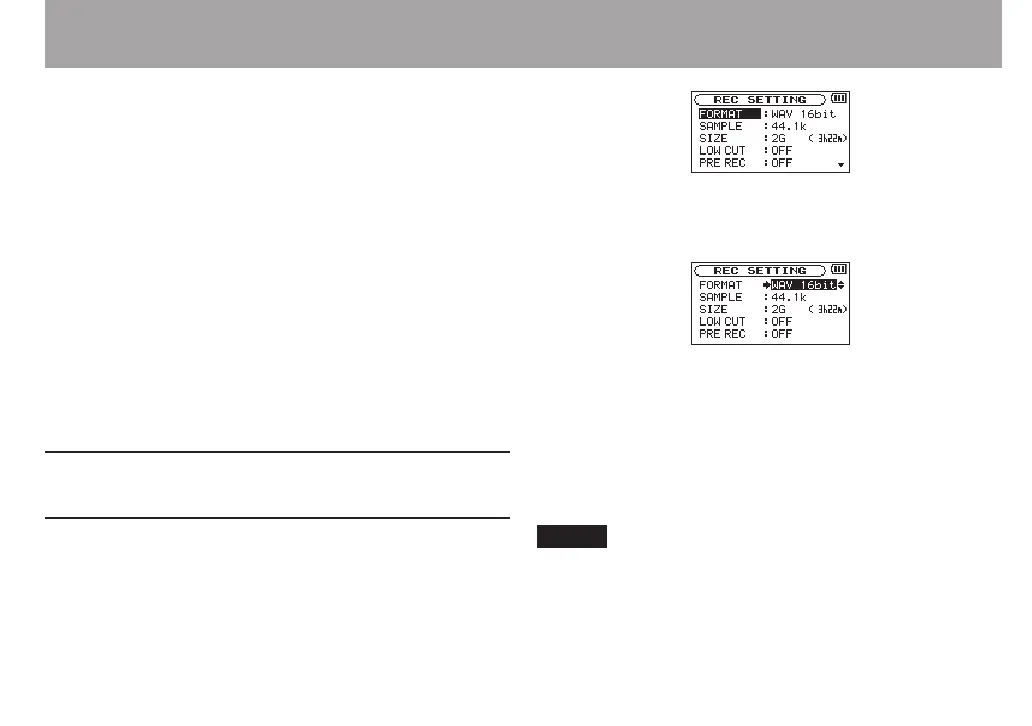
1 Press the MENU button to open the
MENU
Screen.
2 Use the + or − button to select
REC SETTING
, and press
the ENTER/MARK or / button.
REC
SETTING
screen appears.
3 Use the + or − button to select
FORMAT
, and press the
ENTER/MARK or / button.
4 Set the file format with the + or − button to one of the
following options:
BWF:
BWF 16bit, BWF 24bit
WAV:
WAV 16bit
(default),
WAV 24bit
MP3:
MP3 32k
bps,
MP3 64k
bps,
MP3 96k
bps,
MP3 128k
bps,
MP3 192k
bps,
MP3 256k
bps,
MP3 320k
bps
NOTE
BWF is a format created for broadcasting that has the same
•
sound quality as the standard WAV format. It also uses the
same “.wav” le extension as WAV les. In this manual, we
distinguish these le types by using the terms BWF and
WAV.



 To Next Page