0
File name
This shows the le name that is automatically assigned to
a recording le.
The project name is shown when multiple les have been
recorded in 4-channel recording mode, dual recording
mode or OVERDUB SEPARATE mode.
q Remaining recording time
The remaining recording time until the selected max le
size is reached appears in hours: minutes: seconds.
If the remaining recording time on the card is less than the
remaining time until the selected max le size is reached,
the remaining recording time on the card is displayed.
w
Low cut filter status
This shows whether the low cut lter is ON/OFF. The icon
appears highlighted when set to
40Hz
,
80Hz
or
120Hz
.
: Low cut lter o
: Low cut lter on
e
Level control function status
: Level control o
: Peak reduction on
: Automatic level control on
: Limiter on
r
Effect status
Shows whether the eect function is ON or OFF.
: Eect o
: Eect on
t
Peak value in decibels (dB)
Peak input level values are shown digitally.
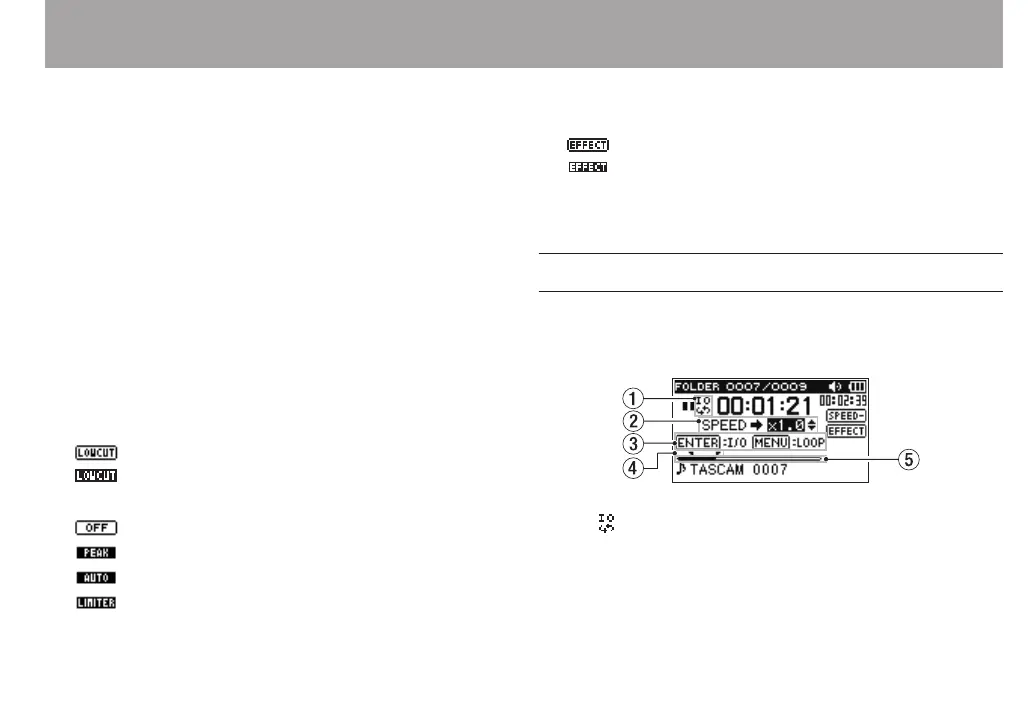
Playback Control screen
The Playback Control screen is displayed if the PB CONT
button is pressed during playback or when playback is
stopped.
1 Loop playback status
The icon is displayed when loop playback is enabled.
2 Playback speed
Playback speed as compared with the normal speed is
shown.
2 – Names and Functions of Parts



 To Next Page