4 – Recording
listen to and select the best one from multiple recordings
afterward.
7 Press the . button to return to setting item
selection.
8 Use the + and – buttons to select
SOURCE
, and press the
ENTER/MARK or / button.
9 Use the + and – buttons to set the input source.
SOURCE Explanation
INT MIC
(default value)
Record using built-in mics.
EXT IN 1 Record using external inputs.
When creating a stereo le, the same sound is
added to both L/R channels.
EXT IN 1/2 Record using external inputs.
When creating a mono recording, the
L
channel is recorded.
10 Press the . button to return to setting item
selection.
11 When setting is complete, press the (HOME) [8]
button to return to the Home Screen.
Select the file you want to overdub
Use the . and / buttons and the
BROWSE
screen to
select that files that you want to overdub.
NOTE
See "Working with Files and Folders (BROWSE Screen)" on
page 69 for selecting les using the
BROWSE
screen.
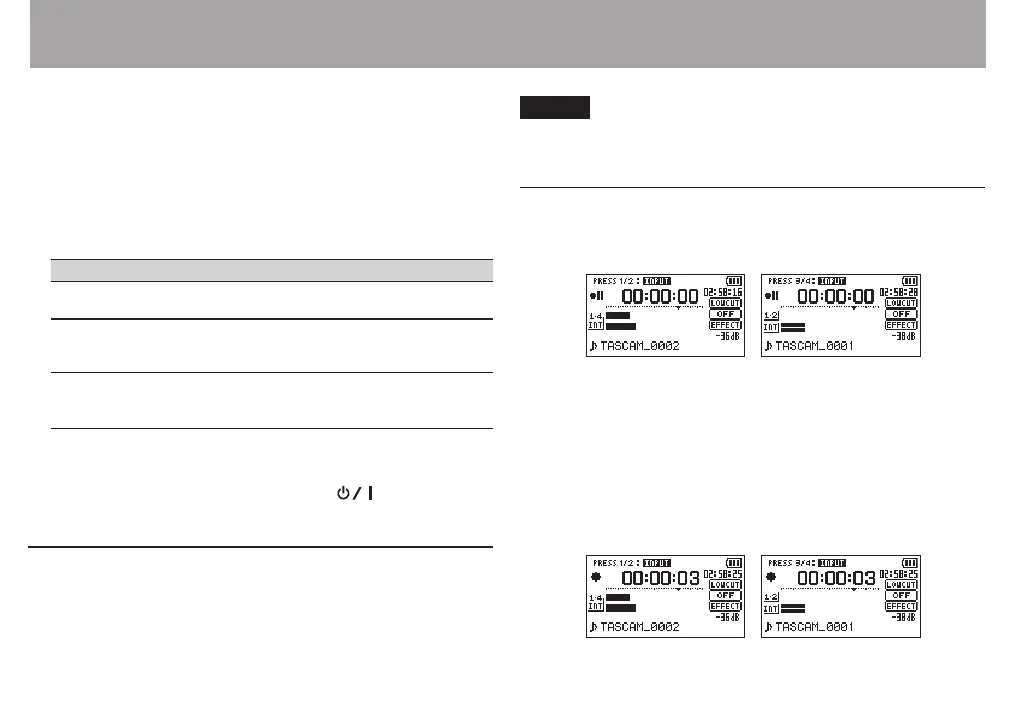
Start the overdubbing
1 Press the RECORD [0] button to set the unit to record
standby.
MIX recording Separate recording
When in MIX mode, press the 1/2 [SOLO] button to mute
monitoring of the input sound.
When in SEPARATE mode, if there are two playback files,
press the 3/4 [SOLO] button to switch between the input
sound and the playback file. If there is only one file, this
mutes the input sound.
2 Press the RECORD [0] button to start overdubbing.
MIX recording Separate recording



 To Next Page