2 – Names and Functions of Parts
q
Remaining time
This shows the remaining time (hours: minutes: seconds)
of the current le.
w
Playback speed setting status
Indication Playback speed
x1.0
x1.1 - x1.5
x0.5 - x0.9
Playback speed not controllable
e Effect status
Shows whether the eect function is ON or OFF.
: Eect o
: Eect on
r Peak value in decibels (dB)
The maximum level that occurs in a xed period of time is
displayed digitally.
t File name
This shows the name of the le playing back or its tag
information.
ID3 tag information is shown when available for an MP3
le being played.
Two project names are shown when there are two les
that have been recorded in 4-channel recording mode,
dual recording mode or overdub separate mode.
NOTE
ID3 tag information includes the titles and artists names that
can be saved in MP3 les.
y Playback position display
The current playback position is shown by a bar. As
playback progresses, the bar extends to the right.
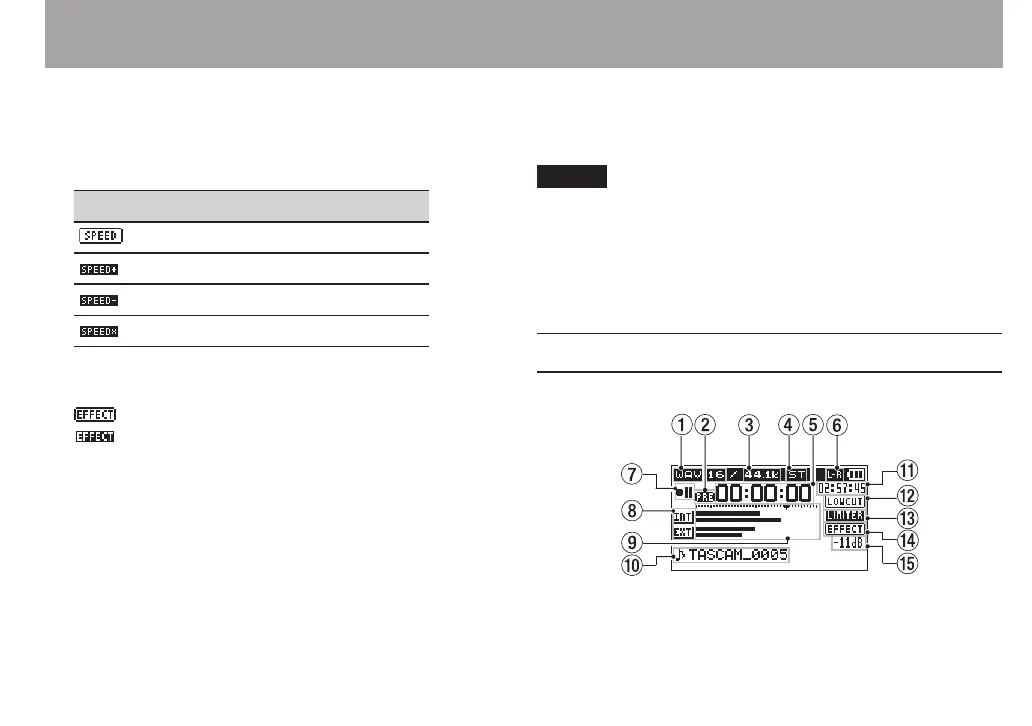
Recording Screen
This screen appears when recording or in recording standby.
1 Recording format
This shows the le recording format.
WAV 16/WAV 24/BWF 16/BWF 24/MP3 320k/MP3 256k/
MP3 192k/MP3 128k/MP3 96k/MP3 64k/MP3 32k



 To Next Page