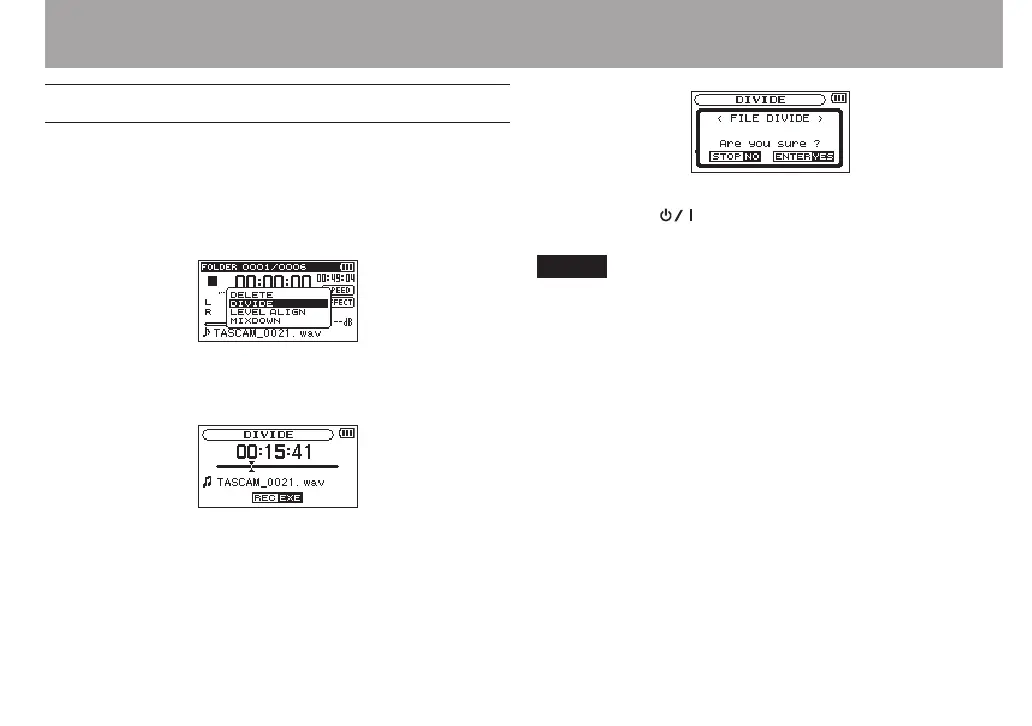
Dividing the selected file (DIVIDE)
A recorded le can be divided into two at a specied position.
1 Select a file to be divided using the . or / button
or the
BROWSE
screen.
2 While the Home Screen is open when stopped, press
the QUICK button to show the Quick menu screen.
3 Use the + or − button to select
DIVIDE
, and press the
ENTER/MARK button.
DIVIDE
screen appears.
4 Use the + or − button to specify the position for file
division, and press the RECORD [0] button.
The following pop-up window appears.
5 Press the ENTER/MARK button to divide the file.
Or press the (HOME) [8] button to return to the
DIVIDE
screen without dividing the file.
NOTE
When the
•
DIVIDE
screen is open, you can press the PLAY
[7] button and set the divide position while playing the
le.
When the
•
DIVIDE
screen is open, press the PLAY [7]
button to pause/resume playback and press the . or
/ button to move to the beginning or the end of the
playback le. Adjust the position for le division using the
+ or − button. Press and hold the + or − button to move the
position continuously.
After dividing a le, two new les with ”a” and ”b” added to
•
the end of the original le name are created.
(4-channel recording file example)
File names before dividing
TASCAM_0003S12.wav
TASCAM_0003S34.wav
File names after dividing
TASCAM_0003aS12.wav (part before division point)
7 – Quick Operations



 To Next Page