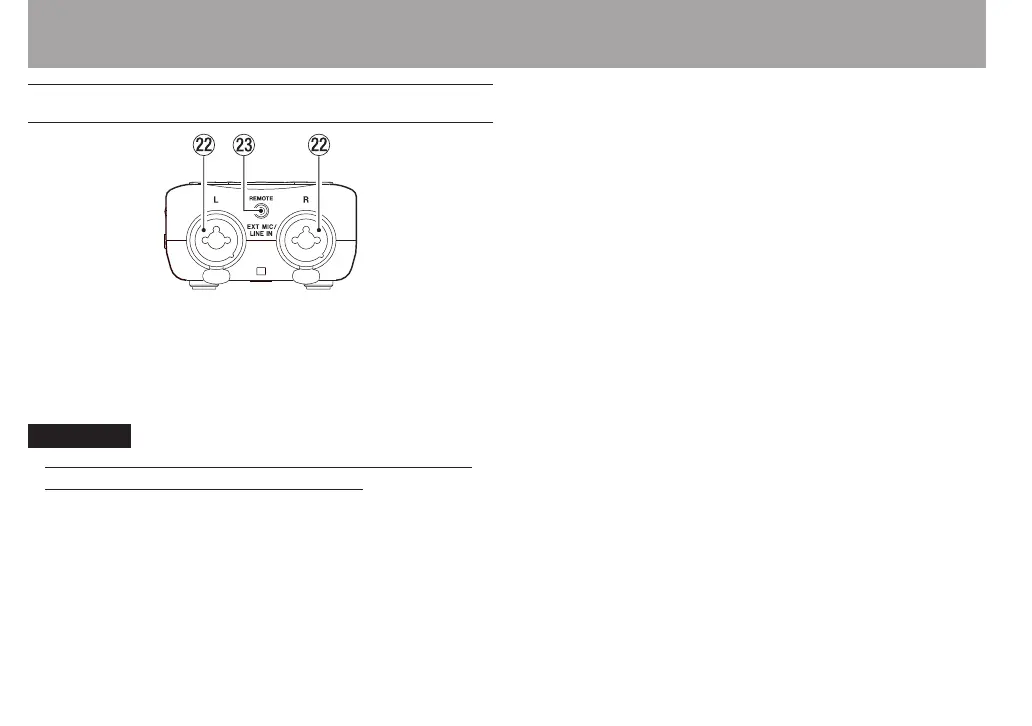
Front panel
s EXT MIC/LINE IN L/R jacks (XLR/TRS)
These are balanced analog XLR/TRS combo jacks for
microphone and line level inputs.
XLR (1: GND, 2: HOT, 3: COLD)
TRS (Tip: HOT, Ring: COLD, Sleeve: GND)
CAUTION
Conrm that phantom power is OFF before connecting a
•
line level device to a EXT MIC/LINE IN jack. If you connect
a line level device while phantom power is being supplied,
that device and this unit could be damaged.
When using a condenser microphone, before connecting
•
to and disconnecting from a EXT MIC/LINE IN jack, conrm
that the phantom power for that jack is OFF. If you connect
or disconnect a mic while phantom power is being supplied,
that mic and this unit could be damaged.
Do not connect an unbalanced dynamic mic to an XLR
•
connector when phantom power is being supplied. Doing
so could damage that mic and this unit.
dREMOTE jack (2.5 mm dia. TRS jack)
Connect a TASCAM RC-3F footswitch or TASCAM RC-10
wired remote control (both sold separately) here to enable
remote starting and stopping of playback and other
functions.
2 – Names and Functions of Parts



 To Next Page